Maintenance 59
Lamp information
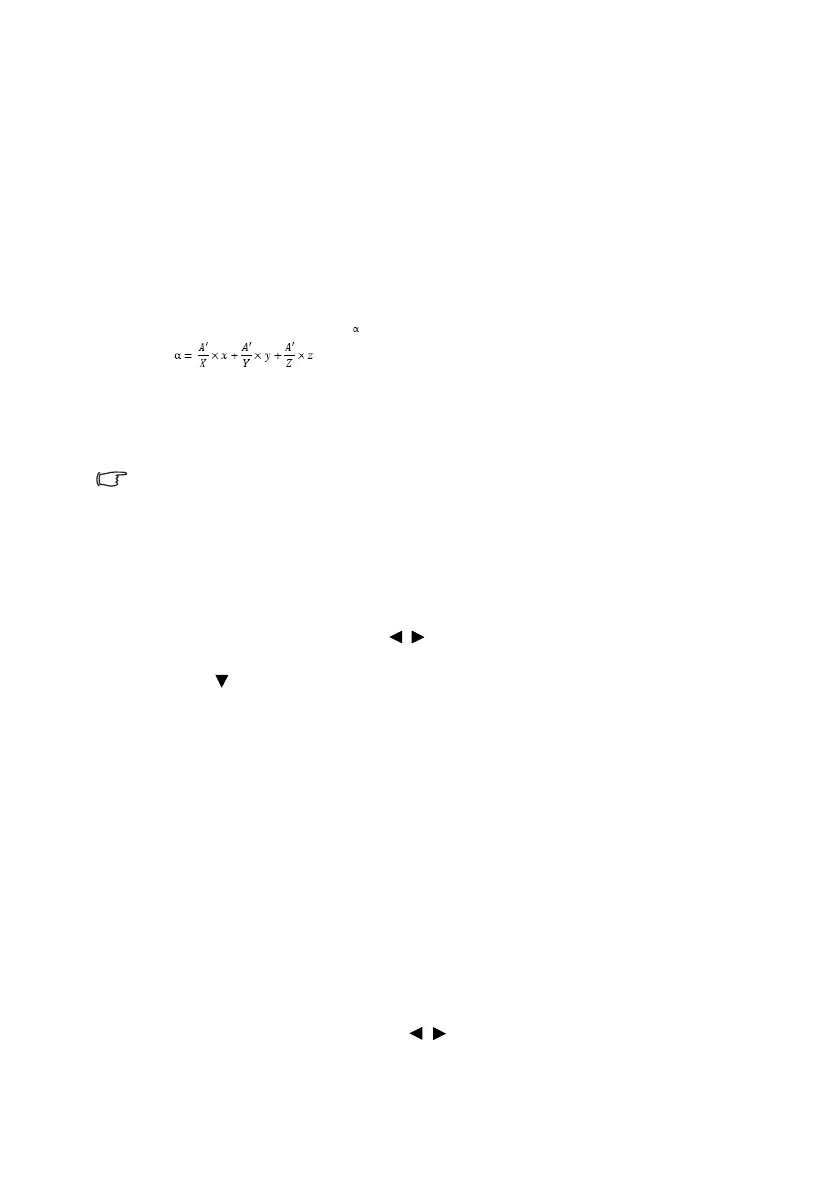
Getting to know the lamp hour
When the projector is in operation, the duration (in hours) of lamp usage is
automatically calculated by the built-in timer. The method of calculating the equivalent
lamp hour is as follows:
1. Lamp Usage Time = (x+y+z) hours, if
Time used in Normal mode = x hours
Time used in Eco mode = y hours
Time used in SmartEco mode = z hours
2. Equivalent Lamp Hour= hours
X= lamp life spec of Normal mode
Y= lamp life spec of Eco mode
Z= lamp life spec of SmartEco mode
A' is the longest lamp life spec amoung X, Y, Z
See "Setting Lamp Power" below for more information on Economic
mode.
The lamp hour in Economic and SmartEco is calculated shorter of that in Normal
mode. That is, using the projector in Economic or SmartEco mode helps to extend
the lamp hour.
To obtain the lamp hour information:
1. Press MENU and then press / until the Advanced menu > System
Setup: Advanced menu is highlighted.
2. Press to highlight Lamp Settings and press OK. The Lamp Settings page
displays.
3. You will see the Equivalent Lamp Hour information displaying on the menu.
4. To leave the menu, press MENU.
You can also get the lamp hour information on the Information menu.
Extending lamp life
The projection lamp is a consumable item. To keep the lamp life as long as possible,
you can do the following settings via the OSD menu or remote control.
Setting Lamp Power
Using Economic/SmartEco mode will reduces system noise and power
consumption. If the Economic/SmartEco mode is selected, the light output will be
reduced and result in darker projected pictures, the projector protected for longer working life.
Setting the projector in Economic/SmartEco mode also extends the lamp
operation life. To set Economic/SmartEco mode, go into the Advanced menu >
Picture > Lamp Power menu and press /.
, if



 To Next Page