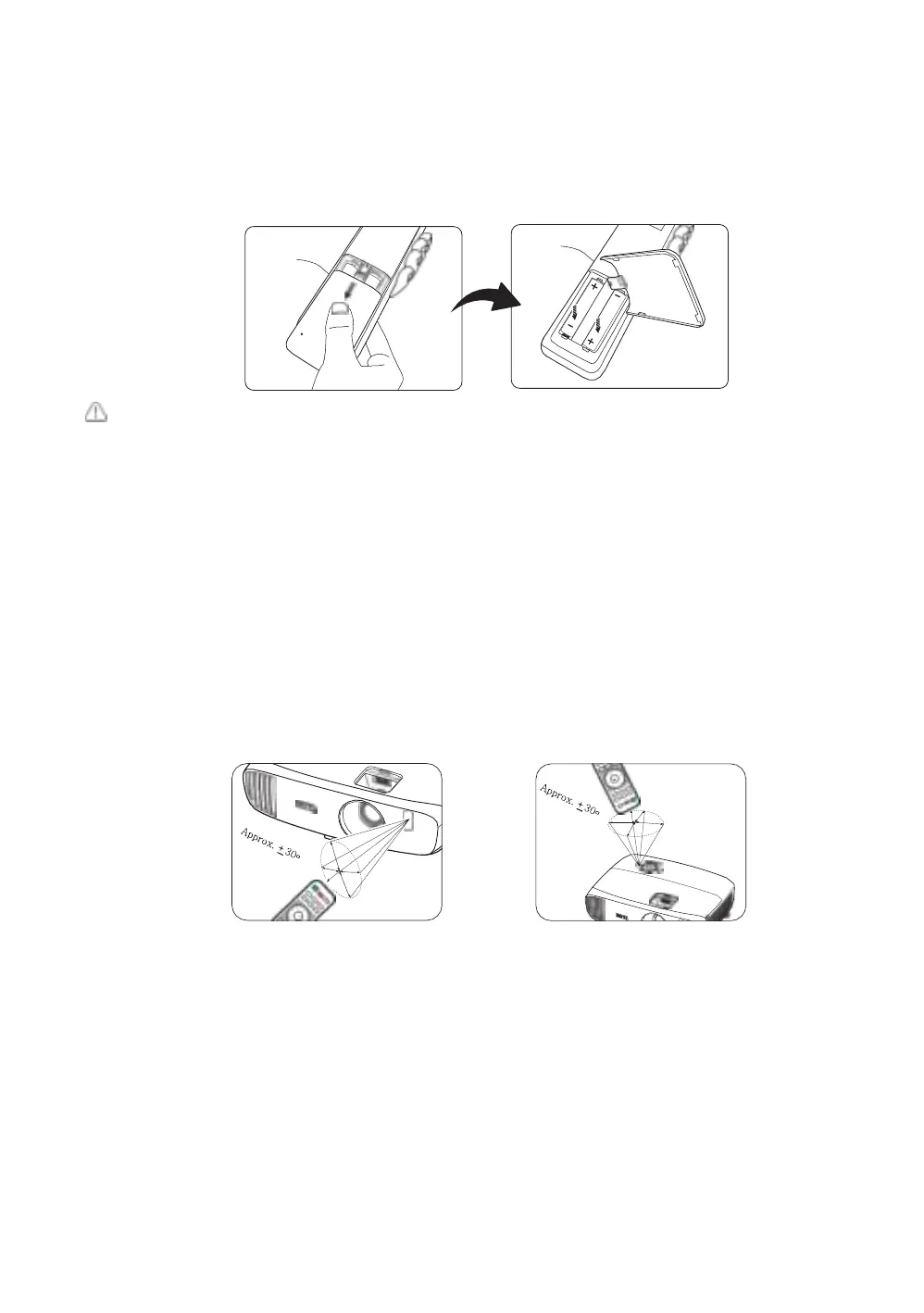
Installing/replacing the remote control batteries
1.
Press and slide open the battery cover as illustrated.
2.
Remove the old batteries (if applicable) and install two AAA batteries. Make sure that the positive and
negative ends are positioned correctly as illustrated.
3.
Slide the battery cover back until it clicks into place.
• Avoid leaving the remote control and batteries in an excessive heat or humid environment like the
kitchen, bathroom, sauna, sunroom or in a closed car.
•
Replace only with the same or equivalent type recommended by the battery manufacturer.
•
Dispose of the used batteries according to the manufacturer's instructions and local environment
regulations for your region.
•
Never throw the batteries into a fire. There may be danger of an explosion.
•
If the batteries are drained or if you will not be using the remote control for an extended period of time,
remove the batteries to avoid damage to the remote control from possible battery leakage.
Remote control effective range
The remote control must be held at an angle within 30 degrees perpendicular to the projector's IR
remote control sensor(s) to function correctly. The distance between the remote control and the
sensor(s) should not exceed 8 meters (~ 26 feet).
Make sure that there are no obstacles between the remote control and the IR sensor(s) on the projector.
•
Operating the projector from the front
• Operating the projector from the top


 To Next Page