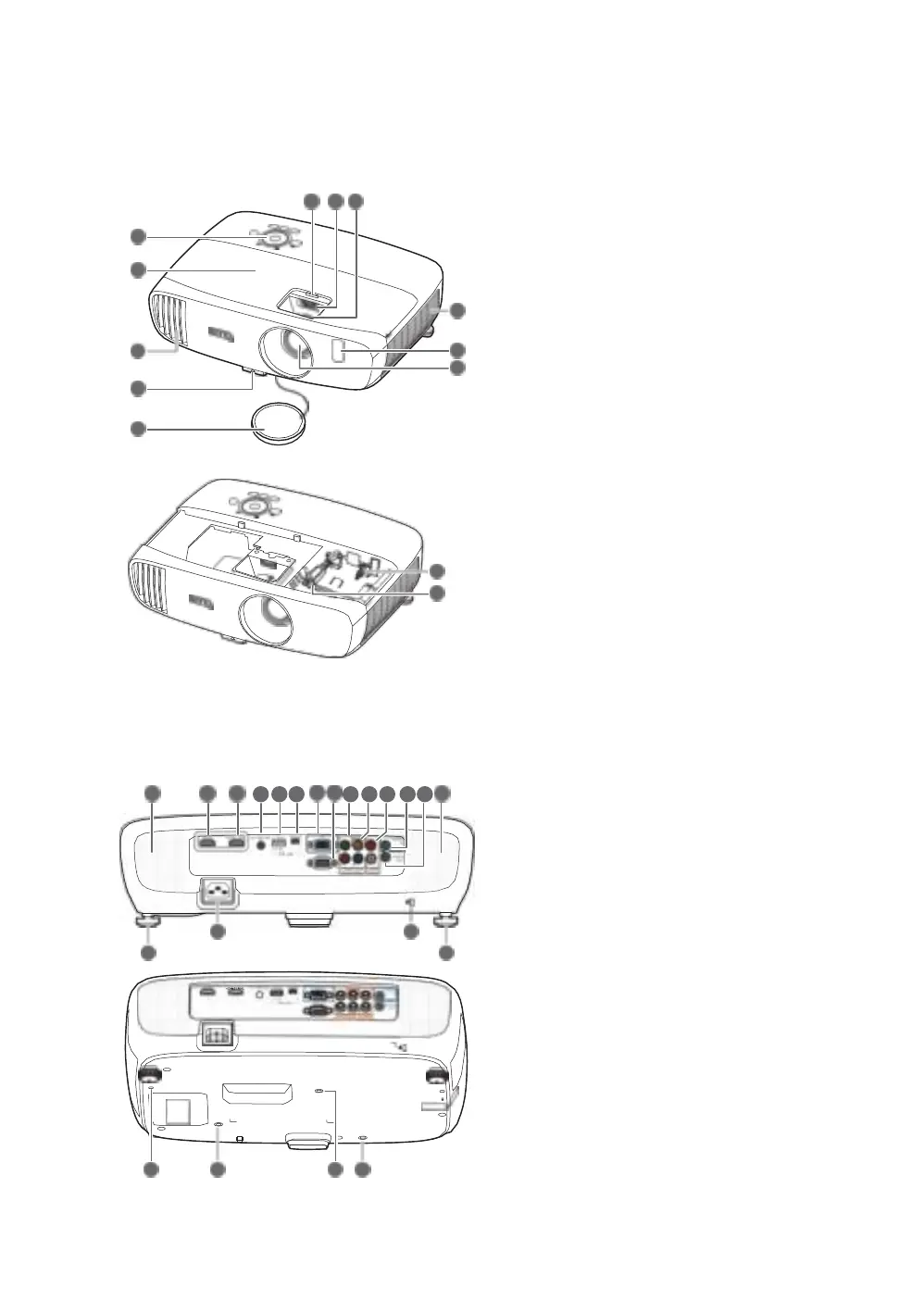
Projector exterior view
Front and upper side view
1. Control panel (See
Control panel for
details.)
2.
Lamp cover
3.
Vent (heated air exhaust)
4.
Quick-release button
5.
Lens cap
6.
Lens compartment cover
7.
Lens shift wheel
8.
Focus and Zoom rings
9.
Vent (cool air intake)
10.
Front IR sensor
11.
Projection lens
12.
USB Mini-B cable
Connects to a Wireless FHD receiver.
13.
HDMI cable
•
Connects to a Wireless FHD receiver.
•
Connects to a MHL dongle through an HDMI
female to female adaptor.
14.
HDMI input port
15.
MHL/HDMI dual mode port
Connects to MHL or HDMI compatible devices
and charges the connected MHL compatible
device as long as power is fed to the projector.
16. 12VDC output terminal
Triggers external devices such as an electric
Rear and lower side view
See
Connecting with video equipment for
connection details.
screen or light control, etc.
17.
USB Type-A port
Charges the receiver box of the Wireless FHD
Kit (optional accessory).
18.
USB Mini-B port
Used for service.
19.
RGB (PC)/Component video (YPbPr/
YCbCr) signal input jack
20.
RS-232 control port
Interfaces with a PC or home theater control/
automation system.
21.
Component Video inputs (RCA)
Support Y/PB/PR or Y/CB/CR video signal.
22.
Video input jack
23.
Audio (L/R) input jacks
24.
Audio input jack
25.
Audio output jack
26.
Speaker grills
27.
Rear adjuster feet
28.
AC Power cable inlet
29.
Kensington lock slot
30.
Wireless FHD Kit mount hole (WDP01)
31.
Ceiling mount holes
14 15 16 17 18 19
20
21 22 23 24 25 26


 To Next Page