22
Multifunction Control Panel
Number 3
_____ Customer
Telephone
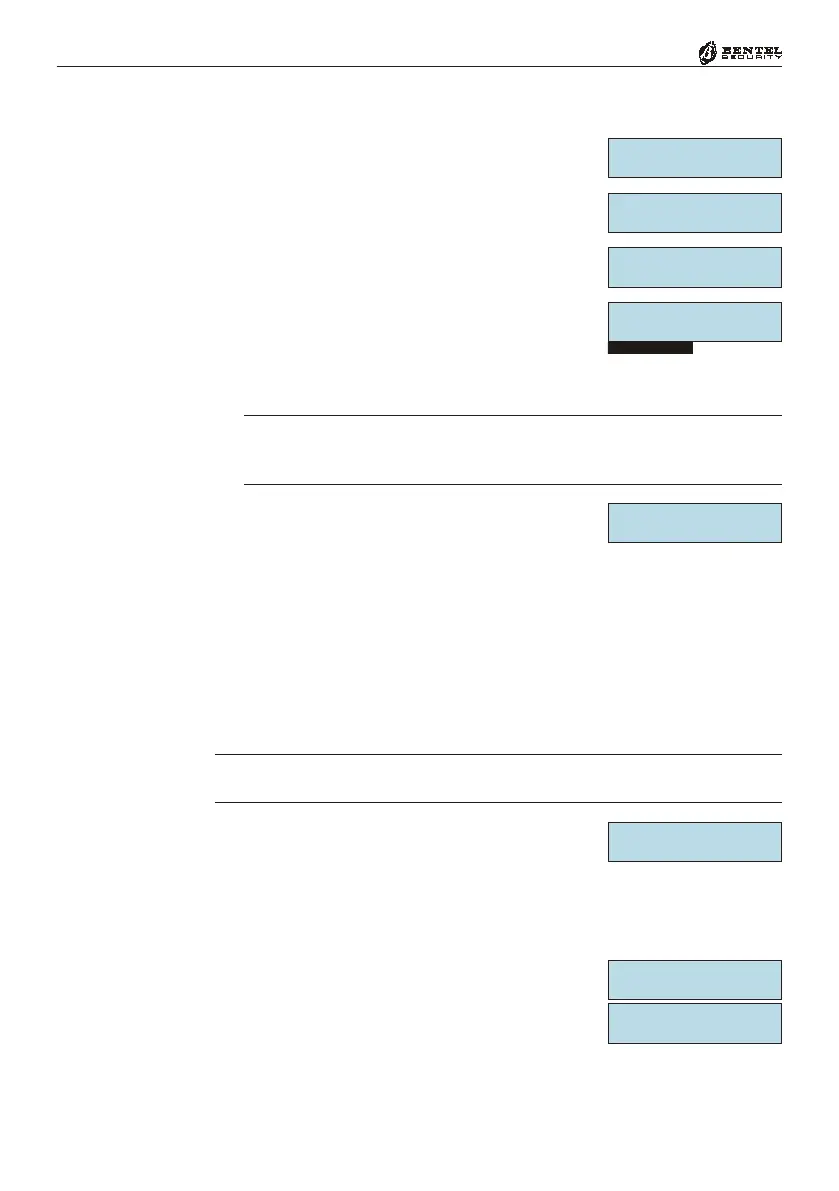
1. From the Installer Menu, using
99
99
9 or
00
00
0, select
the Teleph. option, then press
EE
EE
E.
2. Using
99
99
9 or
00
00
0, select the Telephone Number
ID number (1 to 8), then press
EE
EE
E.
3. Using
99
99
9 or
00
00
0, select the Telephone Number
Type, then press
EE
EE
E.
4. Using keys
11
11
1 to
88
88
8 (toggle keys), assign the Tel-
ephone Number to the Partitions, then press
EE
EE
E.
û = assigned
- = not assigned
NOTE - The Telephone Numbers must be assigned to the Partitions, other-
wise, the User will be unable to program Voice Telephone Numbers (refer to
the USER MANUAL).
5. Enter the Telephone number.
Use
AA
AA
A or
BB
BB
B, to move along the row.
Use
OO
OO
O and
oo
oo
o for the following punctuation marks and pauses (to be
entered in the space indicated by the cursor):
a) “,” — use the comma to insert 2 second dialling pauses;
b) “_” — use the dash to clear telephone number digits;
c) * and #.
6. Once the Telephone number has been completed, press
EE
EE
E to confirm and
go back to step 2.
If, at step 3, you selected a Telephone Number Type which operates with a
protocol (reporting format), work carefully through the following steps.
7. Enter the Customer Code (minimum 4 digits for
all reporting formats except CESA, that requires
5 digits), then press
EE
EE
E.
Use
AA
AA
A or
BB
BB
B to move along the row.
Use
OO
OO
O or
oo
oo
o to enter letters A through F.
8. Using
99
99
9 or
00
00
0, select either the Listen. or 2-
way option then, using
OO
OO
O or
oo
oo
o, Enable or
Disable these options, as required.
9. Press
EE
EE
E to confirm and go back to step 1.
Teleph.
Number 3 âá
PROGRAMMING
Teleph. âá
Number 3
Voice âá
Number 3
0731667890______
Number 3
ûûûûûûûû Part.
Type:
Contact ID
CESA
10-1400
14 bps
20 bps
40 bps
10-1600
Number 3
Listen. OFF âá
Number 3
2-way ON âá







 To Next Page