Channel 2 To store alarm channel 2 telephone numbers, follow the entire procedure
for alarm channel 1, but at point 2 press key 2 .
Display To view the stored telephone numbers, follow steps 1, 2 and 3 of the tele-
phone number programming procedure, and then press d to display, in or-
der, the digits of the telephone number in the selected position; any 1 sec-
ond pauses will be indicated by and 5 second pauses by .
+
If the selected position is empty (no number) the display will show .
Erase To erase a stored telephone number follow steps 1, 2 and 3 of the tele-
phone-number programming procedure, and then press e to confirm.
Alarm messages
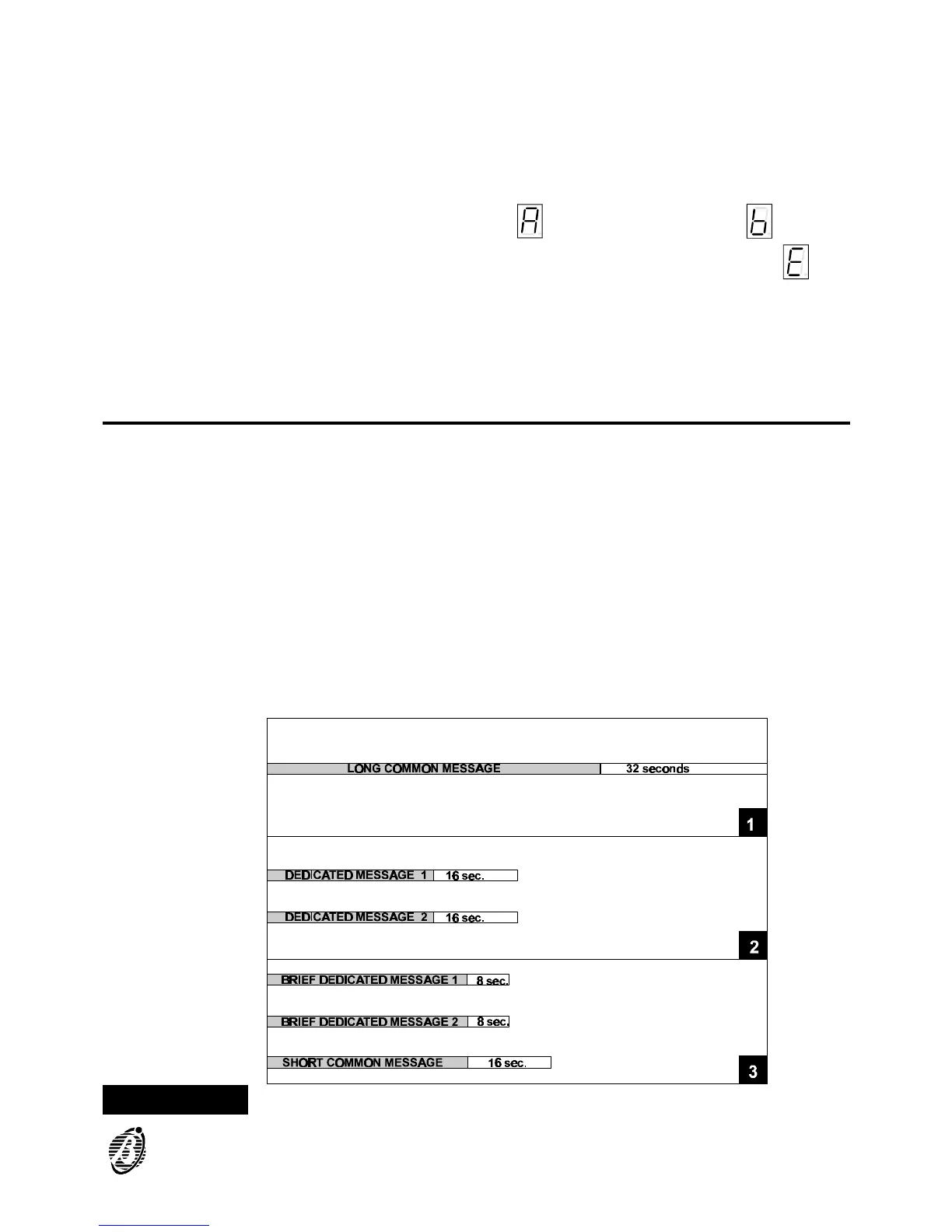
The Alarm messages are sent to the programmed telephone numbers. The
B-TEL99 can store:
Ø Two Dedicated Messages (16 seconds per message), one for each alarm
channel;
Ø A Long Common Message (32 seconds) for both channels, according to
the setting of option n. 1 (see "OPTIONS").
Ø A Short Common Message (16 seconds) for both alarm channels + 2 brief
dedicated messages (8 seconds per message), one for each alarm chan-
nel (see "OPTIONS").
Default setting The B-TEL99 message memory is empty (no default setting).
Figure 6 Alarm message: graphic illustration (see option n. 1)
PROGRAMMING 21


 To Next Page