Logger
The B-TEL99 logger registers the last 255 outgoing calls (events).
View Logger To view and scroll the last 255 events, starting from the most recent and
moving backwards in order, proceed as follows:
Access the programming phase ...
1
Press d.
d
è
2
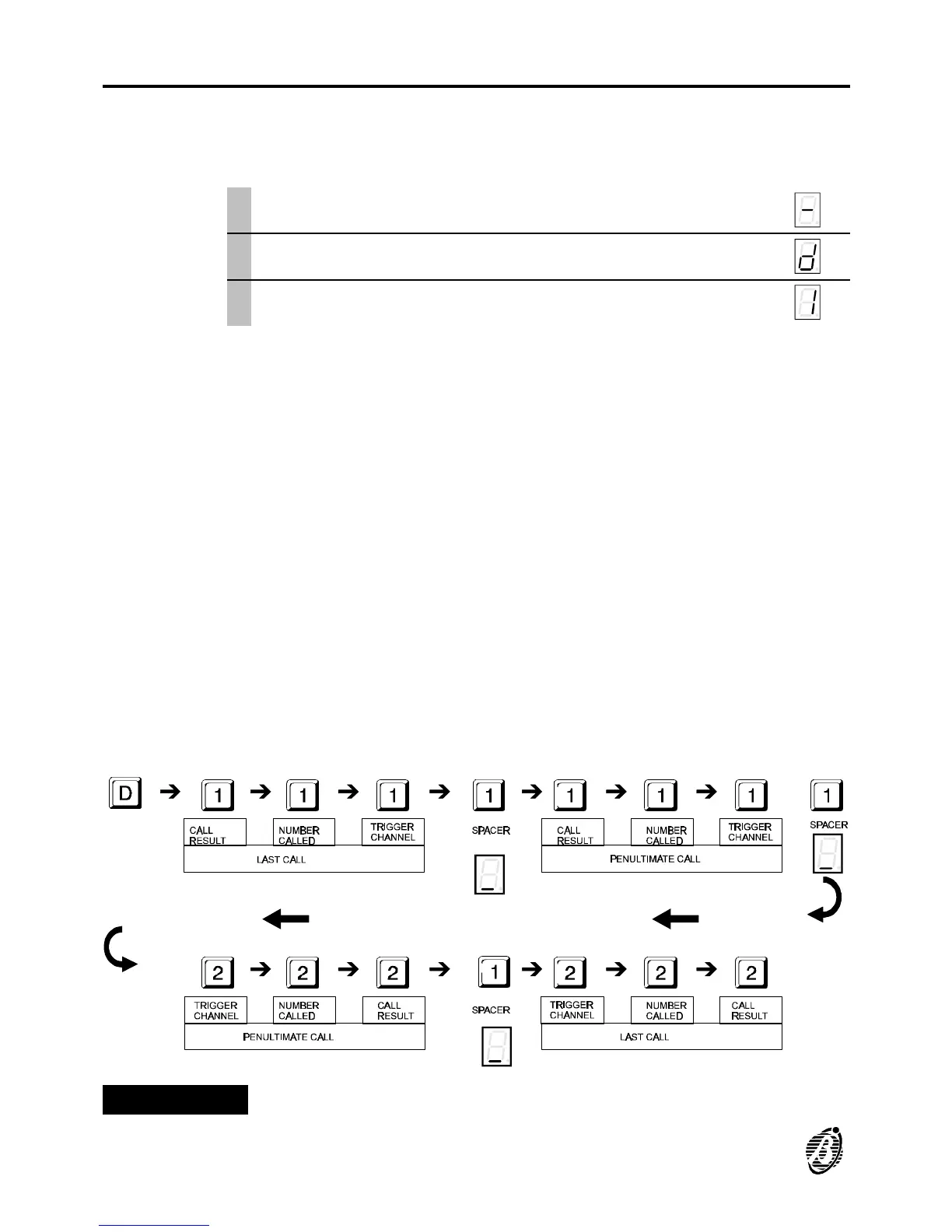
Press 1 or 2 to scroll the logger sequence.
1
è
Keys 1 and 2 function as scroll keys: key 1 scrolls the events from the
last (most recent) to the first, key 2 scrolls the events from the first to the
last (most recent).
Each event (number dialled) shows: the trigger channel (1 or 2); the tele-
phone number called (1-7), and the call result, which may be:
Ø 0 = Successful call
Ø 1 = Line trouble or busy before dialling
Ø 2 = Line busy after dialling
3 = No answer
Clear Logger
To clear the event logger during viewing: press c twice; the logger will be
cleared completely, and the B-TEL99 will step back to the programming phase.
+
If access to the empty logger is requested e will be shown on the display.
+
The B-TEL99 logger is completely empty before installation.
Figure 7 Logger: use of keys [1] and [2].
30 Telephone dialler B-TEL99


 To Next Page