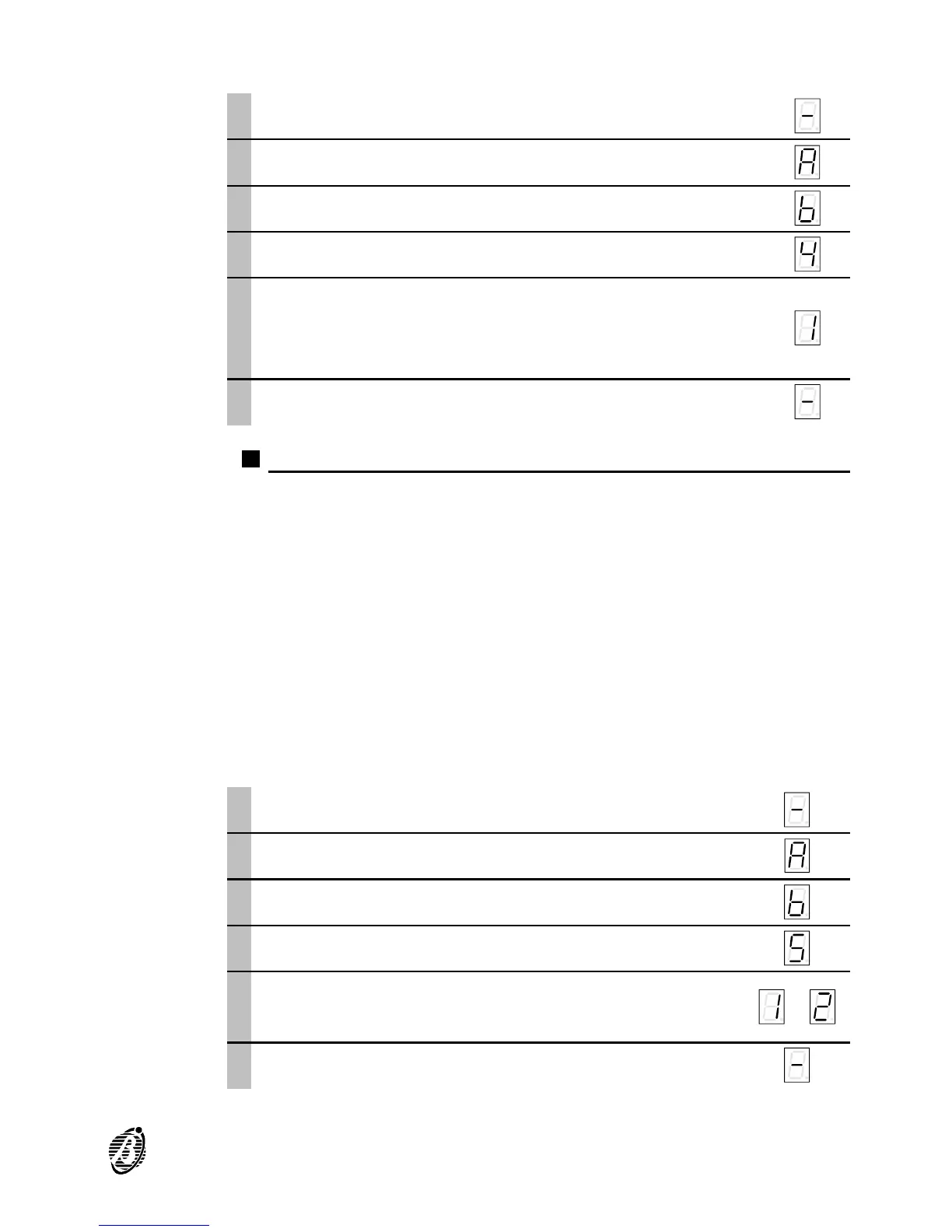
To set the required dialling type proceed as follows.
Access the programming phase ...
1
Press a. a
è
2
Press b. b
è
3
Press 4 (option number). 4
è
4
Select the required dialling type by pressing one of
the following keys:
1 = pulse dialling; 2 = DTMF dialling.
If pulse dialling is required select 1
1
è
5
Press e to confirm and quit. e
è
Option 5) Dial-tone check
When this option is disabled, the B-TEL99 will dial the numbers, assigned
to the alarm channel in alarm status, without checking for the dial tone.
If, however, this option is enabled, the B-TEL99 will dial the programmed
numbers only when the dial-tone is detected, otherwise, it will release the
telephone line and restart the alarm cycle with the same telephone num-
ber: after 4 attempts the B-TEL99 will abandon the telephone number and
step to the successive number.
+
This option must be disabled during the test phase (telephone line discon-
nected), and also when the B-TEL99 is connected to telephone networks
with non-standard tones.
Default setting The default setting is 1 "Disabled".
To enable/disable proceed as follows.
Access the programming phase ...
1
Press a. a
è
2
Press b. b
è
3
Press 5. 5
è
4
Set the dial-tone check as required by pressing
one of the following keys:
1 = Disabled 2 = Enabled
1 or 2
è
or
5
Press e to confirm and quit. e
è
PROGRAMMING 27


 To Next Page