32
Bentone
2.1.
B
A
B
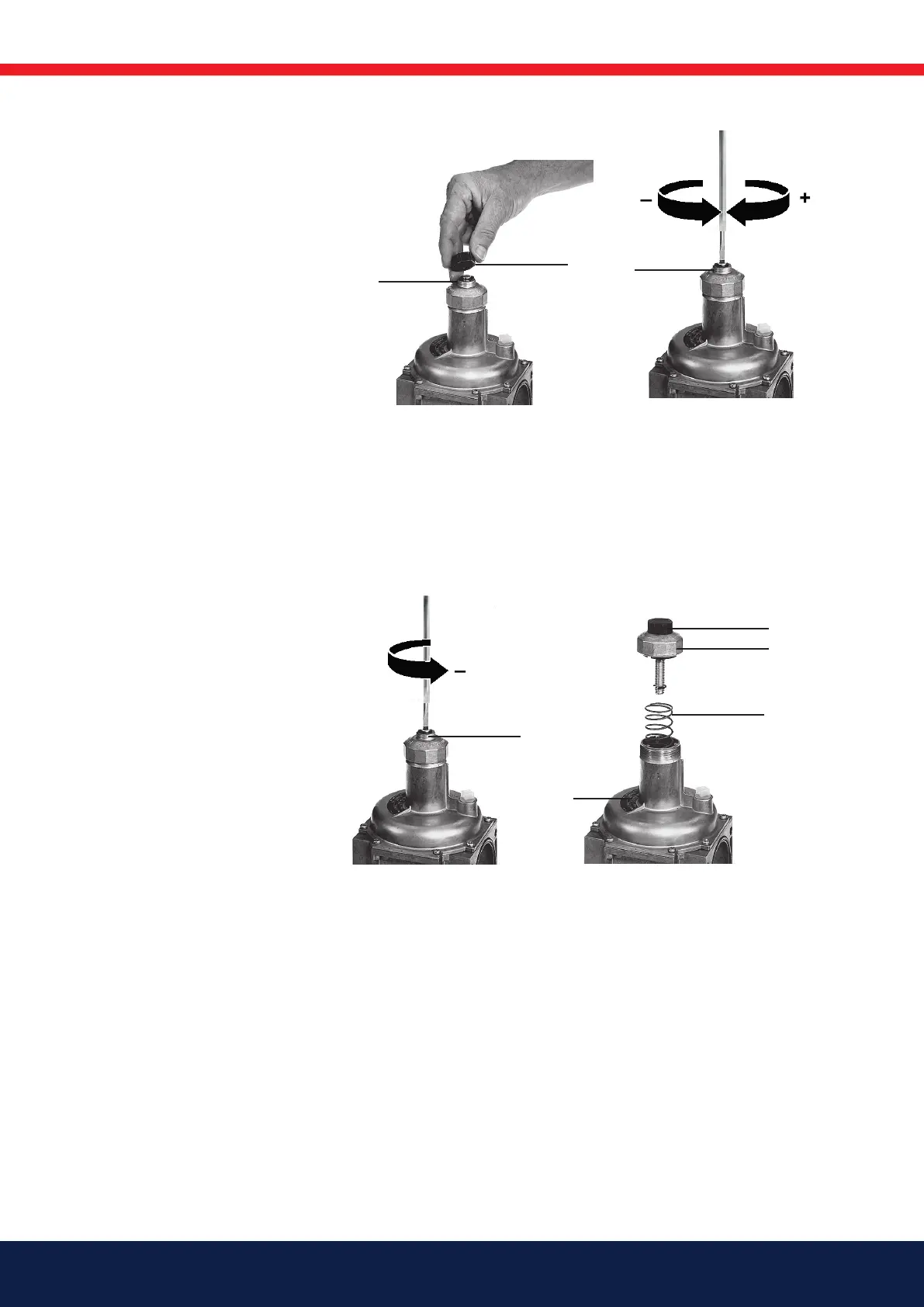
Adjustment of outlet pressure
(setpoint adjustment)
Factory setting: Standard spring p 2
10-30 mbar
1.
1. Unscrew protective cap A.
2. Adjustment (+) Setting
spindle B ”Turn counter-
clockwise” = Increasing
outlet pressure (setpoint)
or
2.
Adjustment (-) Setting spindle B ”Turn
clockwise” = Reducing outlet pressure
(setpoint)
4. Check setpoint
5. Screw on protective cap A.
6. Attach lead seal (Page 5).
4.
B
E
C/D
B
A
3.
Replace setting spring 3-4
1. Remove protective cap. A.
Release spring by turning
adjustment spindle B
counter clockwise. Turn
spindle to stop.
2. Unscrew complete
adjustment device B and
remove spring C.
3. Insert new spring D.
4. Assemble complete
adjustment device and
adjust desired off-set.
5. Screw on protective cap A.
Stick adhesive label E onto
typeplate.
6. Attach lead seal.



 To Next Page