23
Value Display
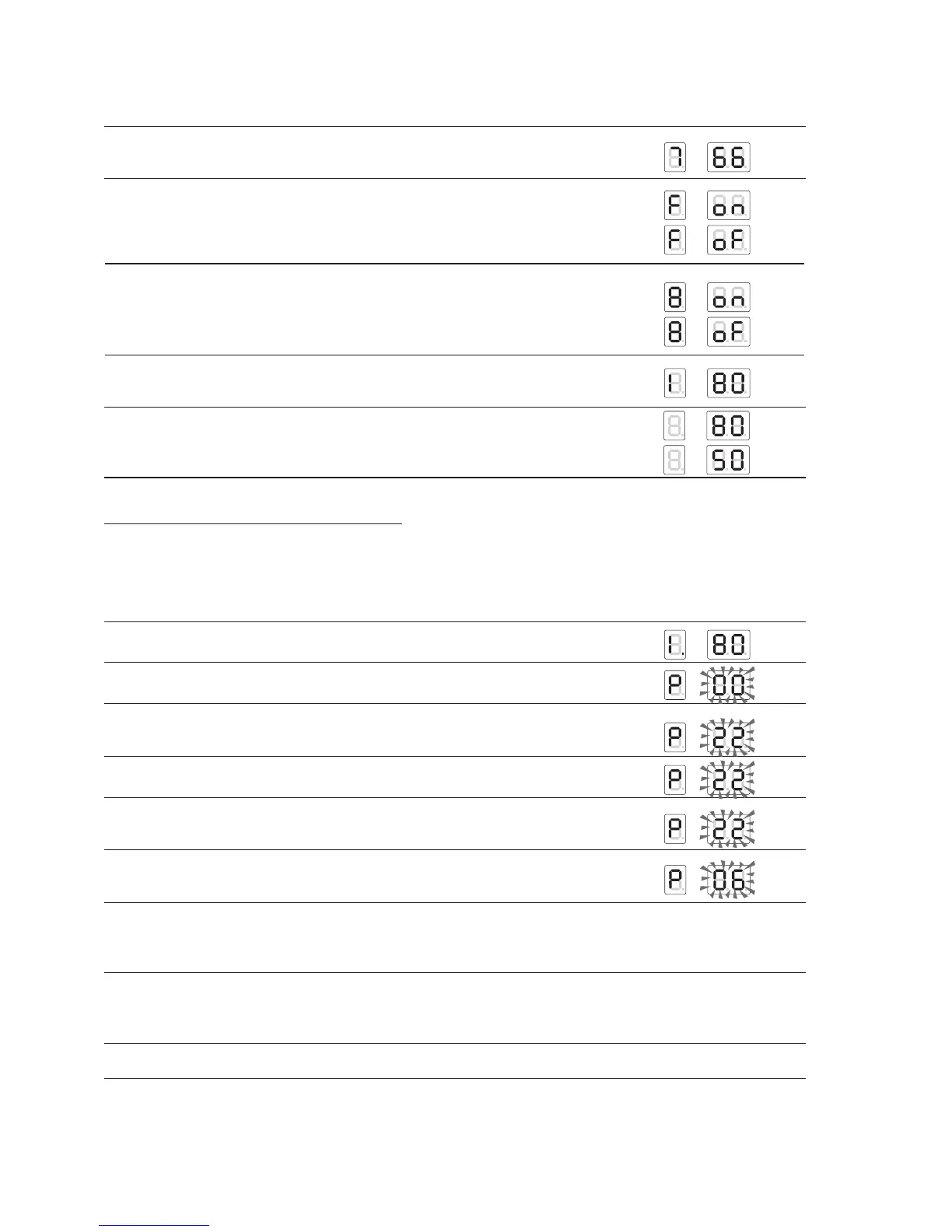
5 Fan PWM signal (%).
If PWM = 100%, this corresponds to 99 on the display.
Es: 66 %
6 Pressure switch open/closed
E.g.: contact open
7 Pump or motorised valve on the individual unit on/off
E.g.: Pump ON
E.g.: Pump OFF
8 Maximum ionisation current (range from 0 to 99) at first attempt
E.g.: maximum ionisation current 80
9 Hours of boiler functioning (from 0 to 9999 hours)
E.g.: 8050 hours: the display reads out paired figures showing the hours
in a sequence of thousands, hundreds, tens and units.
INSTALLER PROGRAMMING MODE
The installer parameters can be changed by entering the password (22).
The password for the installer level allows access to display and change the user and installer parameters.
Procedure to enter programming mode:
Procedure Display
1 E.g.: the outlet temperature T1 is 80°C
2 Press “Set/esc” and “OK” . After 5 seconds the second and third digit will flash.
3 Use “
+” and “-” to enter the first number in the password on the centre digit.
E.g.: password = X2
4 Press “OK” to save the second number in the password.
5 Use “+” and “-” to enter the first number in the password on the centre digit.
E.g.: password = 22
6 Press “OK” to confirm the password, if the password is wrong the board returns
to Display mode. If the password is correct the first parameter P06 is displayed.
7 Press “
+” and “-” to scroll the parameters enabled by the password.
Press “Set/esc” to start setting the parameters.
The code P-XX and the corresponding value will alternate on the display.
8 Use “
+” and “-” to change the value of the parameter.
Whenever a button is pressed, the alternating display of the parameter
and the corresponding value is stopped for 5 seconds and only the value is shown.
9 Press “OK” to save the new value of the parameter.
To exit installer programming mode press “OK”.
For the complete list of parameters see page 58.






 To Next Page