trigger of the switch.
Cams and mechanical stops setting
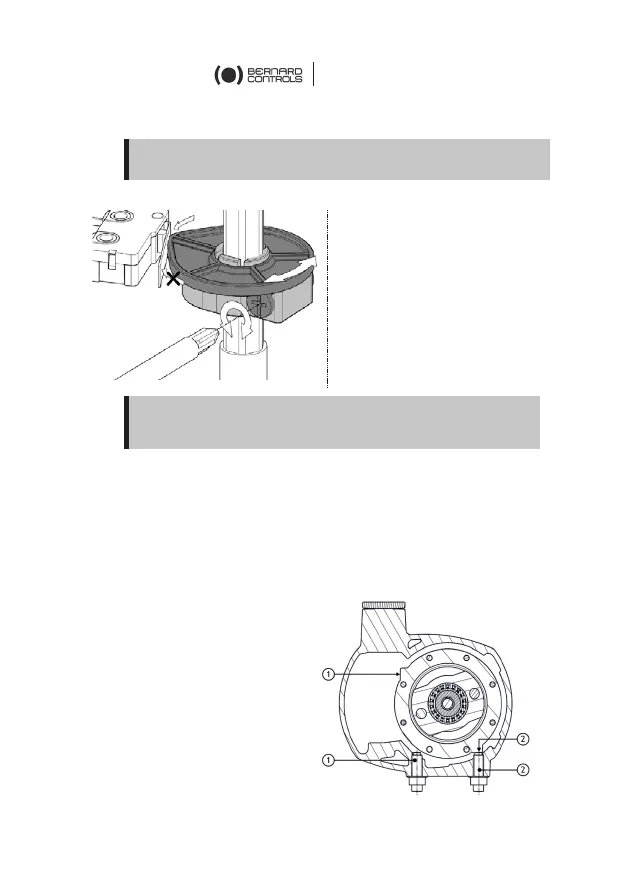
On AQ switch actuators, both cams and mechanical stops can be set.
The actuator stops on open and closed position when the travel limit
switch is tripped.
Travel limit settings
The mechanical stops (1: counter-
clockwise – 2: clockwise)
avoid over-travel in case of
handwheel operation.
They can be set on the actuator or
on the gearbox if a gearbox is
fitted on the actuator.
Fine adjustment of the stop
screws position is possible
within a limit of ± 2°
maximum. These screws
are located on the lower side of the actuator.
Take care that cams get to the lever according to its inclination
direction, otherwise you could damage the switch.
If the actuator is supplied mounted on a valve,
following settings should have been performed by the
valve
supplier.


 To Next Page
 Loading...