Buttonholes
64
2020-09 EN 5220205.00A.04
> Set the stitch width to 4–6.
> Set the required stitch length in the buttonhole symbol range on the dial.
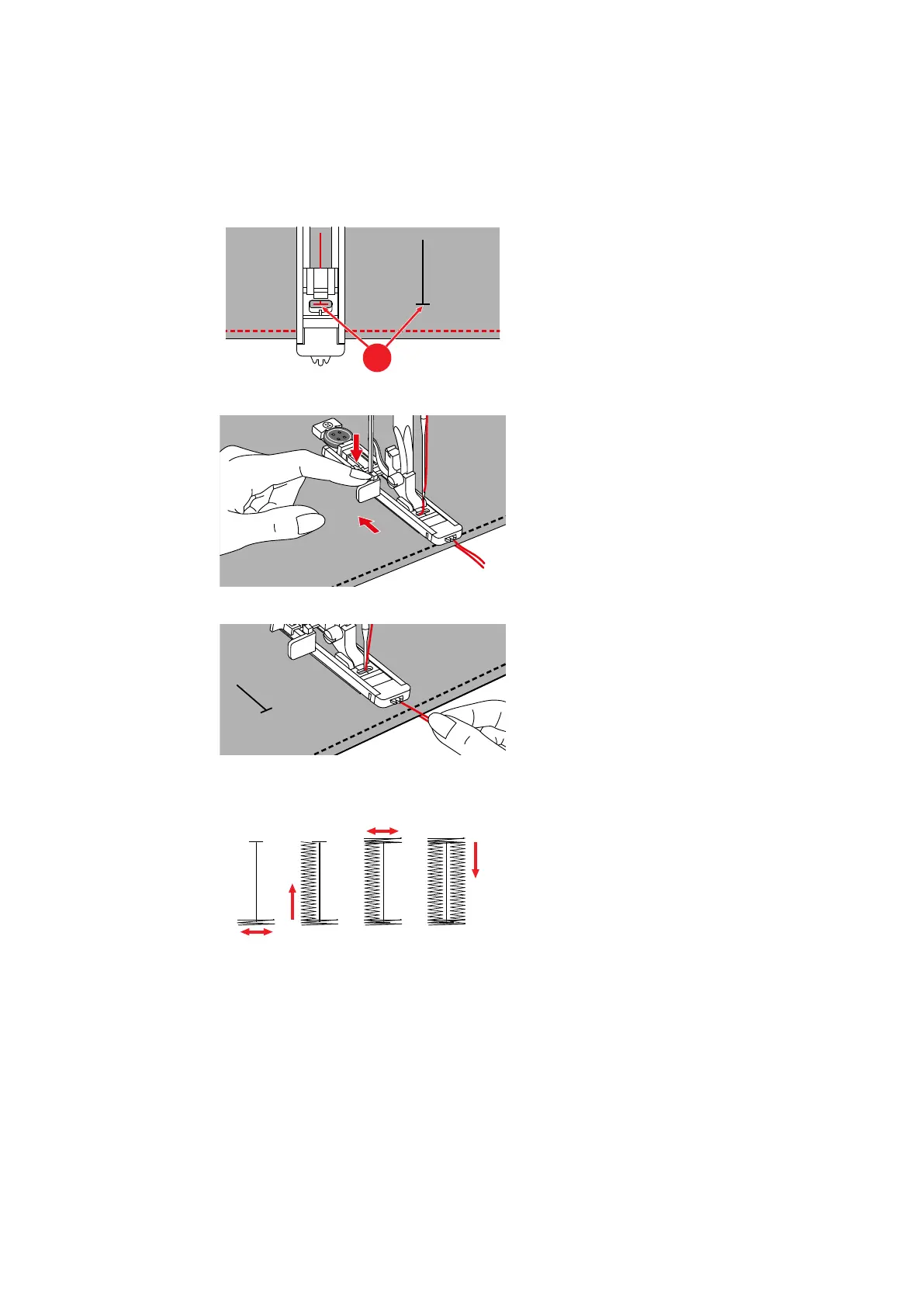
> Position the fabric under the presser foot so that the marking for the center line is aligned with the
starting point (1).
> Press the buttonhole lever all the way down and press it backwards slightly until it clicks in position.
> Hold the upper thread perpendicular to the buttonhole foot with slide.
> Use the foot control to start sewing.
– The buttonhole is sewn from the front of the presser foot to the back.
> At the end of the buttonhole, where the bead meets the bar, stop the machine.
> Raise the presser foot, remove the fabric and cut the thread.
> Pull the upper thread downwards and tie it in a knot.
> If you must interrupt sewing a buttonhole, pull the buttonhole lever forwards and sew 2–3stitches until
the mechanism has switched over.
> To sew another buttonhole, push the buttonhole lever backwards.



 To Next Page