10
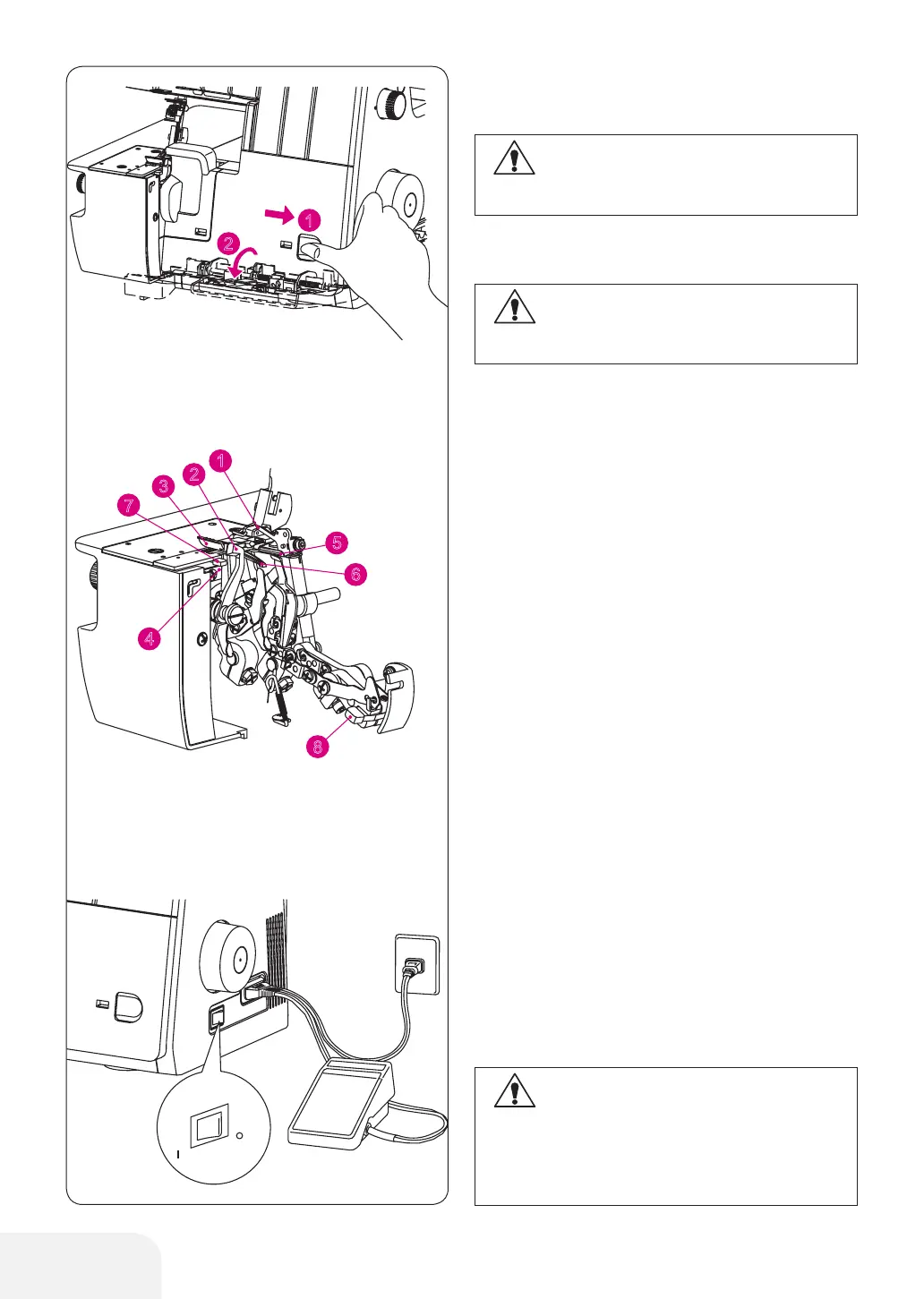
Principal Parts behind the Looper
Cover
PREPARATION TO SEWING
HOW TO OPEN LOOPER
COVER
(1) Upper looper
(2) Upper knife (moveable)
(3) Standard presser foot Overlock/Coverstitch
(4) Fixed position lower knife
(5) Lower looper
(6) Chain/Cover looper
(7) Rolled Hem lever
(8) Upper looper clutch
Power Switch
– Connect the controller/electric plug to the
machine receptacle.
– Plug power line into electric outlet.
– Push " l " mark side to turn "ON"
– Push "O" mark side to turn "OFF"
1. Push the cover to the right as far as it will go.
2. Pull cover down toward you.
CAUTION:
Be sure to turn off power switch.
CAUTION:
Be sure looper cover is closed when sewing.
CAUTION:
Use only foot controller provided with this
machine. (Type 4C-316B for USA & CANADA
only). Be sure to make reference to “Warning”
on following Page.
Foot Controller
– To run the machine and control the speed,
press the controller.
– The harder you press, the faster the machine
will sew.
– To stop the machine from sewing, remove your
foot from the controller



 To Next Page