BestCode Next Series 8 Technical Manual October 2022 Page 47 of 290
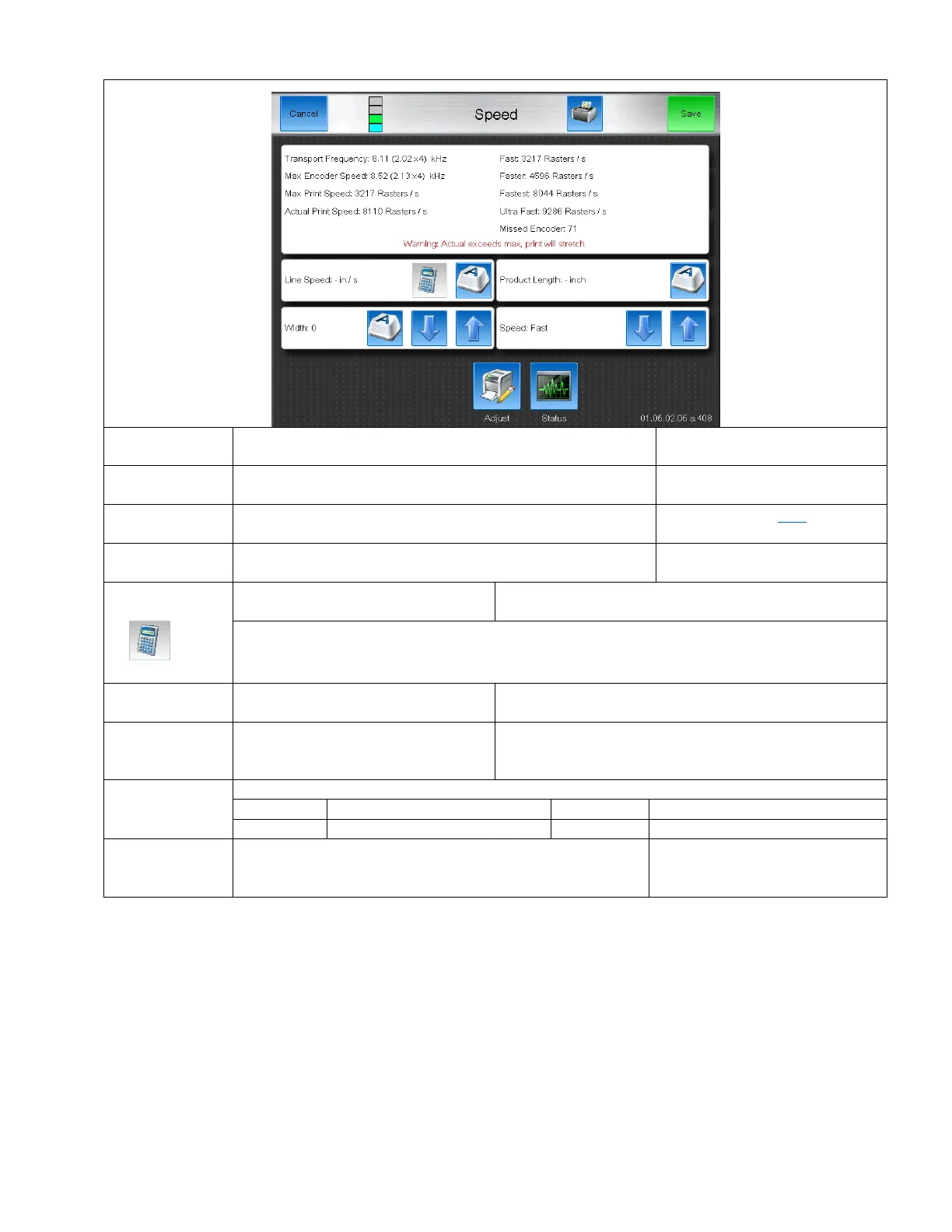
Shaft Encoder Enabled Speed Screen
Displays the speed of incoming encoder pulses. (Raw data in
Parenthesis)
Captures the maximum speed that encoder pulses. Helpful to
ensure width valve is fair.
The maximum number of rasters per second the printer can
print.
Based on the input Width value, this is the actual speed that
drops are being printed. Cannot exceed the Max Print Speed.
If the line speed is known, it can be
typed in here.
Press this button after entering a Product Length and the Line Speed will be calculated.
The length in inches where the product
passes over the photoeye.
Increases or decreases the length of
the message by stretching or shirnking
the print
Used to increase the maximum print speed.
Faster than Fast, Good Quality
Fastest Print, Readable Code
Increments when an encoder pulse arrives prior to the
currently printing raster being finished printing. Indicates that
width is too low for the selected message.
Should be 0 when width is properly
configured.
“Warning: Actual exceeds max, print will stretch” prompt
The “Warning: Actual exceeds max, print will stretch” message will occur when the Actual Print speed is greater than the
Max Print Speed. Increase the width value until the message goes away or use a faster speed.
Check on the Status screen to see if Missed Prints, Missed Encoder, or Missed Photo Eye are increasing. Continue to
increase width and selecting faster print speed until these values stop incrementing.



 To Next Page