BestCode Next Series 8 Technical Manual October 2022 Page 15 of 290
Pre-Power Up Guide
EQUIPMENT DAMAGE: Connect the pump fittings before powering on the machine for the 1
st
time.
Failure to follow this instruction will cause permanent damage to the pump.
Procedure Time: 2 minutes
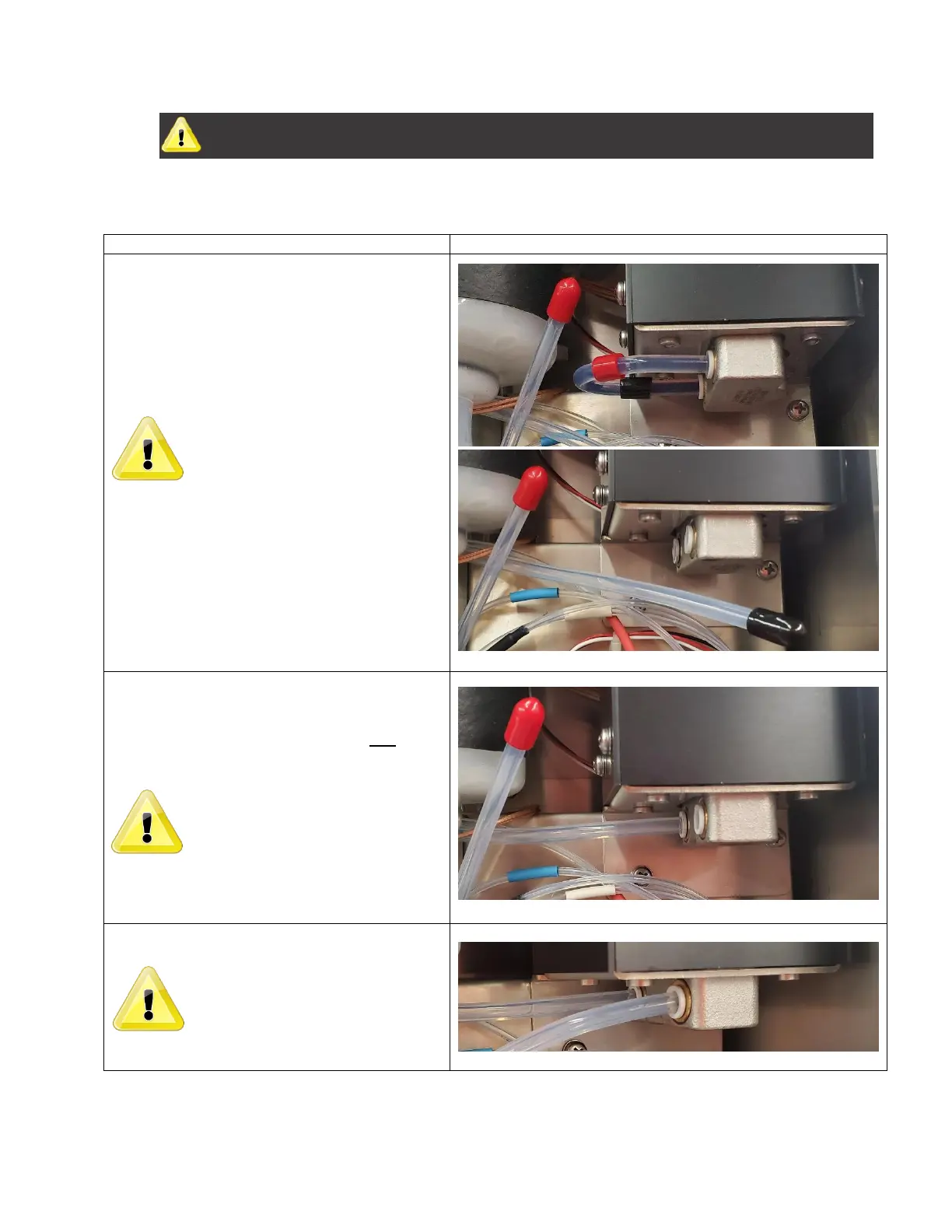
1. Locate the ¼” pump tubes with Red and Black
coding.
2. Remove the Red and Black end from the
pump.
The red tube is on the pressure side
of the pump, and flows into the main
ink filter. Verify the tube connects
directly to the main BestCode Ink
Filter.
3. Remove the Black cap from the tube.
4. Wet the pump fitting o’ring with cleaner and
firmly press the black tube into the rear fitting
on the pump.
Pull back on the tube to ensure that it
is completed seated and sealed into
the pump fitting. Failure to fulling
insert to tube will cause ink leakage.
5. Repeat for the Red tube in the front Port.
The black tube is on the vacuum side
of the pump, ensure that it is
connected to the Ink Pickup tube in
the Ink Tank.



 To Next Page