BestCode Next Series 8 Technical Manual October 2022 Page 67 of 290
Fluidic
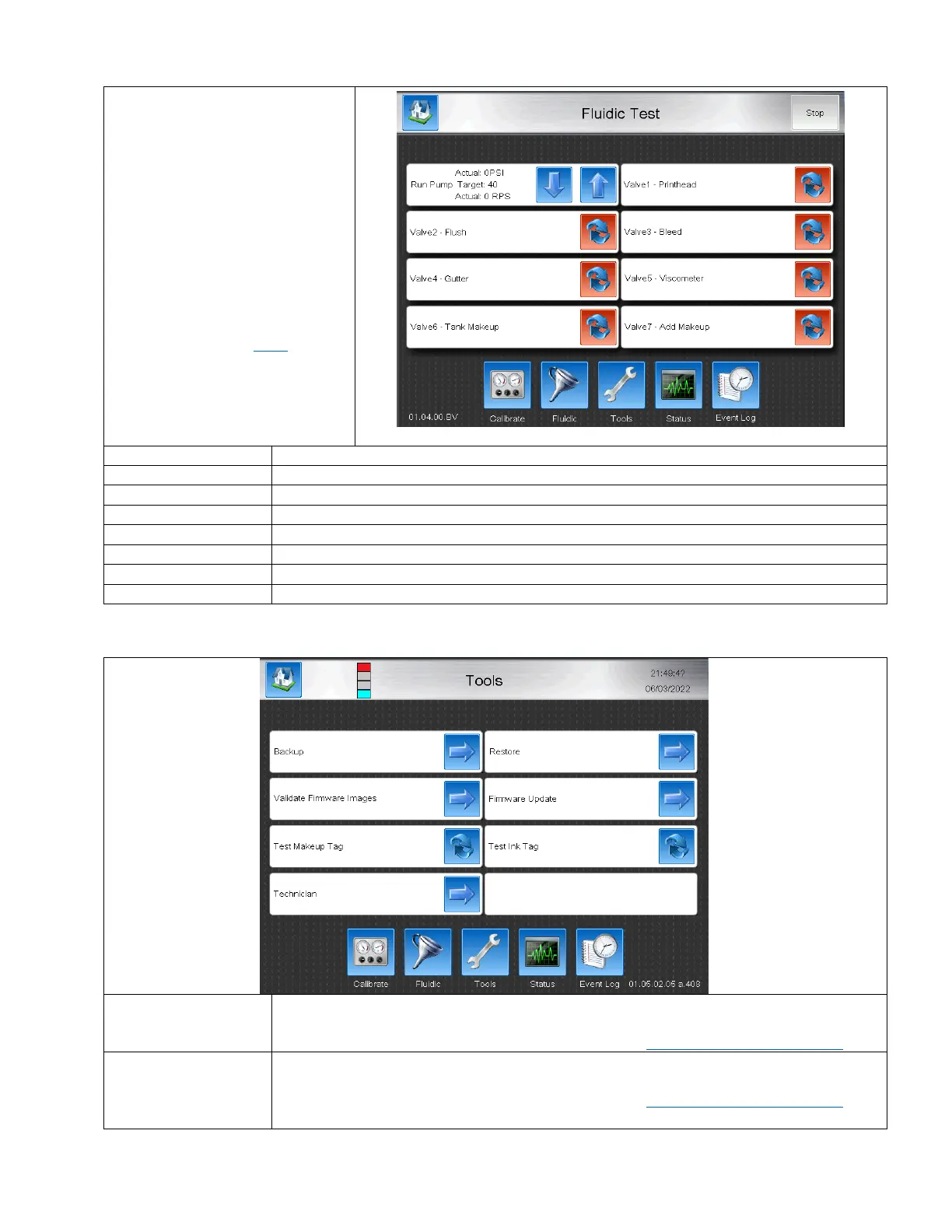
The Fluidic screen is used for testing
valve and pump function.
Enabling each value should cause an
audible click.
Note: Valve 1 – Printhead will click
when activated and de-activated
since it is a 3 way. Listen for a Click-
Clack when cycling the valve on and
off.
Valve Troubleshooting Here
Pressing up and down causes the pump to turn. Actual pressure and actual RPS are displayed.
Activates and de-activates the printhead valve.
Activates and de-activates the Flush valve.
Activates and de-activates the Bleed valve.
Activates and de-activates the Gutter valve.
Activates and de-activates the Viscometer valve.
Activates and de-activates the Tank Makeup valve.
Activates and de-activates the Add Makeup valve.
Backs up all system files to a USB stick. Stick must be FAT32 format. Used for creating backups
for messages, graphics, keyboards, translations, and system files.
A video Guide for Backup and Restore can be found here: https://youtu.be/iQyzcH09Ub4
Restores up all system files from a USB stick. Stick must be FAT32 format. Used for restoring
messages, graphics, keyboards, translations, and system files from another system.
A video Guide for Backup and Restore can be found here: https://youtu.be/iQyzcH09Ub4



 To Next Page