BestCode Next Series 8 Technical Manual October 2022 Page 63 of 290
Network
IP address is defined by operator
IP address is assigned by the network
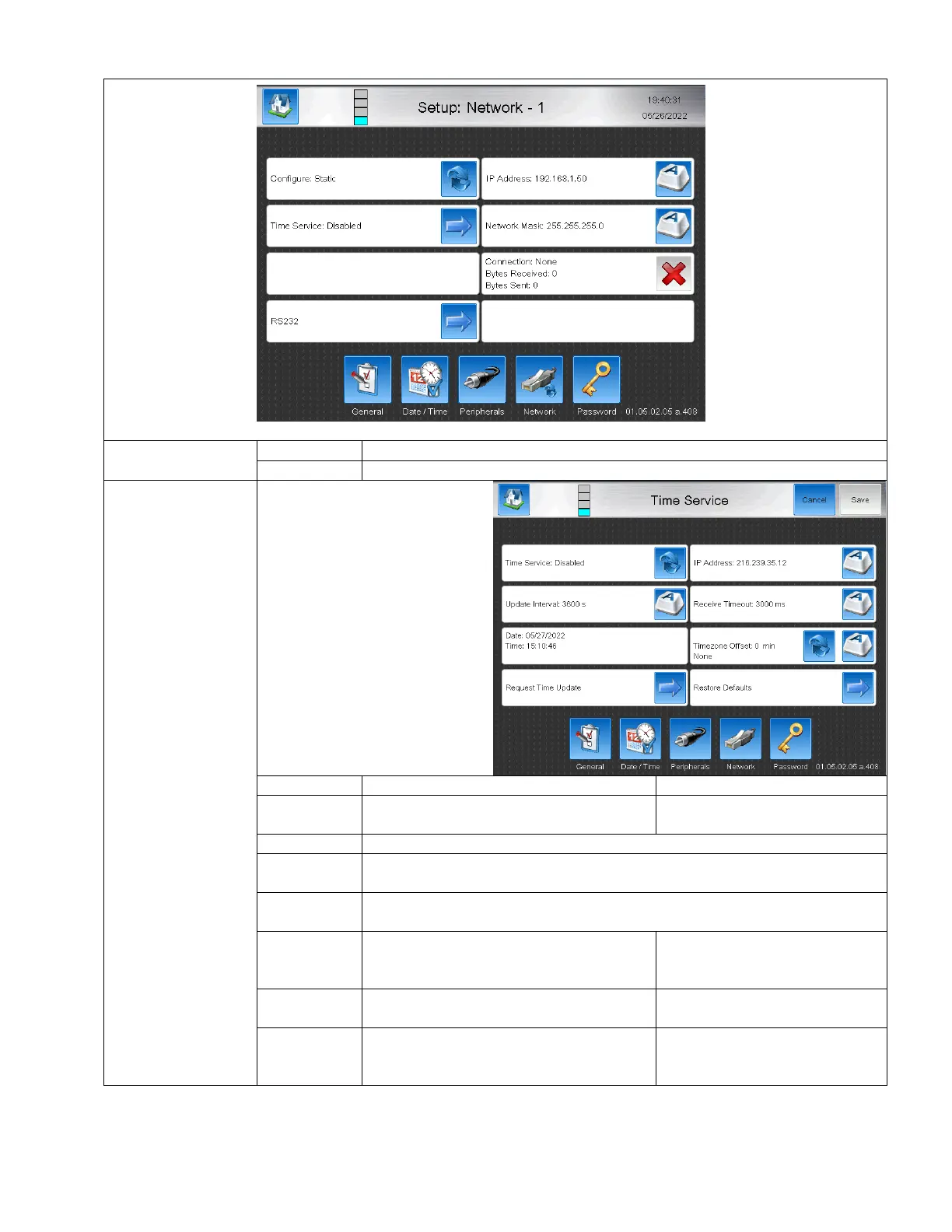
The time service screen is used to
automatically synchronize the
machine time against an NIST
Internet Time Server.
This ensures that time on the
system is always linked to a
factory or internet standard for
product coding accuracy.
This feature only works when
internet access is provided and
when the device is configured as
DHCP.
Enable or disable the Time Service feature
Controls the amount of time between
updating the clock from the Time Server.
Displays the Date and Time data from the system
Attempts to gather the time data from the specified IP Address of the Time
Server
The IP address for the desired Time Server. This defaults to the Google free
global time service.
The amount of time after sending the Time
Service request allowed before closing
connection.
Allows time offset for seasonal time
corrections and manual time changes
None, Summer (+/- 720 minutes),
Winter (+/- 720 minutes)
Resets the page to the Default Values
IP: 216.239.358.12
Update Interval: 3600s
Receive Timeout: 3000 ms



 To Next Page