UNITE – System information
12
7. Create/define a new pairing
Transmitter and receiver mu be paired to enable them
to communicate with one another. The code required
for this is generated in the charger and transmitted
during the pairing process to both transmitter and
receiver.
Note: For group ID 256 only, a factory preset code is
used that cannot be changed. You can use this group
ID for a syem without pairing.
To establish a pairing with a charging unit, please
proceed as described below:
1.
On the transmitter, set the group ID you wish to use
for pairing.
2. Inse one transmitter only in the charger. If more
than one transmitter is used in the charger, pairing
will not a and the charger’s atus indicator
will show an error message (see table 2).
Alternatively you can connect the transmitter using
a USB cable connected to the charger’s USB po.
3. Inse one or more receivers to be paired with the
transmitter into the charger’s charging compa-
ment. You can also connect another receiver to the
charger using the USB po. Remove all receivers
that are not to be paired. Should no receiver be
connected to the charger, pairing information is
ored in the charger only. This is used for later
pairing without connecting the transmitter to the
charger.
4. To transmit information from the transmitter to the
receivers in the charging compaments and to the
charger itself for future pairings, hold down the
“Pair/Reset” button on the charger for more than
2 seconds. The “Status” light will flash yellow for a
few seconds if the pairing is successful. The atus
light will then remain yellow because the pairing
information is now also saved in the charger.
5. If you wish to pair other receivers, remove the trans-
mitter and all receivers from the charger, switch to
“Pair & Charge” and inse the unpaired receivers
into the charger. The pairing information will be
saved immediately in the unpaired receivers. The
atus light on the receiver will rapidly flash yellow
while this happens.
6. If you have no fuher devices to pair, switch the
charger to “Charge only” .
7. Switch on the transmitter and one receiver to check
that they have both been paired successfully. Aer
a few seconds the atus light on the receiver will
light up green and show the channel name of the
transmitter.
8. To delete pairing information ored in the charger,
hold the “Copy/Reset” button down for more than
5 seconds. The atus light will then remain
permanently green.
Display Status
O The device is switched o
Green • Device is ready to use
• No pairing information saved
Flashing
yellow
Pairing information is being copied to the
charger or receiver
Yellow Pairing information has been ored in
the charger
Flashing
green/
yellow
Device is being localised
Flashes red
5 times
• No transmitter
• Too many transmitters
Flashing
red rapidly
• Operating error
• Charging error
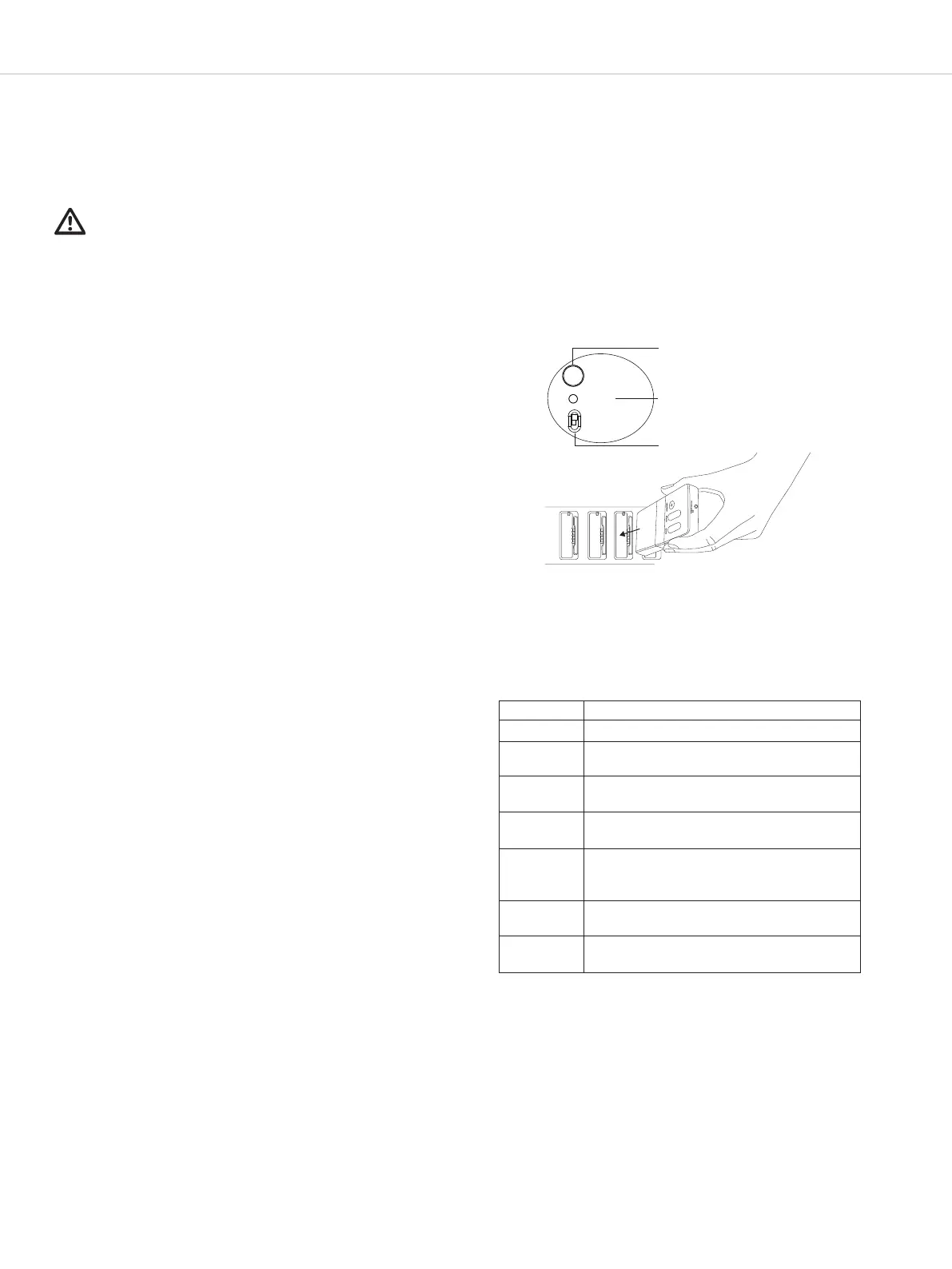
In pairing mode (switch to “Pair & Charge”), the atus
light on the charger will display the following infor-
mation:
Pair/Reset
Status
•
Pair & Charge
• Charge only
Pairing with Unite charger
Table 2
Found on charger


 To Next Page