UNITE – Menu items
27
. “Bluetooth” main menu
In the “Bluetooth” main menu, the menus lied in the following table (menu path / level 2) with fuher submenus (menu
path / level 3) are available for various syem settings.
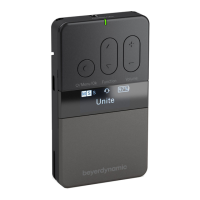
• Press the button on the already switched on transmitter/receiver for approx. 2 seconds to access the
menu.
• Press the multifunction button to select the “Bluetooth” main menu.
• Briefly press the button to access the “Bluetooth” main menu.
• Press the multifunction button to select the “State”, “Connect” or “Pair” submenu.
• Briefly press the button to access the respective submenu.
• Press the multifunction button to make settings in the respective submenu.
• Briefly press the button to confirm the setting.
Device Menu path
Level 2
Menu path
Level 3
Adjustable parameters Description
Talk Button
Push
T
oggle
With the “Toggle” setting selected, press the Talkback button once to
switch on the internal or connected headset microphone. By pressing
the button twice, the microphone will be deactivated.
I
n the “Push” setting, the relevant microphone is activated only for as
l
ong as the Talkback button is pressed.
Audio
R
outing
RP Talkback All
M
aer
Maer & Sub-Maers
This menu is used to set the routing of talkback signals.
Maer: only the Maer device can hear the talkback signals.
M
aer+Sub-Maer: only Maer and Sub-Maer can hear the
talkback signals.
All: All devices in a specific group are able to lien in on talkback
signals.
Audio
Routing
Sub-Maers All
Maer
M
aer & Sub-Maers
This menu is used to set the routing of audio signals from devices con-
f
igured as Sub-Maer.
M
aer: only the Maer device can hear audio signals from the Sub-
Maer.
Maer+Sub-Maer: only the Maer and all other Sub- Maers can
hear audio signals from all Sub-Maer devices in a group.
All: All devices in a specific group are able to lien in on the signals of
Sub-Maer devices.
RP-T
TP
T
P
Device Menu path
Level 2
Menu path
Level 3
Adjustable parameters Description
State O
Headset
Phone / PC
The Bluetooth® inteace can also be used both for playing in external
audio material and playing back audio signals. This menu is used to
set Bluetooth® mode.
When set to “Phone/PC”, the device serves as an external soundcard
and can be connected to a smaphone, PC or Mac computer.
Connect In this menu, devices are lied with which you have already
successfully peormed a Bluetooth® connection.
Pair To connect Unite via Bluetooth® to another device, it mu fir be
paired with the connecting device. Go into this menu to get a li of all
active, potential devices in the immediate vicinity. Select the device
you wish to pair with and follow the inructions on both devices –
Unite and the external device.
TP
TP
. “Talkback” main menu
In the “Talkback” main menu, the menus lied in the following table (menu path / level 2) with fuher submenus (menu
path / level 3) are available for various syem settings.
• Press the button on the already switched on transmitter/receiver for approx. 2 seconds to access the
menu.
• Press the multifunction button to select the “Talkback” main menu.
• Briefly press the button to access the “Talkback” main menu.
• Press the multifunction button to select the “Talk Button” or “Audio Routing”.
• Briefly press the button to access the respective submenu.
• Press the multifunction button to make settings in the respective submenu.
• Briefly press the button to confirm the setting.
TP


 To Next Page