44 - Espas 20I
D812913 10598_02
Operator Cards allows enabling up to 400 cards using the Espas Conf. software. 400 num-
bered positions are indicated, to which the 125KHx cards can be associated; each position
has a specic function:
Position Function
1,2,3,4 Normal
5,6,7,8 Open
9,10,11,12 Closed
13,14,15,16 Loop (automatic)
17...400 Single pass (Free pass)
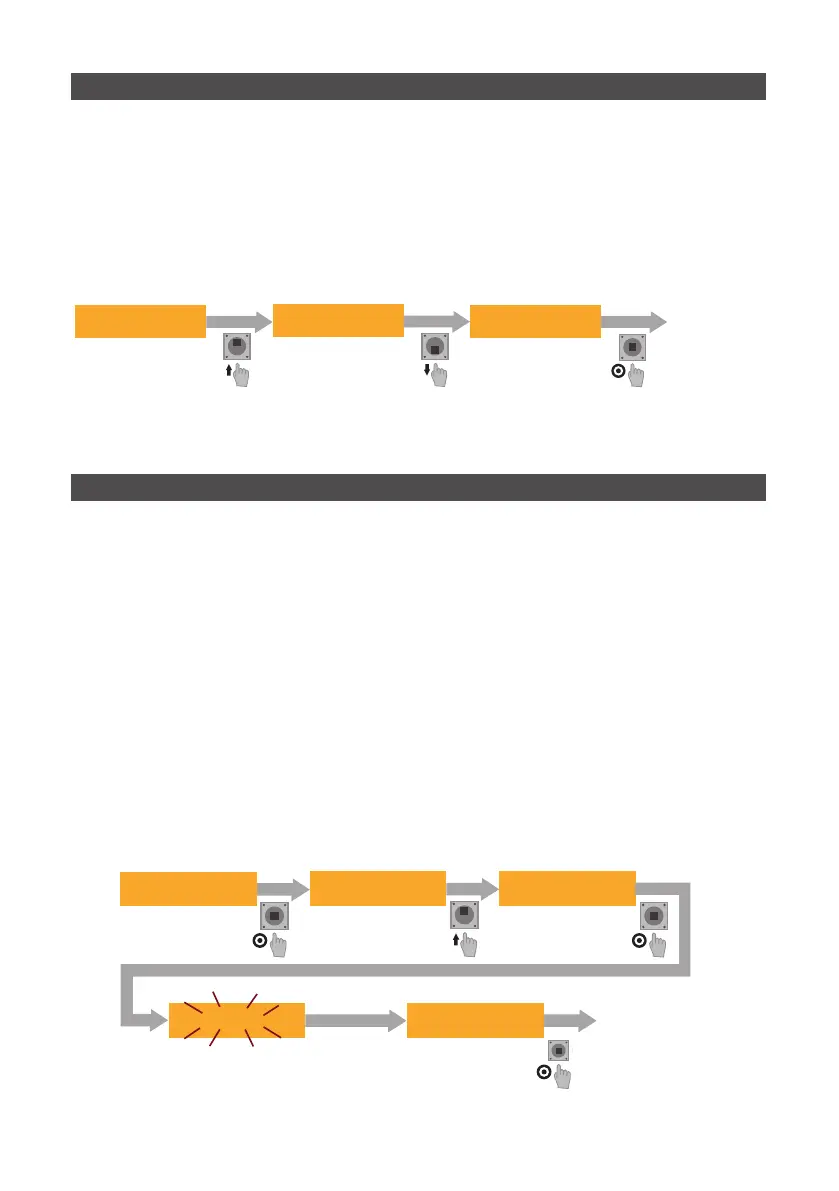
INSTRUCTIONS:
- Enter the menu and scroll with LEFT and RIGHT until Operator Card is displayed
- Scroll through the positions with UP and DOWN
- When the desired position is reached , press PUSH: the value saved in that position starts
ashing: submit the card you wish to enable to the reader on the front.
- Press PUSH to conrm
01.00000000 norm
4
AVVICINARE CARD
AL LETTORE FRONTALE
CARD PROGRAMMATA
CON FUNZIONE OPEN
OPERATOR CARDS
05.00000000 open
05.00000000 open 05.10456985 open
PULSANTE DI RESET
Grace time is a time value expressed in minutes, that determines how long a customer can
take to get out of the car park from the moment the barcode is printed after payment.
ATTENTION! Grace Time must be set on all devices.
INSTRUCTIONS:
- Enter the menu and scroll with LEFT and RIGHT until GRACE TIME is displayed
- Press PUSH and modify the value with UP or DOWN
- Press PUSH to conrm
GRACE TIME = 000
GRACE TIME = 010
GRACE TIME = 008
10 2
GRACE TIME = 8
14.1 - GRACE TIME SETTING
14.2 - OPERATOR CARD CONFIGURATION
CARD PROGRAMMED
WITH OPEN FUNCTION
RESET BUTTON
PLACE THE CARD NEAR
THE FRONT READER


 To Next Page