45 - Espas 20I
D812913 10598_02
ENGLISH
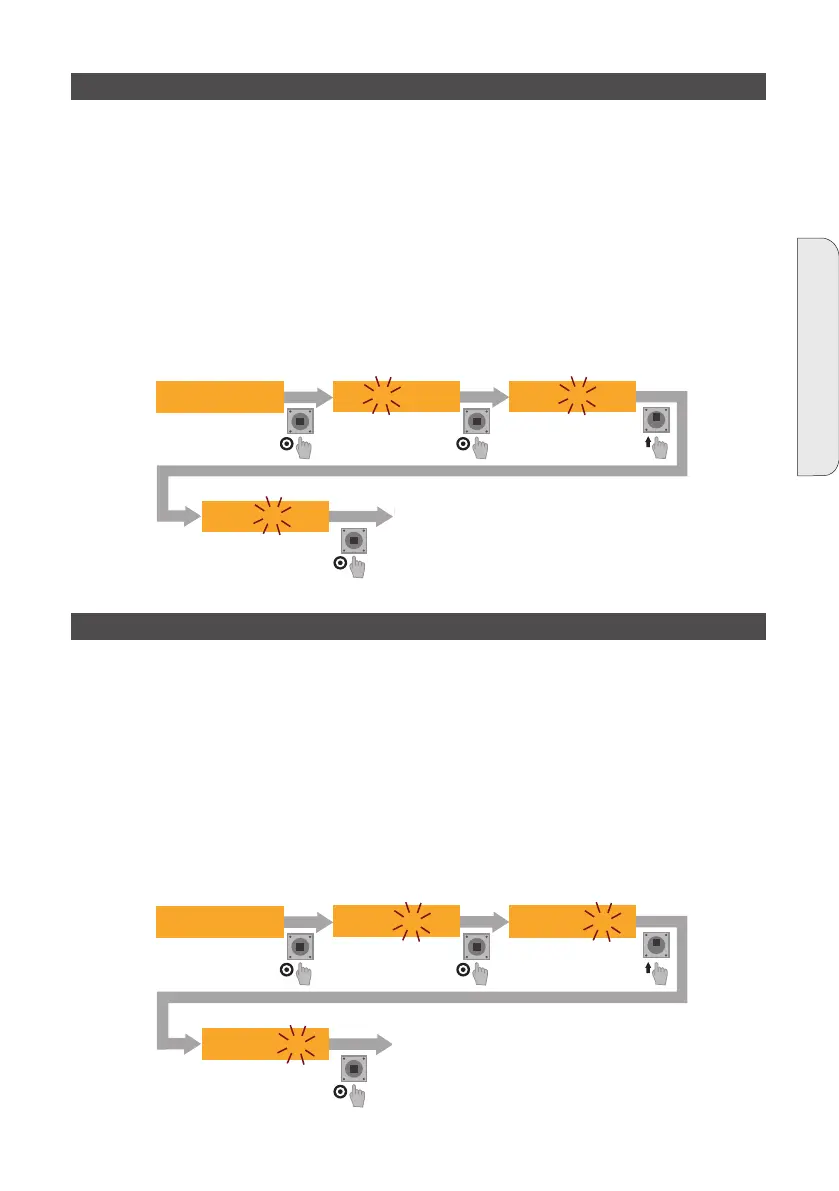
DATE allows modifying the current date in the dd/mm/yy format
INSTRUCTIONS:
- Enter the menu and scroll with LEFT and RIGHT until DATE is displayed
- Press PUSH to enable the modication of the dw (day of the week) eld
- Modify the value with UP and DOWN
- Press PUSH to enable the modication of the dd (day of the month) eld
- Modify the value with UP and DOWN
- Press PUSH to enable the modication of the mm (month of the year) eld
- Modify the value with UP and DOWN
- Press PUSH to enable the modication of the yy (year) eld
- Modify the value with UP and DOWN
- Press PUSH to save the settings
date mo 23/02/12
NUOVA DATA IMPOSTATA
Lunedì 24/02/2012
date mo 23/02/12
date mo 23/02/12
date mo 24/02/12
TIME allows modifying the current time in the hh:mm:ss format
INSTRUCTIONS:
- Enter the menu and scroll with LEFT and RIGHT until TIME is displayed
- Press PUSH to enable the modication of the hh (hours) eld
- Modify the value with UP and DOWN
- Press PUSH to enable the modication of the mm (minutes) eld
- Modify the value with UP and DOWN
- Press PUSH to enable the modication of the ss (seconds) eld
- Modify the value with UP and DOWN
- Press PUSH to save the settings
NUOVA ORA IMPOSTATA
15:13:36
time 15:12:36 time 15:12:36 time 15:12:36
time 15:13:36
14.3 - DATE SETTING
14.4 - TIME SETTING
NEW DATE SET Monday
24/02/2012
NEW TIME SET
15:13:36


 To Next Page