11
BIFFI FAIL SAFE ELECTRIC ACTUATORS, MODEL EFS2000V4
InstructIon and operatIng Manual
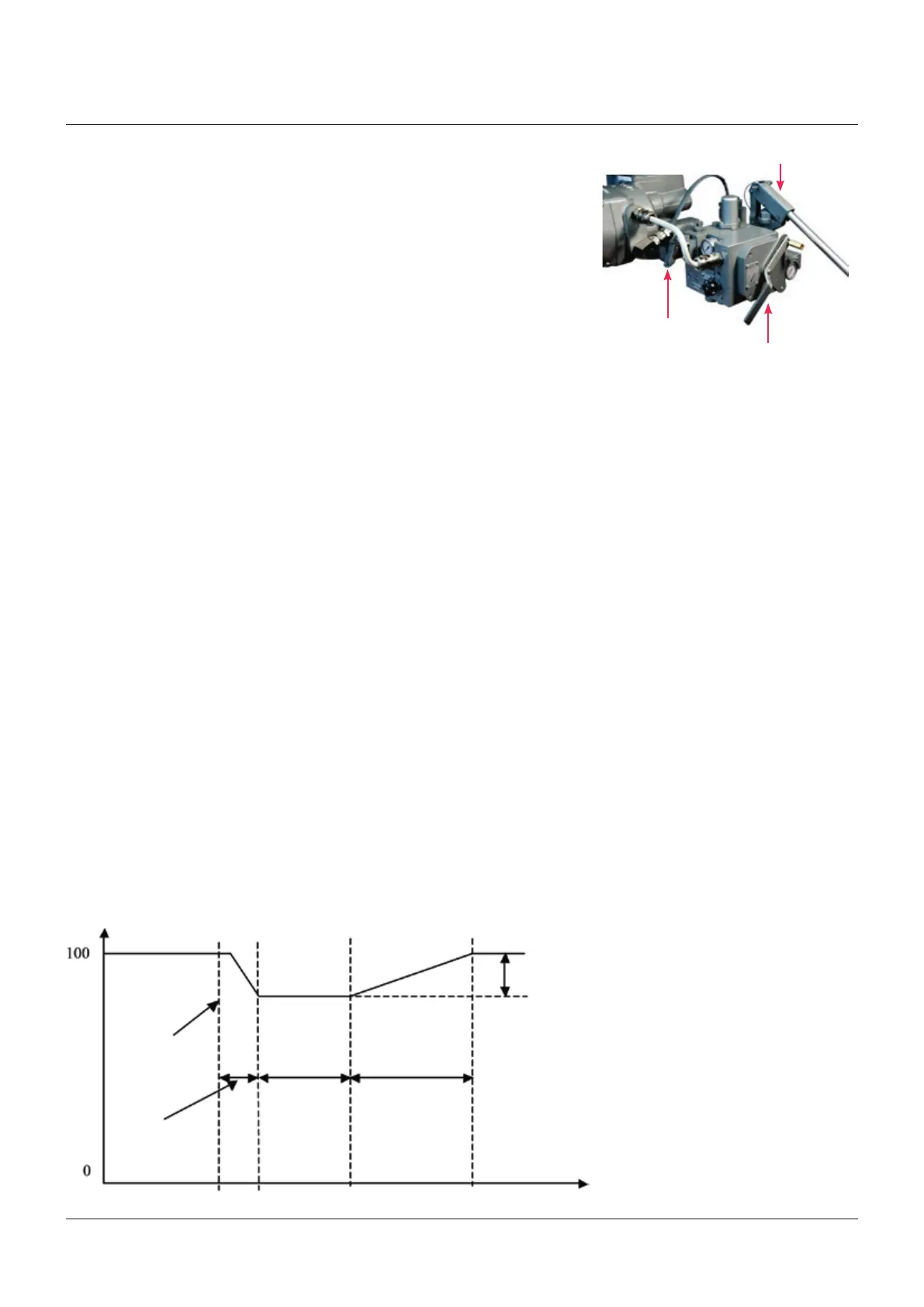
Auto/man selector
Hand operated valve
Hand pump
PST travel
Time sec
Position %
PST cmd
T-PST
time (spring action)
Pause
T-RET time
(electrical actuator
action)
7.5 Manual override operation
The AUTO/MANUAL selector allows selecting
between MANUAL and AUTO mode.
In MANUAL mode the ESD clutch is de-
energized, the actuator remains in its current
position, electrical commands are inhibited,
the LED in the clutch enclosure is red, the
message on the actuator display is INT EFS and
the actuator can be manually moved by means
of the hand pump and the hand operated spring
return valve (hydraulic control group). To re-
energize the clutch and be ready to perform
the EFS action, press the red mushroom push
button for 10 seconds and then switch the
AUTO/MANUAL selector to AUTO within 30
seconds to enable AUTO mode. The actuator
remains in its current position and is available
to be driven by electrical commands. If the
selector remains in MANUAL mode during
30 seconds, the clutch is de-energized again.
If the selector is switched to AUTO without
performing the above procedure, the actuator
carries out the ESD action since the clutch is
not energized.
The condition EFS in MANUAL can be
configured to activate the monitor relay by
means of VIEW and SETUP menu (“output
relays, ESD – EFS” parameter). The above
condition can also be signaled by an auxiliary
relay As1, …, As8 by configuring the parameter
“EFS in manual” in the VIEW and SETUP
features: Output relays.
In AUTO mode the EFS is controlled by the
electrical actuator as described in previous
paragraphs.
7.6 Partial stroke test (PST)
The PST function is available to check the
functionality of the essential parts and
to achieve the EFS safety function while
the valve is in line and in service. The test
consists in de-energizing the clutch to move
the valve to the configured position (PST
TRAVEL) by action of spring and then re-
energizing the clutch to stop the valve moving.
After the PAUSE time the valve is moved to
initial position by the actuator.
The following parameters are available in the
VIEW and SETUP menu, ACTUATOR SETUP,
EFS SETUP, PST SETUP routine, to set PST
function behaviour:
1. PST mode: OFF, AUTO, MANUAL
- OFF: PST not used
- AUTO: PST cycle carried out automatically
and cyclically with time interval set by the
parameter PERIOD and at the time set by
the parameter HOUR of DAY
MANUAL: PST cycle carried out on receiving
of a remote hardwired or bus command or
bya local command available in the VIEW
and SETUP menu, Maintenance functions.
- MAN-AUTO: both automatic and manual
mode are available
2. SPRING action: spring to open or spring to
close
3. PERIOD: time interval between PST, in days
from 0 to 1000, in PST AUTO mode
4. HOUR of DAY: hour of PST, in hour from
0to23, in PST AUTO mode.
5. PST TRAVEL: position change during PST
cycle, in % of position from 10 to 40
6. MAX T-PST: max time allowed to change the
position of PST TRAVEL due to spring action,
measured in %, from 1 to 1000% of relevant
BASELINE time
7. MAX PST T-RET: max time to return to
initial position by the electrical actuator,
measured in %, from 1 to 1000% of relevant
BASELINE time
8. PAUSE: time of stayput of actuator after
spring action and before command to return
to initial position, measured in sec, from 2 to
255 sec.
9. MAX PST OV-TR: max position over-travel
allowed during PST cycle, in percentage of
position, from 1 to 100.
The following figure shows the PST curve for
EFS with close safe position:



 To Next Page