6 User Manual • Basic-Step
Viper Climate and Production Computer
2 USER’S GUIDE
2.1
Get started
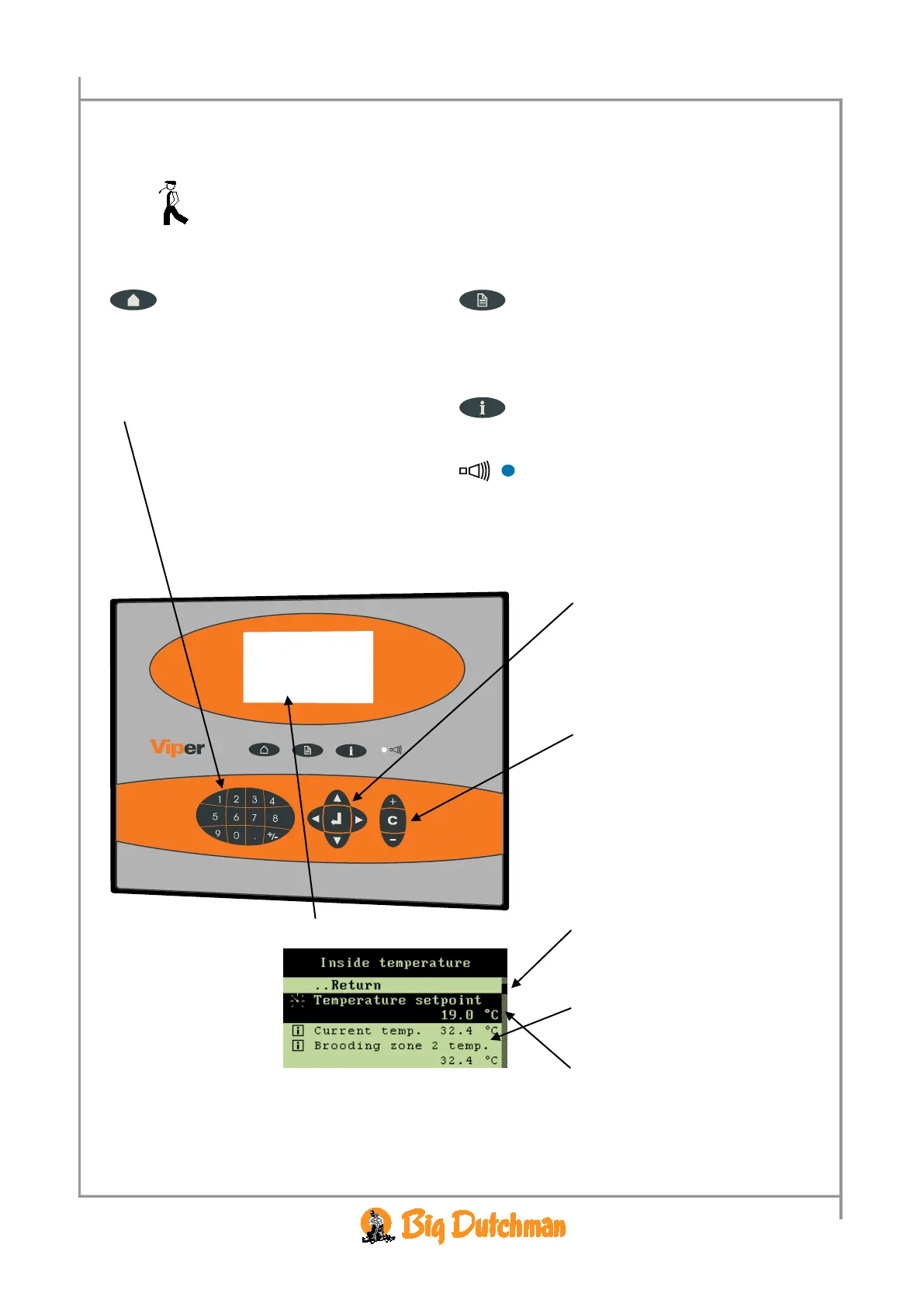
2.1.1 Keyboard
Outline menu key
• read the outline screen
• gain direct access to setting values
Main menu key
• read the values and settings in the
function menu
• set function menus
• used to enter values
• the keys 1-4 are used as shortcut keys
when the outline screen is displayed
Information key
• gain access to the help menu
Alarm lamp
Quick flashing → alarm
Slow flashing → acknowledged alarm
Constant light → non-acknowledged alarm where
the error has disappeared
• with the arrow keys, you can
move around in the menus
• with the enter key, you can
connect or disconnect
functions and accept changes
+, - and C key
• used to change/delete settings
– e.g. when changing the
house name
A scroll panel on the right side
of the display shows you how
long the menu is and where you
are in the menu.
Values, which are readings or cal-
culations, are in
normal type.
The values and functions, which
you can change, are highlighted
in
.



 To Next Page