16 User Manual • Basic-Step
Viper Climate and Production Computer
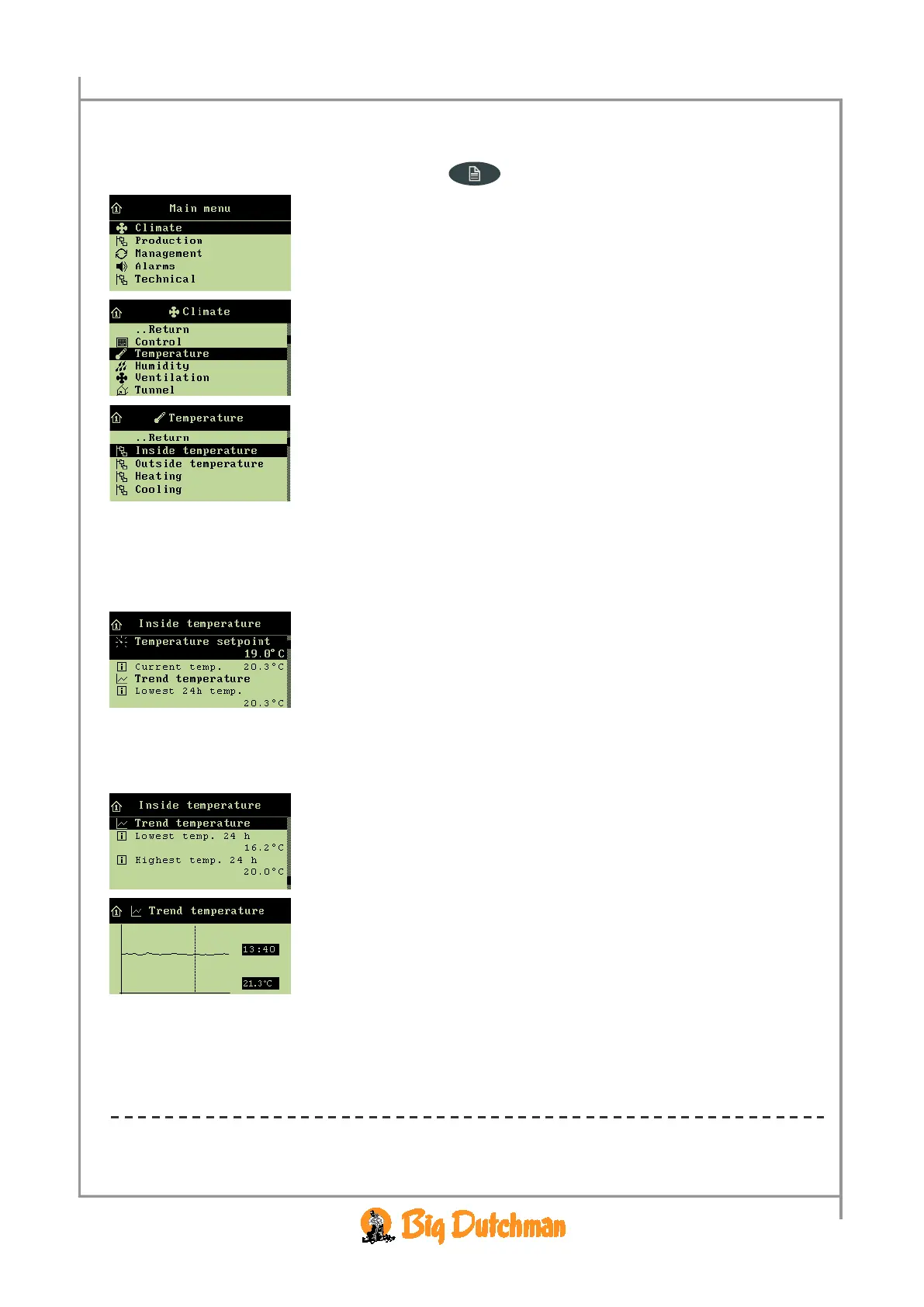
All menu items … in the temperature menu Inside temperature can be set by
→ pressing the menu key
→ select
Climate, and press
→ select
Temperature, and press
→ select
Inside temperature, and press
2.2.2.1.1 Setting the Temperature Setpoint
When you want to … set the temperature,
open the
Climate/Temperature/Inside temperature menu, and
→ select
Temperature setpoint, and press
→ set the temperature, and press
2.2.2.1.2 Temperature Curve
The Climate/Temperature/Inside temperature menu.
The
Trend temperature curve provides you with a clear picture
of the temperature development in the house during the last 24
hours.
→ Press the arrow keys to read the exact time and figure values.
→ Press the enter key to return to the inside temperature menu.
2.2.2.1.3 Lowest and Highest 24-hour Temperatures
The 24h temperatures indicate the lowest and highest measured temperatures within the last 24 hours
and the time when they occurred.



 To Next Page