8 User Manual • Basic-Step
Viper Climate and Production Computer
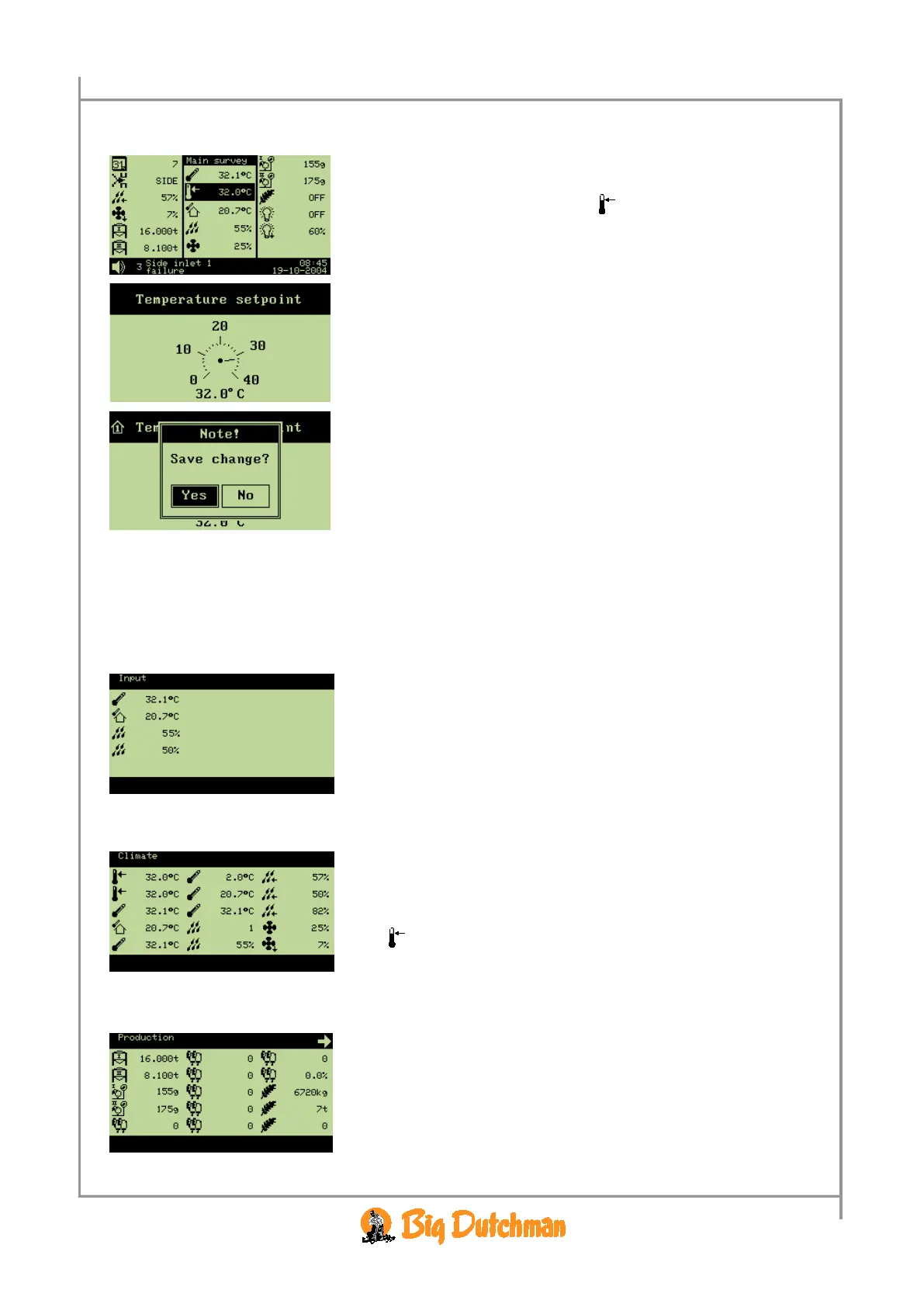
2.1.2.1.2 Changing a Setting via the Outline Screen,
→ select the required setting (e.g.
Temperature
setpoint
), and press the enter key
→ change the setting
→ when
Yes is highlighted, press to approve and save the
change
or
→ when
No is highlighted, press to undo
2.1.2.1.3 Installation Overview via Outline View
The numeric keyboard can help you to get an overview of what has been installed on inputs and
outputs as well as which climate and production functions have been installed.
2.1.2.1.3.1 Outline of Inputs
→ press
1
on the numeric keyboard
From this menu, you can read the values of the individual inputs.
2.1.2.1.3.2 Outline of Climate Functions
→ press
2
on the numeric keyboard
From this menu, you have direct access to change the values set.
(e.g.
Temperature setpoint)
2.1.2.1.3.3 Outline of Production Functions
→ press
on the numeric keyboard
From this menu, you can read the values of the installed production
functions.
In the right corner of the display an arrow indicates if more
functions are available than shown in the display.



 To Next Page