Using the tDigitalClock
Binatone Helpline: 0845 345 9677 (UK), 1300 768 112 (Australia), +91 7503011385 (India), +491805938802 (Europe)
71
17 Using the tDigitalClock
17.1 Open tDigitalClock
1 Tap Program Launcher > tDigital Clock.
17.2 Set Alarm Clock
1 Tap Program Launcher > tDigitalClock.
2 Press
O and tap Alarm.
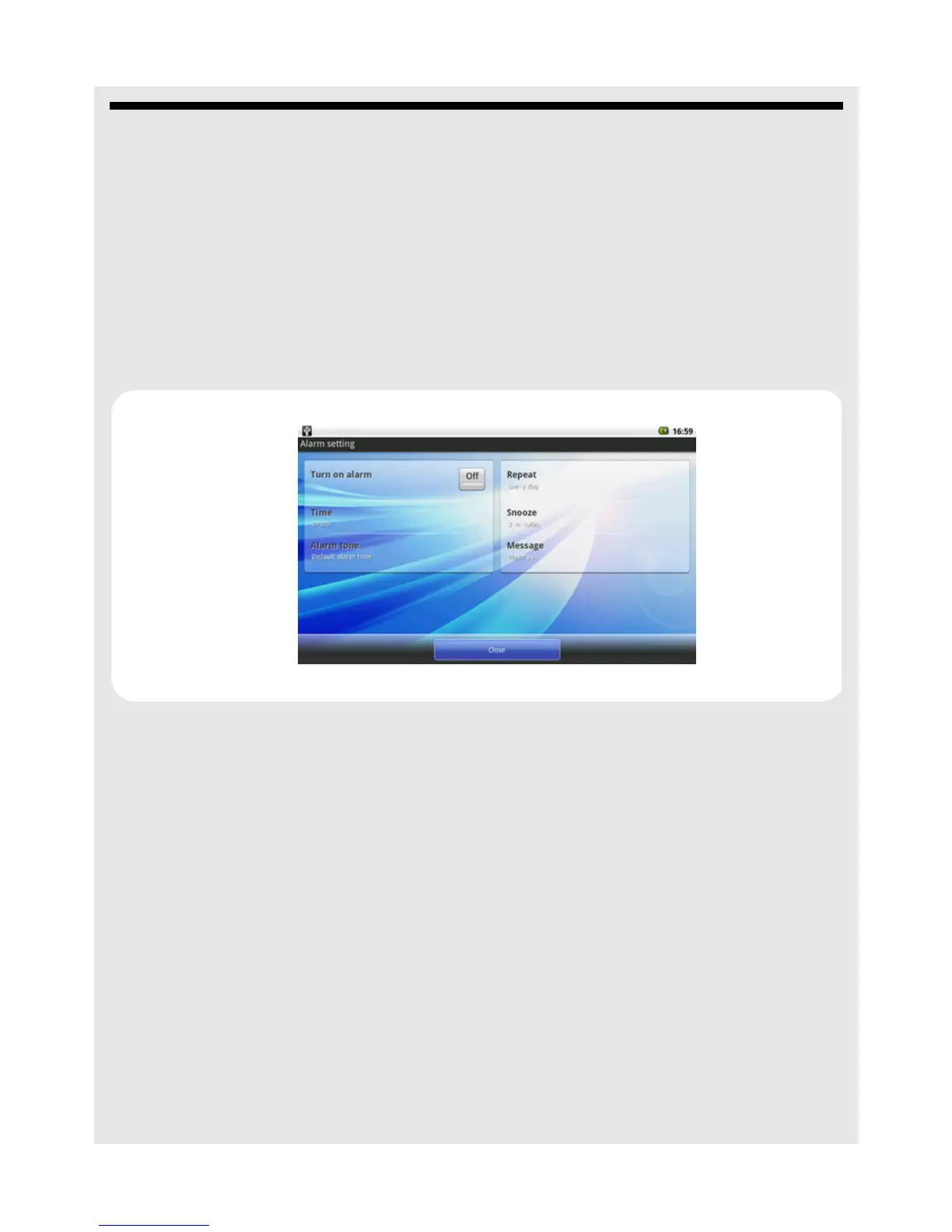
3 Tap t h e Off button in Turn on alarm option to activate the alarm clock.
4 Tap Time and tap + or - to set the hour and minute of the alarm time and tap OK.
5 Tap Alarm tone and select the alarm ringtone from the Ringtone list or Audio file list
and tap OK.
6 Tap Repeat to select the days of the week that you wish the alarm to ring and tap OK.
7 Tap Snooze to select the snooze duration and tap OK.
8 Tap Message and enter the message to be displayed on the alarm screen and tap OK.
9 Tap Close to exit.
Note
✓ indicates that the option is activated.
Note
When the alarm rings, tap Snooze or Dismiss to snooze or dismiss the alarm.



 To Next Page