Defining New Programs
Bio-Plex Pro and Bio-Plex Pro II Wash Stations 53
Defining New Programs
Introduction
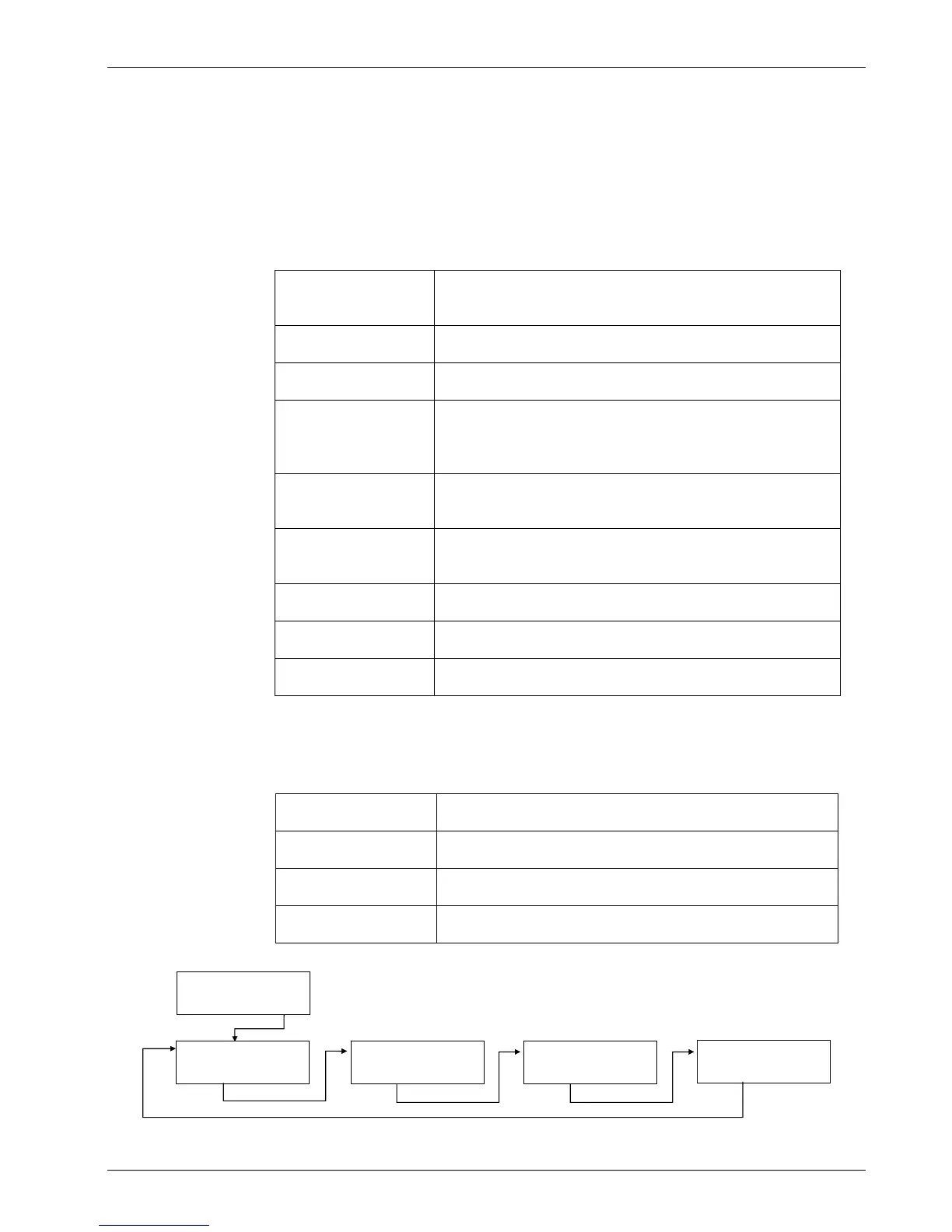
The following program items are available:
CYCLE:
The number of cycles the subsequent processing steps
should be performed
ASP:
An aspirate step removes liquid from the wells
DISP:
A dispense step fills the wells with liquid
WASH:
Liquid is dispensed and aspirated simultaneously
creating a circular flow with a maximum volume of 3000
µl in one wash step for increased wash efficiency
SOAK:
During a soak step the liquid remains in the wells for the
set time (with or without shaking)
VAC:
For collecting desired substances by vacuum filtration
using filtration plates
USER PROMPT:
User interaction is requested
FINAL ASPIRATE:
An aspirate step at the end of a program
END PROGRAM:
The program finishes
Program Menu
The Program menu has the following options:
Start
Run a defined wash program
Define/Edit
Define or edit a program on the instrument
Show
View the parameters of a defined program
Clear
Clear a wash program from the instrument’s menu
The Program menu has the following structure:
START
< > EXIT OK
PROGRAM
< > OK
DEFINE EDIT
< > EXIT OK
SHOW
< > EXIT OK
CLEAR
< > EXIT OK


 To Next Page