Troubleshooting and Error Messages
Bio-Plex Pro and Bio-Plex Pro II Wash Stations 77
PC (Process Control) System Error
If the Process Control board does not respond, the following error message is
displayed:
Examples of Error Messages: PC SYS ERROR
PC FUNCT. ERR
PC ASP ERROR
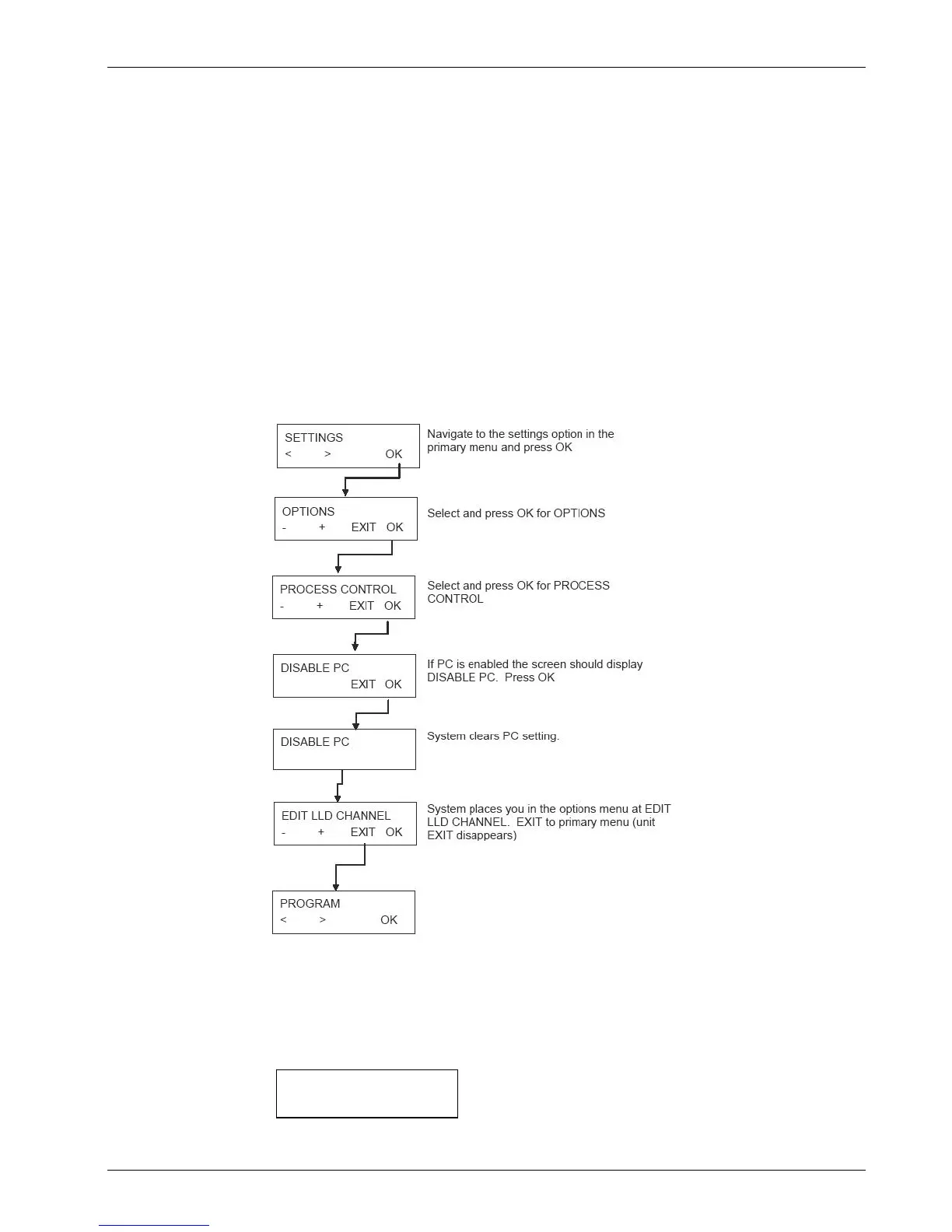
Process Control functionality has been inadvertently activated for your system. Your
system is not equipped for process control, so it must be deactivated. The following
directions describe how to check and disable a PC setting.
Remember to exit to the Primary Menu before performing this procedure. (Press Exit
until the word EXIT disappears.)
Turn instrument off and back on for change to take effect. If the error continues,
call the service technician.
No Aspiration at Vacuum Filtration Error
The following error message appears on the display:
NO ASP AT VACFIL
OK
Press OK to remove the error message and to return to the standby menu.


 To Next Page