29
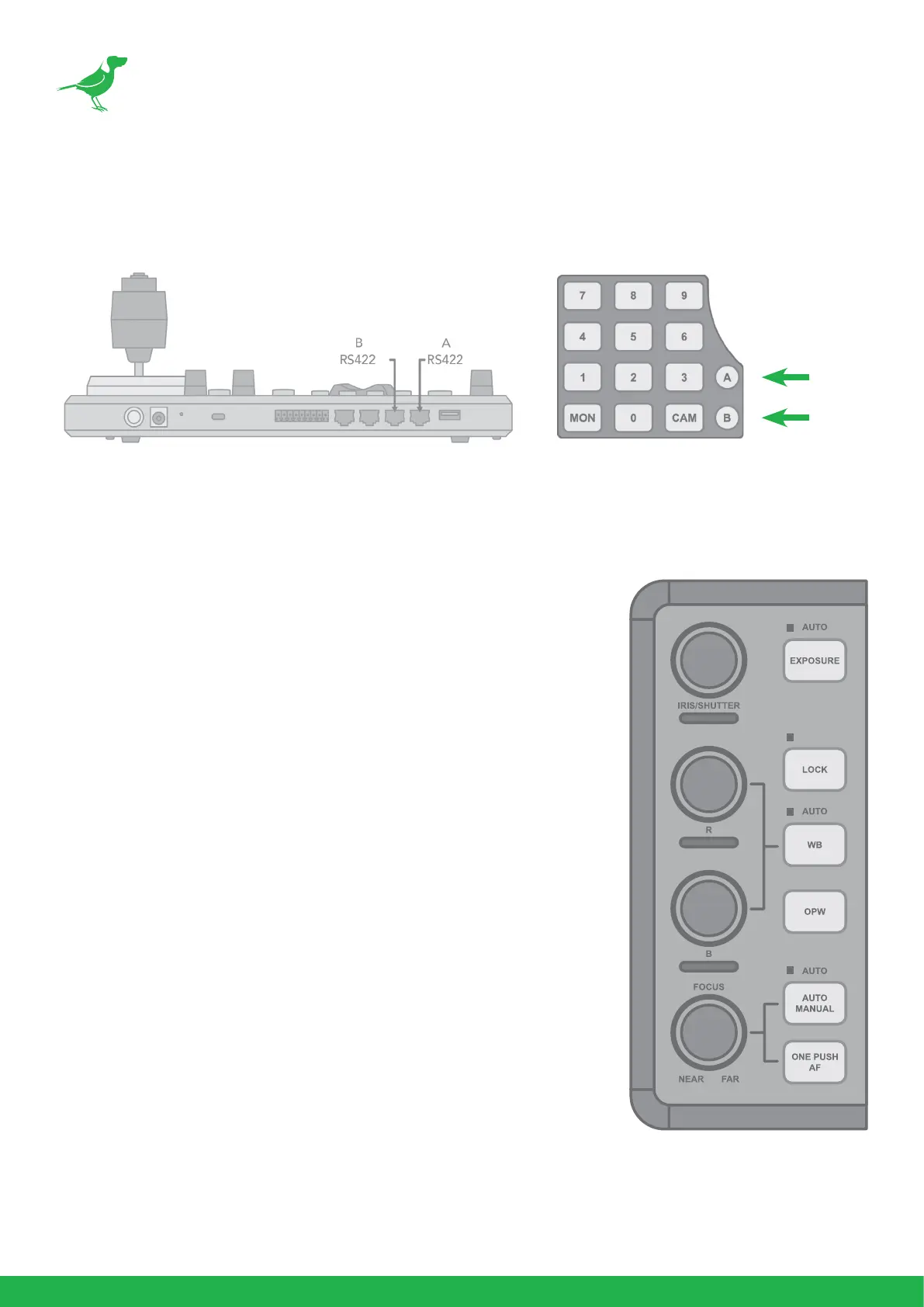
Dual RS422 Button A/B
There are 2 RS422 ports on the back panel of the Keyboard. Up to 7 cameras can be daisy chained
from each RS422 port. You can toggle between these by using the A and B buttons.
Adjusting Image Parameters
The following image parameters can be set/adjusted by using the
Image Adjustment Panel. The knobs are velocity sensitive and
responding naturally for incremental, as well as large adjustments.
Iris/Shutter
• Adjust manually by rotating the IRIS/SHUTTER knob.
• Auto-adjust by engaging the EXPOSURE button.
• Toggle the exposure between Iris priority and Shutter
priority by pressing the EXPOSURE button.
Red/Blue/White Balance
• Adjust Red or Blue values manually by rotating the R or B
knob.
• Auto-adjust by engaging the WB button.
• Engage One Push White Balance by pressing the ONE
PUSH WB button.
Focus Near/Far
• Adjust manually by rotating the FOCUS knob (NEAR/
FAR).
• Auto-adjust by engaging the ONE PUSH AF (Auto Focus)
button.
Lock the image adjustment panel buttons by engaging the LOCK
button.



 To Next Page