
 Need help?
Do you have a question about the BlueLine PowerCost Monitor and is the answer not in the manual?
 General
| Type | Energy Monitor |
|---|---|
| Wireless | Yes |
| Data Logging | Yes |
| Real-Time Monitoring | Yes |
| Display Type | LCD |
| Power Source | Battery |
| Communication | RF |
| Compatibility | Compatible with most utility meters |
| Functionality | Monitors and displays real-time energy usage |
Describes how to unpack the PowerCost Monitor system components and keep packing materials safe.
Explains how to power the Display Unit using batteries or an optional wall adapter.
Provides instructions on how to install batteries in the Sensor Unit correctly.
Guides users on identifying their utility meter type to follow the correct installation procedure.
Details the step-by-step process for installing the PowerCost Monitor on an electromechanical utility meter.
Explains how to install the Sensor Unit on different types of electronic utility meters.
Provides specific instructions for installing the Sensor Unit on top-mounted electronic utility meters.
Provides specific instructions for installing the Sensor Unit on side-mounted electronic utility meters.
Details the steps to synchronize the Display Unit with the Sensor Unit for proper system operation.
Explains the initial display and how the unit starts showing information after power-up.
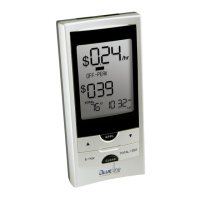
Describes the display mode showing electricity consumption in dollars and cents per hour.
Explains the display mode showing electricity consumption in kilowatts and kilowatt-hours.
Details how the display shows temperature readings in Celsius or Fahrenheit.
Describes the display indications when the Display Unit loses signal from the Sensor Unit.
Illustrates and explains the function of the buttons on the Display Unit.
Provides step-by-step instructions for setting the correct time on the Display Unit.
Explains how to input electricity rates (Rate A, Rate B) and the Kh factor for accurate readings.
Details how to reset the total electricity consumption values displayed on the unit.
Explains how to use the backlight feature to improve screen visibility in low light conditions.
Provides instructions on how to restore the Display Unit to its original factory settings.

 To Next Page
