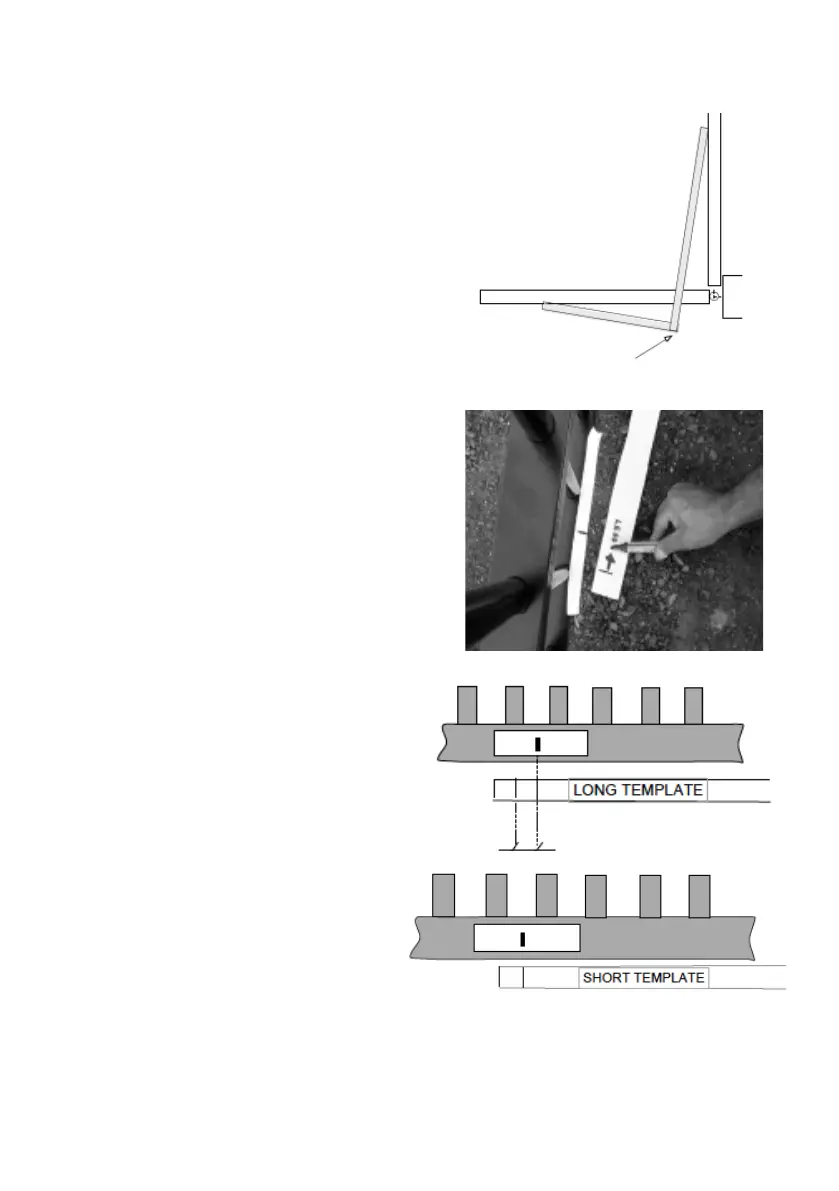
Push-to-Open Setup
You may require the longer push to open
secondary bracket for this setup
(see optional extras page 9)
Step1.
Position the template on the ground
approximately where the pivot point of the
arm is to be installed with the long length in
the (gate) fully open position and the short
length at the (gate) fully closed position.
Step 2.
OPEN the gate to 90 degrees with the long
template and place a length of white tape
to the gate roughly where the gate bracket
maybe positioned (2 lines at the end of the
template indicates the gate bracket bolt).
Short Template
Identifying approx. location
for the gate post bracket
pivot point using the
cardborad template
Step 3.
CLOSE the gate to the gate stop.
• Compare the short template
mark with the mark on the gate
that was done on Step #2.
• Check that the gate mark is
at least 10mm LESS than the
mark on the template. This is to
ensure that the gate will have a
solid push onto the gate stopper
in the closed position.
LONG Template.
Gate Fully OPENED to 90 degrees
Put a sticker to mark the approximate
location to mount the Gate Bracket.
Short Template. Gate in Fully CLOSED
Position. Ensure that the Mark on the
Gate is Less than the mark on the short
template.
Long Template



 To Next Page