IP address (MINI Wallbox Plus)
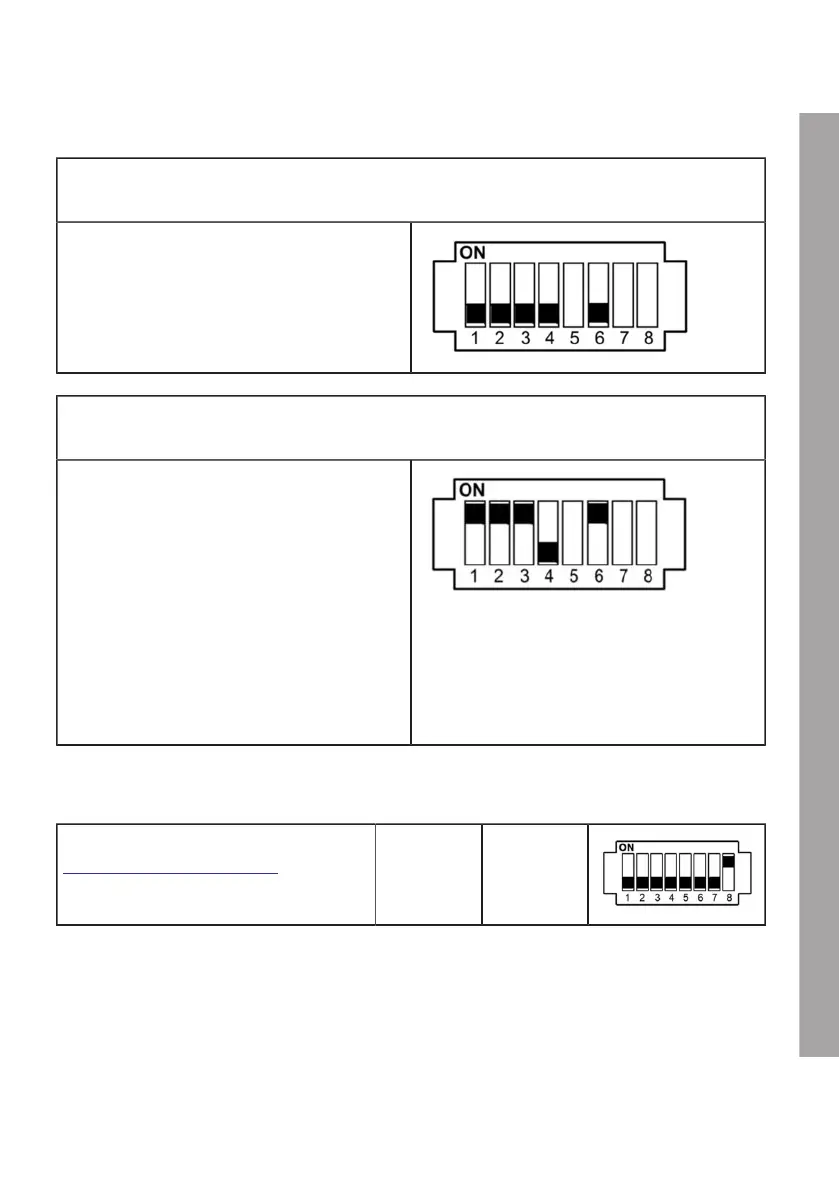
REFER TO IP ADDRESS VIA DHCP (NO ADDRESS)
DSW2.1 to DSW2.4=OFF / DSW2.6=OFF
The Wallbox attempts to obtain an IP address
through a DHCP server. This is also the
default setting for a Wallbox without a network
connection.
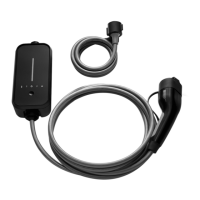
USE A FIXED IP ADDRESS
DSW2.1 to DSW2.4 / DSW2.6=ON
The addressing process is completed using DIP
switches DSW2.1 to DSW2.4. The configurable
Ethernet addresses start at 10 + DIP switch
setting.
Addresses 11 to 25 can be used
[192.168.25.xx] with 4-bit addressing. Subnet
mask: [255.255.255.0]
DSW2.1 = address bit 2
0
(Value=1)
DSW2.2 = address bit 2
1
(Value=2)
DSW2.3 = address bit 2
2
(Value=4)
DSW2.4 = address bit 2
3
(Value=8)
Example for address "17":
DSW2.1 = ON (Value=1)
DSW2.2 = ON (Value=2)
DSW2.3 = ON (Value=4)
DSW2.4 = OFF (Value=0)
Address= 10 + 1 + 2 + 4 + 0 = 17
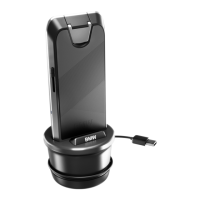
Commissioning mode (DSW2.8)
Activate commissioning mode, see section
Commissioning mode/Self-test.
DSW2.8 ON = yes
EN
43











 To Next Page