S2000M MAINTENANCE GUIDE
37
LCD alarm message press keyboard button ‘CLR’. If all alarm messages are canceled, console
will return in time displaying mode.
The events below are shown in alarm level increasing order:
− ‘Arm failed’;
− troubles (‘Loop trbl short’, ‘Loop trbl open’, ‘Power failed’, ‘Battery failed’, ‘Zone
config err’, ‘Fire trouble’;
− faults (‘Device restart’, ‘Tamper alarm’, ‘Disconnected’ (RS-485 or 2-wire device);
− ‘Entry alarm’;
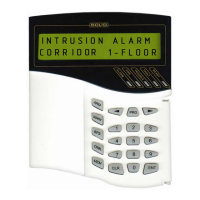
− ‘Intrusion alarm’;
− ‘Silent alarm’ (personal attack);
− ‘Fire prealarm’;
− ‘Fire’ (maximum alarm level).
Message ‘Arm failed’ is not alarm message, but it required personal attention. Message
‘Arm failed’ is not accompanied with sound signal.
To view event buffer messages transmit panel in the time indication mode and press
button ‘MEM’. By ‘
4’ (scrolling events in chronological order) and ‘3’ (scrolling events in
back order) 1023 last messages can be scrolled at LCD. Console makes double sound indicator,
if buffer finished. Double sound signal at scrolling events in direct chronological order means,
that shown on LCD event was last in the buffer, at scrolling events in back order - first. To view
message time and date press and hold button ‘0’. For immediate transition from message
displaying mode in time displaying mode use button ‘CLR’.
2.2.2 Partition arming and disarming
Partitions and partition groups are controlled identically (partition group is a partition
type), so below we will consider partition control only.
Control functions are authority level password protected (or Touch Memory key or
Proximity card protected). If password is correct and its owner has control privilegies, console
saves ‘USER'S CODE ENTR’ message in the buffer and gives the user available access
according with 2.2.2.1-2.2.2.3 items of this manual. If the password is not recognized, the
‘ILLEGAL CODE’ message is saved in event buffer. If the password entered has no required
autrority level ‘ACCESS DENIED’ message is storied. The access will be denied if:
1) User has not control privilegies for any parttion. For example, for empty authority
level when partitions are not assigned or assigned partitions cannot be controlled from the
device;
2) Presented PIN-code, TM key or Proximity card has no proper authority level;
3) Engineer password is typed.
2.2.2.1 Console controlling of partitions
The main controlling function of console is arming/disarming of partition. Additionally if
the system includes "S2000-ASPT" device it would be possible to select automatic or manual
launching modes of automatic fire extinguishing systems, launch fire extinguishing system
remotely or remotely cancel the launching.
Partition can be armed or disarmed if the password typed has properly authority level. If
arming/disarming is not enabled nonetheless it is possible to get the state of partition. Password
can be typed in time indication mode or in password typing mode (after pressing ‘ENT’).
Parameter ‘CODE LENGTH’ determines the maximum number of digits in the password (see
2.2.4.4) which is by default equal to 4. If there is less numbers in the password it is necessary to
press the "ENT" key after typing. If the entered password is incorrect the console will sound in


 To Next Page