"
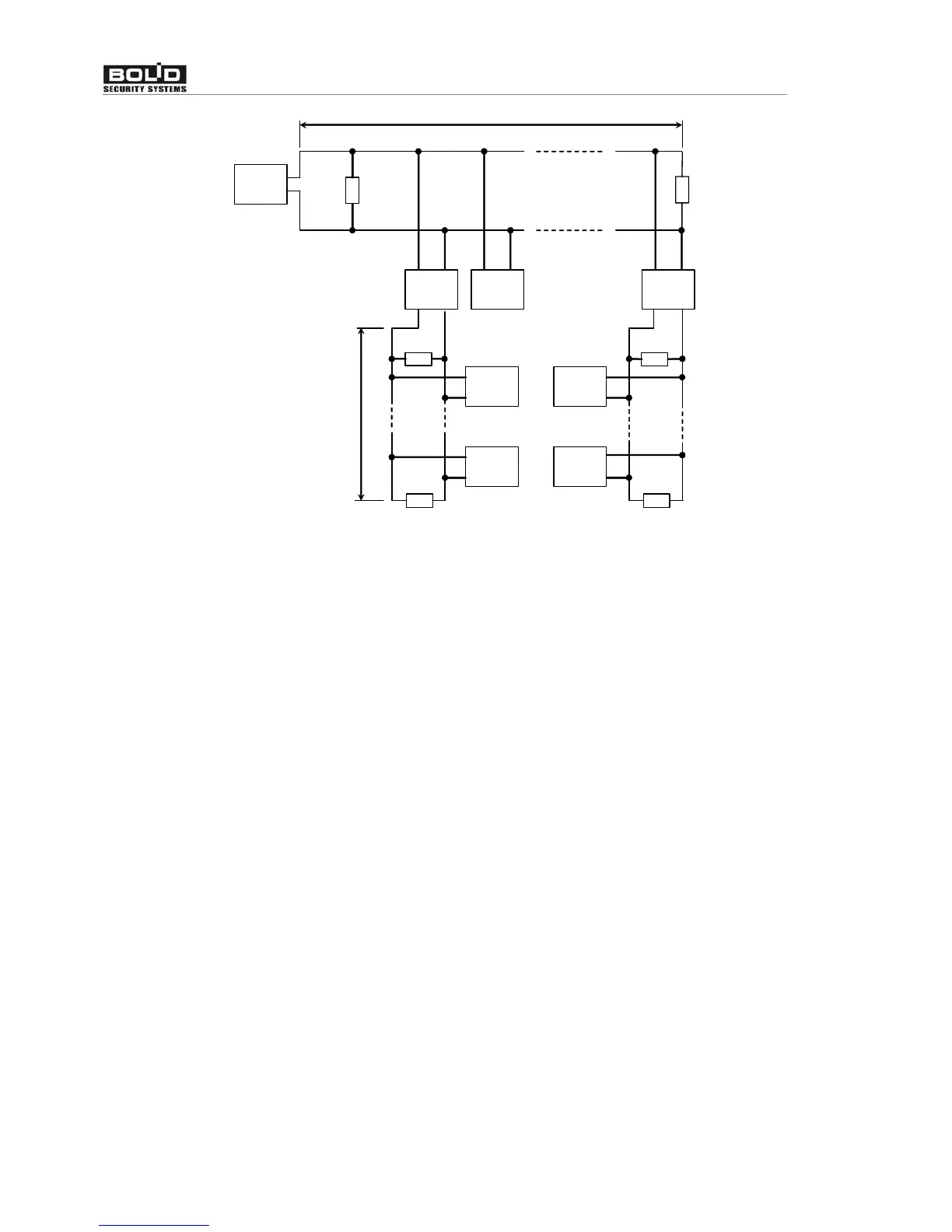
below 2000 м
R
R
RR
S2000-PI
S2000-PI
Receiving
control
device
Receiving
control
device
Receiving
control
device
Receiving
control
device
Receiving
control
device
Figure 4 Built ‘star’ configuration with the help of interface repeaters
Sometimes there is need to connect console to devices through radio channel, radiorelay
channel, fiber or other connection lines. To interface RS-485 channel with connection channel
equipment with RS-232 input or ‘RS-485’ input and having next data transmission parameters
and: speed transmission 9600 bit/s, word length 8 bit, without check even parity, 1 stop bit. If
equipment with RS-232 output RS-485 interface signals have to be converted in RS-232
interface signals by RS-232 – RS-485 converter (for example, ‘S2000-PI’). Similarly at the other
side of the connection line RS-232 signals need to be converted in the RS-485 interface signals.
As a rule, at data receiving-transmission equipment has own noises. More over, it may have
significant receive-transmit switching time. If the timeouts are above acceptable values, console
will not detect devices or connection will be unstable. For example, if transmission equipment
imports delay 3 ms, then ‘S2000M’ console receive reply from device more then 6 ms after
request. Because console waits reply from device no more 5 ms, device will not be detected. To
solve these problems few connection parameters made customizable. There are standby time at
duty cycle poll, device search, at command, and set of customizable delays before transmission.
If equipment distortion is only data transmission delay, it is just enough to increase polling
latency time. In more complicated cases, it is need to increase device delay before reply and
console pauses, if equipment switches from receive to transmission too long. It is need to keep in
mind that if pauses values increase then device polling time decrease. Console connection
parameters are customized by ‘pprog.exe’ program, device connection parameters – by
‘uprog.exe’ program. Programs ‘pprog.exe’ and ‘uprog.exe’ are free and can be downloaded at
site www.bolid.ru.
2.1.3 Setting device configuration parameters
One can configure such device parameters as alarm loop type, transmission delays from
one operating mode to another (arm delay or fire delay), alarm loop connection with output keys,
work algorithm (control program) of output keys and others. Configuration parameter values
saved in the device nonvolatile memory. Program and control device configuration can be done


 To Next Page