50
Firmware Upgrade
Dante AV Module Firmware Upgrade
Dante AV Module Firmware is the operating software for Dante AV module that’s developed by Audinate.
For Bolin Dante AV devices, there’s Bolin customized version that’s been optimized for Bolin camera and
decoder. It is released by Bolin, so please visit Bolin website www.bolintechnology.com to download Dante Device
Firmware.
Dante AV D20H/D20S transceiver firmware can be upgraded to use the device as an encoder or decoder (Not
Encoder/Decoder at same time).
1. No matter the original device has been built as an Encoder or Decoder
2. If you want to upgrade the device to an encoder: download encoder FW from Bolin website for upgrading.
3. If you want to upgrade the device to a decoder: download decoder FW from Bolin website for upgrading.
Important information:
In order to use Bolin Dante AV device including PTZ camera and encoder/decoder properly, Dante Controller software
version 4.4.2.96 or above version is needed.
Please download the latest Dante Controller from Audinate website:
https://www.audinate.com/products/software/dante-controller
The product firmware for Bolin Dante AV devices including PTZ cameras and codec transmitter/receiver,
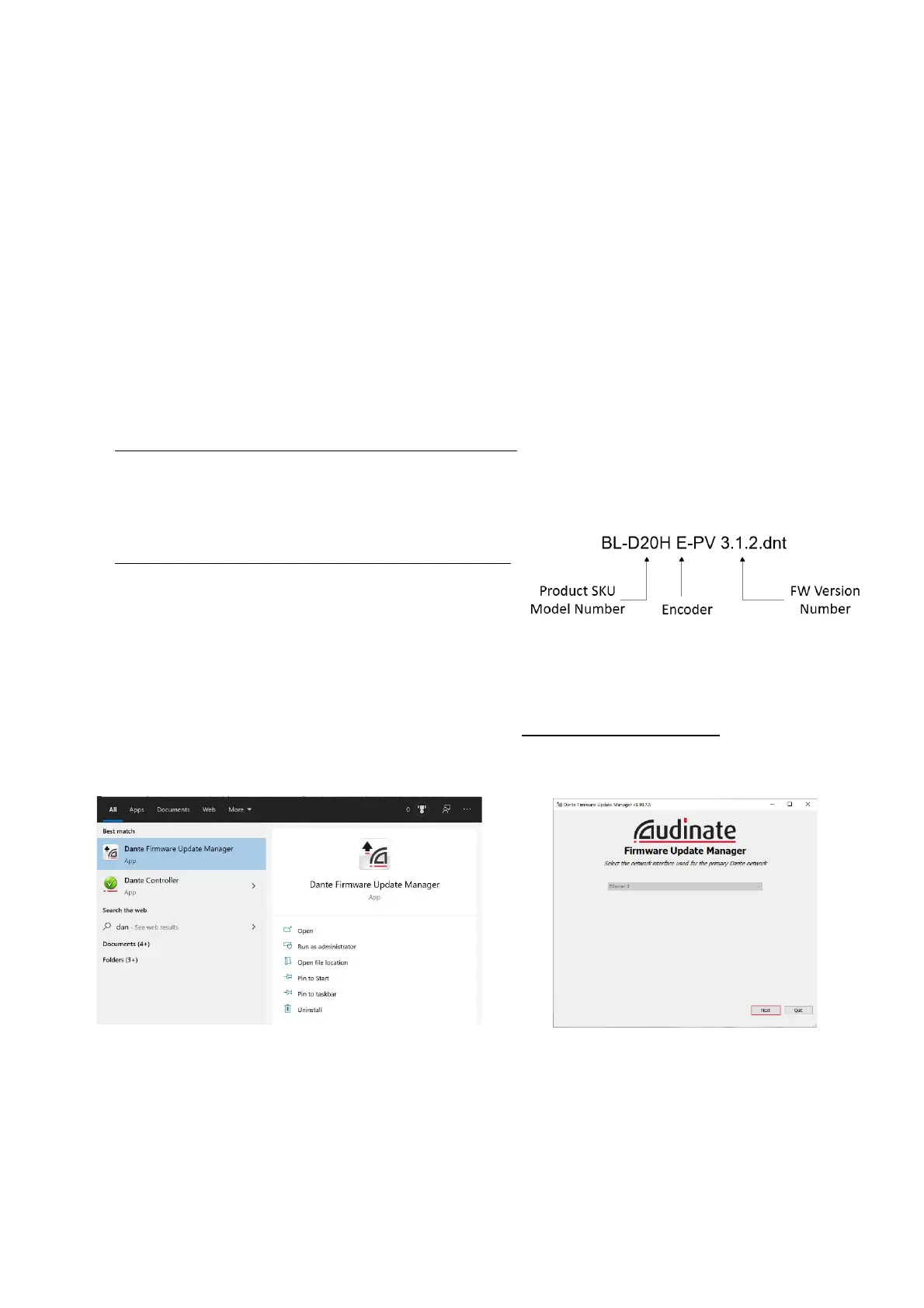
1. Encoder is shown as: BL-D20H E-PV 3.1.2.dnt
2. Decoder is shown as: BL-D20H D-PV 3.1.2.dnt
3. It can be downloaded at Bolin website:
https://www.bolintechnology.com/learning-download-center
4. *Product SKU number must match the product that you
want to upgrade FW for. For example, if you are upgrading
D412 PTZ camera, the FW shown as: BL-D412-PV
3.1.2.dnt
5. Bolin Dante AV encoder and decoder can be converted to each other through Dante firmware upgrade.
• NOTE: The previous decoder D10H can’t converted to encoder.
Install “Dante Firmware Update Manager” on your PC/laptop prior to starting the Dante AV firmware
upgrade. Download Dante Firmware Update Manager from www.bolintechnology.com
1. Running “Dante Firmware Update Manager” and click Next button.
2. Select Update Dante Firmware.


 To Next Page