DUAL VIEW (DV)
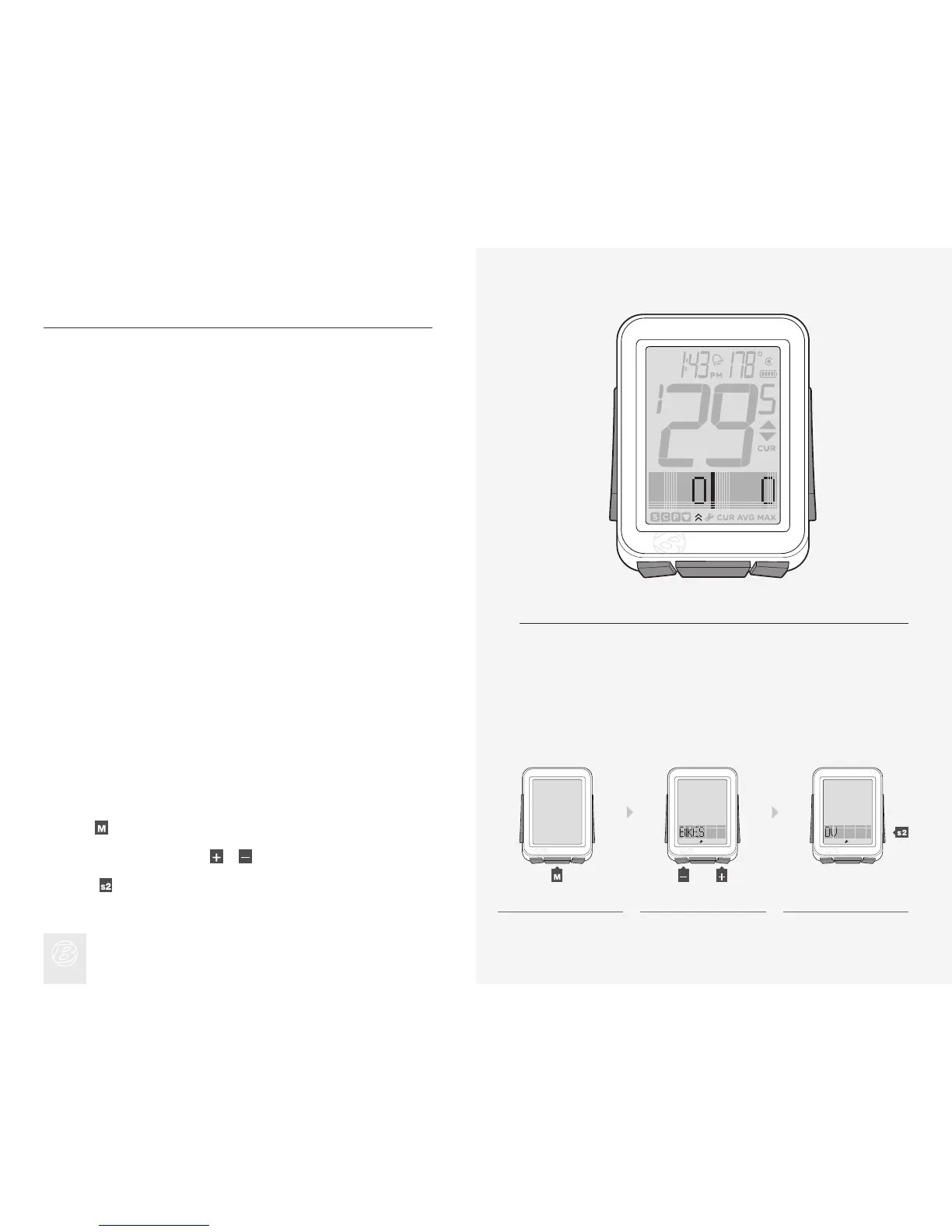
Dual View splits the lower screen to show two of the secondary functions
simultaneously (Figure 19). Speed, the primary function, always displays in Ride
mode. With Dual View, in addition to Speed, your NODE can also display, for
example, Power and Heart Rate.
There are four functions available in Dual View:
· HR (Heart Rate)
· TRP (Distance)
· CAD (Cadence)
· PWR (Power)
In order for these functions to be available in Dual View, they must switched ON,
Paired, and Connected. (See “Pairing Procedure,” “Connecting Procedure,” and
“Switching Sensors to OFF or ON” above.)
To Turn the Dual View Function On, Confi gure Display
Hold for three seconds to go to Setting mode.
When BIKES appears, scroll
or to DV.
Press
.
1.
2.
3.
Figure 19. Dual View Function.
1. 2. 3.
(3 sec)
(or)











 To Next Page