Before Your First Ride
Pairing (Pair) Procedure
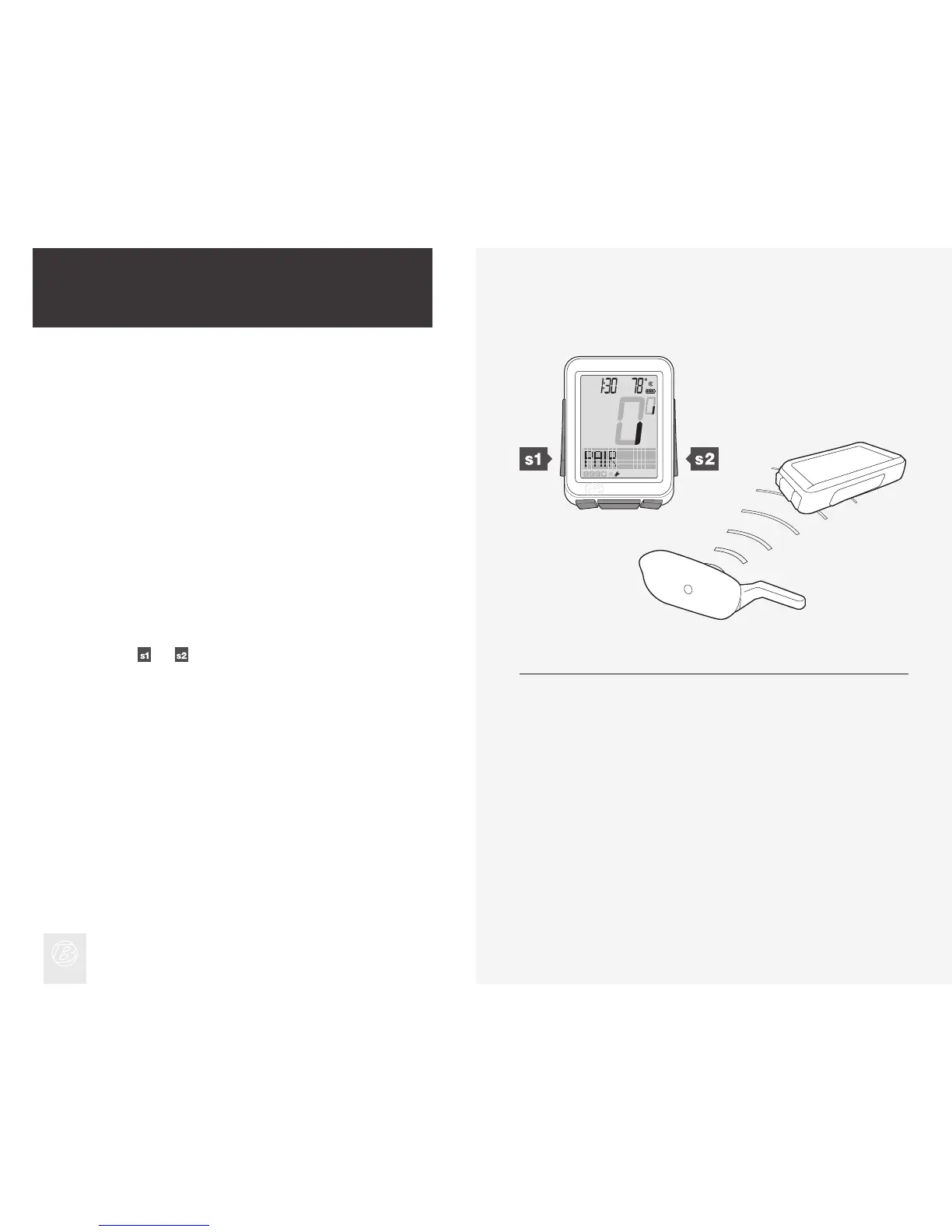
Before the NODE can display any data, it must identify each radio signal sent
by the sensors (Figure 6). This process, which takes about one minute, is called
“Pairing” (Pair). After the NODE creates a Pair, it remembers the signals, so
normally this only occurs once (during the initial set up).
Sensors only send signals when they are activated:
• The wheel must turn to activate the speed sensor
• The crankarm must rotate to activate the cadence sensor or the power sensor
• You must wear the chest strap to activate the heart rate sensor
During the Pairing procedure, the 0 of the speed display ashes. This procedure
can take up to 60 seconds. When it is complete, the icons for successfully
connected sensors display at the bottom of the screen. If an icon for a sensor
disappears, a pair was not created for that sensor.
Force Pair
The NODE only needs to perform the pair procedure once. If the Pair fails, or
later you add another sensor, you can also force the Pairing procedure:
In Ride mode, hold
and for three seconds while you make the sensors
send signals.
Figure 6. Locking onto Radio Signals from Sensors.
(3 sec) (3 sec)











 To Next Page