Analog and Frequency Inputs | 11
Bosch Motorsport Vehicle_Control_Unit_VCU_Manual 67/136
Calculated speed is average of both speeds if speed difference between wheels <
limit.
Calculated speed is maximum of both speeds if speed difference between wheels >
limit.
– Calculating vehicle speed of 4 wheel drive: (Wheel speeds of all wheels as input)
Calculated speed is speed of 2nd fastest wheel.
11.4.2 Setting up calculated speed
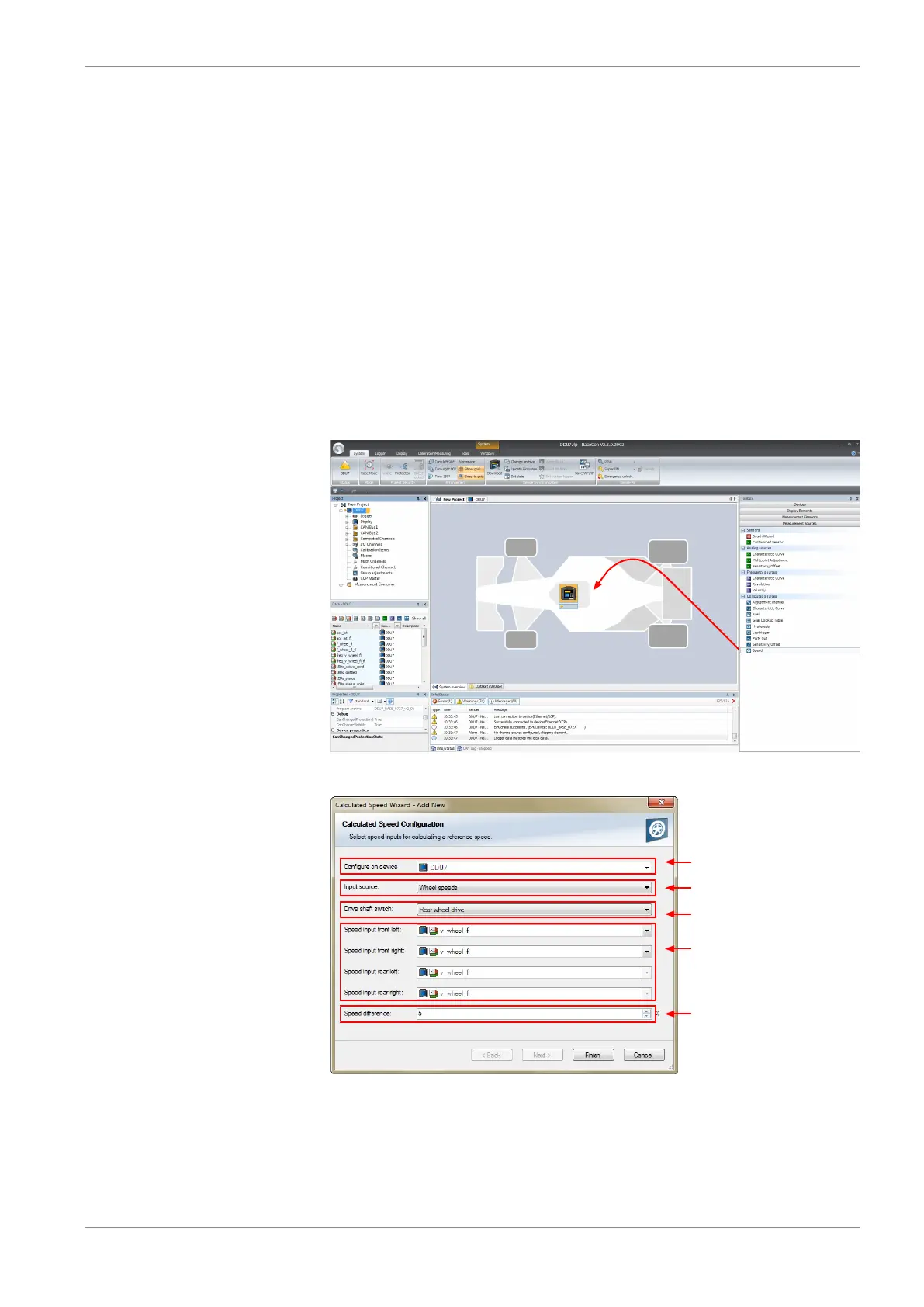
1. Click on tab ‘System Overview’.
2. Click on ‘Measurement Sources’ in the Toolbox.
3. Drag the ‘Speed’ computed source from the Toolbox and drop it on the project name
in the Vehicle Control Unit VCU Project Tree. Do not drop it on ‘Vehicle Control Unit
VCU’!
A ‘Calculated Speed Wizard’ opens.
Choose device
Choose input source
(internal/external)
Choose driven axle
Choose individual wheel
speed channels
Set limit for speed
difference for calculation
4. Click ‘Finish’ when done.
The speed calculation is inserted into the Vehicle Control Unit VCU Project Tree.




 To Next Page