
 Need help?
Do you have a question about the Bosch VCU and is the answer not in the manual?
Defines the highest level of danger with severe consequences.
Defines a significant risk of death or serious injury if not observed.
Warns of slight bodily injury in case of disregard.
Alerts to potential damage to equipment if ignored.
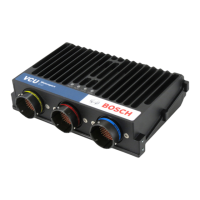
Details the physical dimensions and properties of the device.
Details electrical specifications like supply voltage and inputs.
Details the output capabilities of the device.
Details the power supply specifications for the device.
Covers function documentation and code generation support.
Lists available free software tools for data analysis and configuration.
Describes components required for USB connectivity.
Details the high-speed logging upgrade package.
Details the I/O upgrade package with expanded communication and inputs.
Explains the real-time Ethernet upgrade for data transfer.
Details the CCP master functionality upgrade.
Lists connector types and their mating connectors.
Details pin assignments for the LIFE connector.
Details pin assignments for the SENS-A connector.
Details pin assignments for the SENS-B connector.
Describes the CAN bus capabilities and configuration.
Describes the Ethernet channel capabilities and configuration.
Details the RS232 serial port for GPS data.
Details the connector used for vehicle diagnostics.
Covers initial setup steps and software requirements.
Guides through creating a new project in RaceCon software.
Explains how to activate optional software features.
Provides a quick guide for initial data recording.
Details how to set the device's internal clock.
Describes creating channels for arithmetic and logical operations.
Explains creating functions with If-Else structures.
Details creating channels based on conditional logic.
Covers combining multiple conditional channels for complex calculations.
Discusses monitoring and managing CPU load for optimal performance.
Provides basic information and concepts about CAN bus.
Guides on configuring CAN bus inputs.
Guides on configuring CAN bus outputs.
Explains the use of multiplexers for CAN messages.
Details specifications and features of analog inputs.
Guides on configuring analog and frequency inputs.
Explains how to configure derived data sources.
Details the hysteresis function for signal stabilization.
Guides on setting up real-time data display and monitoring.
Explains how to calibrate sensors online.
Details online calibration for multipoint adjustment channels.
Lists the capabilities of the recording system.
Guides on setting up data recording parameters.
Explains how to record data using a USB device.
Details how to set up high-frequency data logging.
Explains how errors are displayed and managed in RaceCon.
Guides on how to access the device's error log.
Details the types of information available about recorded errors.
Describes properties related to the error memory itself.
Explains diagnosis for analog inputs, including limits and cable breakage.
Covers monitoring limits and detecting shortcuts or cable issues.
Details the implementation of open line detection.
Explains the lap trigger function and its purpose.
Describes how electrical signals are used as trigger signals.
Details the use of GPS signals for lap timing.
Discusses methods to avoid erroneous lap triggers.
Explains the use of forced triggers to compensate for missed signals.
Guides on the configuration process for lap triggers.
Explains how outings, laps, and fragments are counted.
Details how to adjust lap triggers for timing accuracy.
Describes protection against retriggering based on time.
Describes protection against retriggering based on distance.
Explains forced triggers based on distance.
Details the calculation of lap segments.
Explains the use of a countdown timer for pit stops.
Covers automatic detection of race tracks using GPS.
Details the types of data stored on the VCU.
Guides on the process of updating the device firmware.
Explains how to create a backup of device configuration.
Guides on restoring a cloned configuration to a device.
Provides an overview of GPS technology.
Details the serial interface settings for GPS.
Explains the NMEA protocol used for GPS data.
Recommends a specific GPS sensor model.
Guides on configuring the recommended GPS receiver.
Lists and describes the measurement labels for GPS data.
Provides guidance for troubleshooting GPS sensor issues.
Guides on setting up fuel calculation and tank management.
Explains how to diagnose and reset fuel consumption counters.
Provides an example illustrating fuel consumption data.
Guides on configuring the predated laptime function.
Describes the functionality and output channels of predated laptime.
Provides the EU declaration of conformity for the product.
Details compliance with REACH regulations regarding hazardous substances.
 General
| Category | Control Unit |
|---|---|
| Manufacturer | Bosch |
| Operating Voltage | 12V |
| Communication Protocol | CAN, LIN |
| Operating Temperature Range | -40°C to +85°C |
| Protection Class | IP67 |



 To Next Page