Recording | 14
Bosch Motorsport Vehicle_Control_Unit_VCU_Manual 81/136
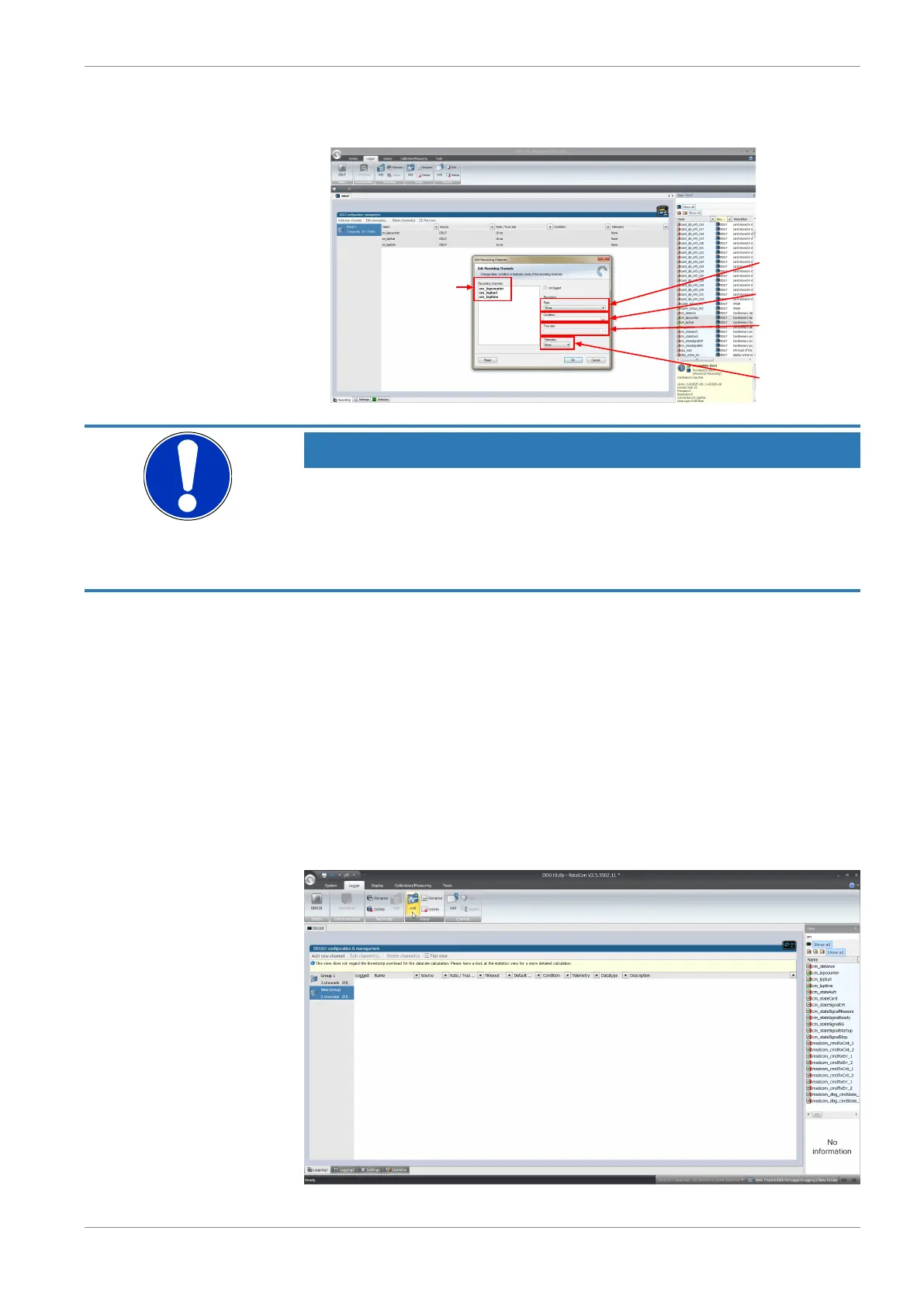
An ‘Edit Recording Channels’ window opens (if you choose only one channel, the win-
dow looks a bit differently).
List of channels
selected
Recording rate
1 ms ... 1 s
Condition to switch
between fast/slow rate
Recording rate if
condition is 'true'
Settings for long
range telemetry
'None/Fast/Slow'
(only if telemetry
unit is available)
NOTICE
If no recording condition is defined or the recording condition is
‘false’, measurement channels are recorded at the value chosen in
‘Rate’.
If the condition is ‘true’, measurement channels are recorded at the value chosen in ‘True
rate’.
6. Click ‘OK’ when done.
14.2.1 Adding a recording group
Recording channels can be grouped. These groups will also be visible in Darab and will
help to get a better overview during the data analysis
1. To add a new group, select the ‘Logger’ tab.
The ‘Logger’ window opens.
2. Click on the ‘Add’ button.
A new group will be added and can be renamed ‘Gearbox’, ‘Aero’, ‘Engine’, etc..
3. To rename a group, click on the ‘Rename’ button next to the ‘Add’ button.




 To Next Page