BradyPrinter i5100 11
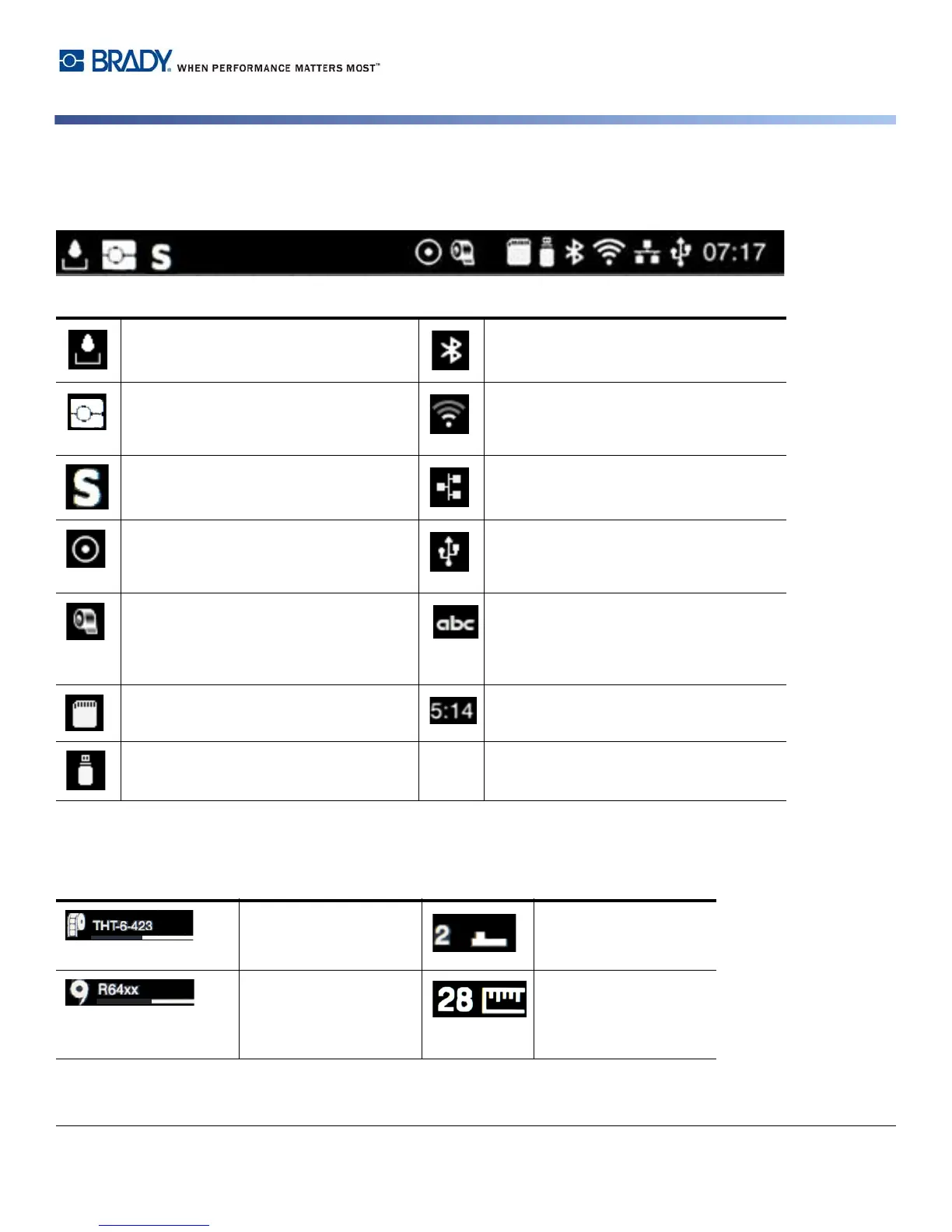
Informational Icons at Top of Home Screen
Icons will appear dependent on the configuration and printing situation.
IP-Enabled Supply Information on Home Screen
Displays the current data transfer in the
form of a falling drop
gray: Bluetooth adapter installed, white:
Bluetooth connection active
Operating in Brady Mode
(IP-Enabled mode)
WiFi connection active
The WiFi strength is displayed by the
number of white arcs
Operating in Standard Mode Ethernet connection active
The Save data stream function is active
> Configuration manual
All received data are stored in an .lbl file
USB connection active
Warning ribbon end > Configuration
manual
The remaining diameter of the ribbon
supply roll undershoots the set value
abc program active
SD card installed Clock
USB memory installed
Shows label part
installed and how much
is remaining
Indicates to use the gap
sensor along with the
value to set the switch
Shows ribbon series
installed and how much
is remaining
Indicates to use the
notch sensor along with
the value to set the
sensor scale



 To Next Page