20 BradyPrinter i5100
Loading Fan Folded Label Media
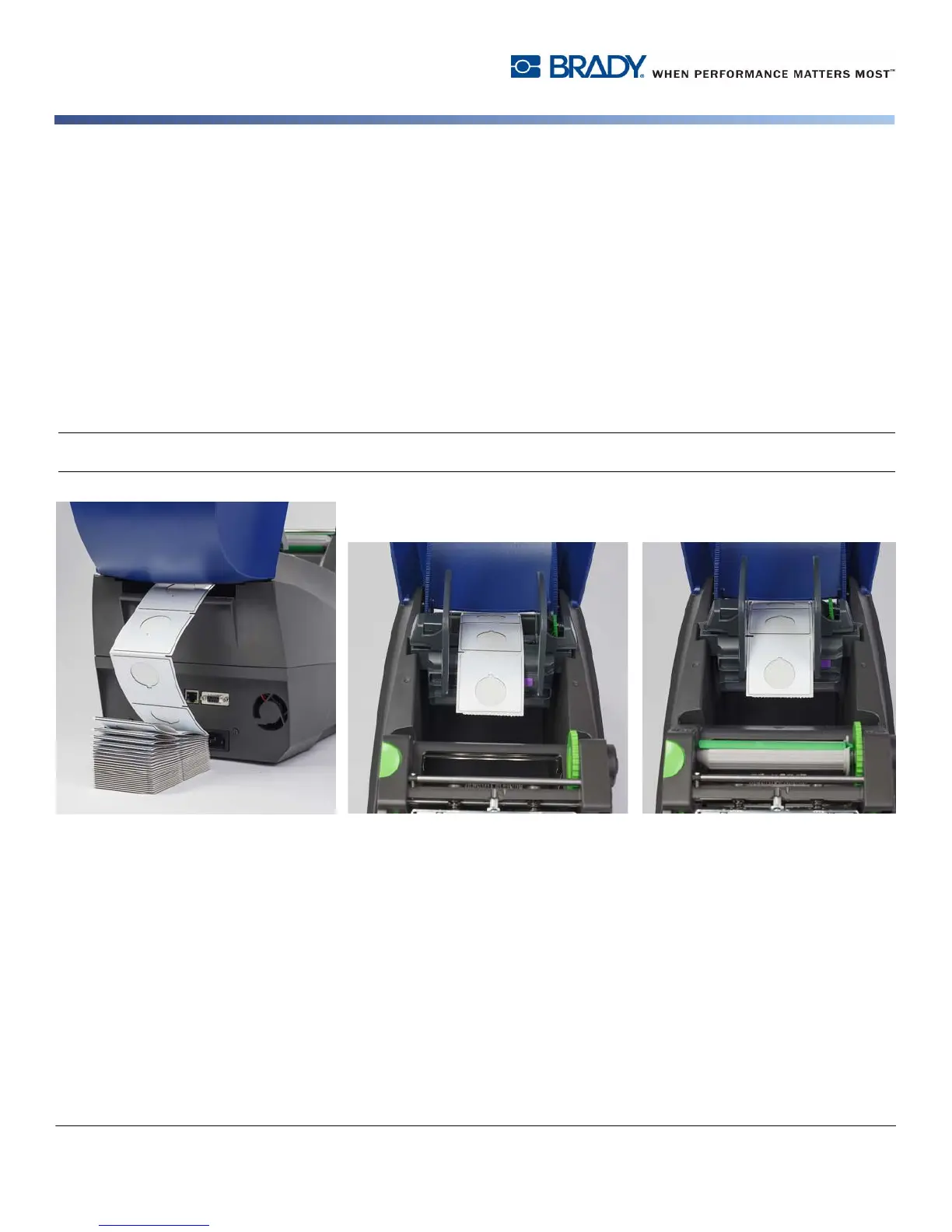
Fan folded media is externally fed through the slot in the back of the printer.
At the time of printing this manual, fan folded media does not have an IP-Enabled RFID tag. Therefore, the printer will operate in
Standard Mode or Partial Standard Mode (see chapter 5) when using fan folded media.
Feed Labels into Back of Printer
1. Open the cover of the printer and make sure the EMPTY roll holder is installed with the holder's margin stops spread fully apart
2. With the printable side facing UPWARD, place the stack of fan folded media behind the printer.
3. Locate the slot in the back of the printer between the hinges of the cover.
4. Feed the leading edge of the media through the slot and forward between the open margin stops of the roll holder.
5. Squeeze the green tab on the roll holder to move the margin stops towards each other until they just touch the left and right edges of
the label media. - note this auto-centers the media
6. Proceed to Loading the Label Roll > “Thread Label Material Through Print Module” on page 19 and then to the “Selecting and Set-
ting the Label Sensor” on page 23 before loading the ribbon.
Note: When the fan folded media is loaded the printer will operate in Standard Mode or Partial Standard Mode depending on the ribbon
installed.



 To Next Page