ES Range Product Manual
Version 2.9
© Copyright Brainboxes Limited 2013
Page 18 of 66
5. RS-232 Settings (ES-246/ES-257/ES-701/ES-
279/ES-357/ES-020)
The RS-232 Standard
The RS-232 standard was introduced in 1962, it is now widely established. RS-232 is a slow speed, short
distance, single ended transmission system (i.e. only one wire per signal). Typical RS-232 maximum cable
length is 50 feet.
9 Pin D Serial Port RS-232 Cables
To connect to the RS-232 Serial Port you will need a cable terminating in a 9 way female D connector. It is
sound practice to use cables with screws fitted that will allow you to fasten the cable securely to the PC
card.
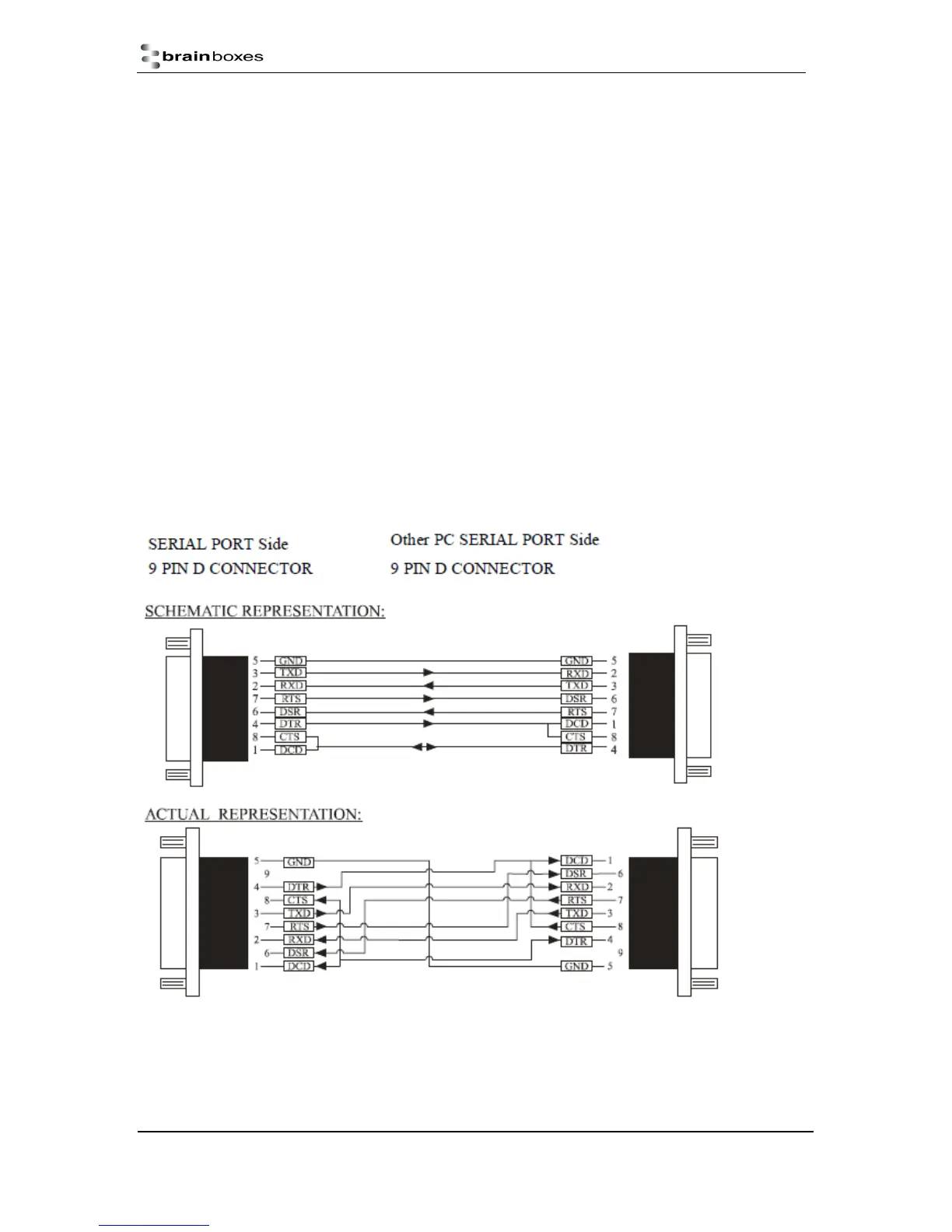
In general, you will need to make up a "cross-over" cable to correctly interface the PC to the RS-232 port of
another computer or device. Provided you have the pin outs and handshake requirements of both sides of
your RS-232 connection, the cross over cable becomes a matter of common sense. The cross-over cable
is simply to ensure that the right signals going out of one RS-232 port go into the appropriate lines of the
other RS-232 port.
9 Pin D serial port connections to another PC



 To Next Page