Chapter 4 Profiler OperationChapter 4 Profiler Operation
4-1 What is set point profiler4-1 What is set point profiler
Many applications need to vary temperature or process value with time.
Such applications need a controller which varies a set point as a function
of time. The profiling controller P41 and P91 can do this.
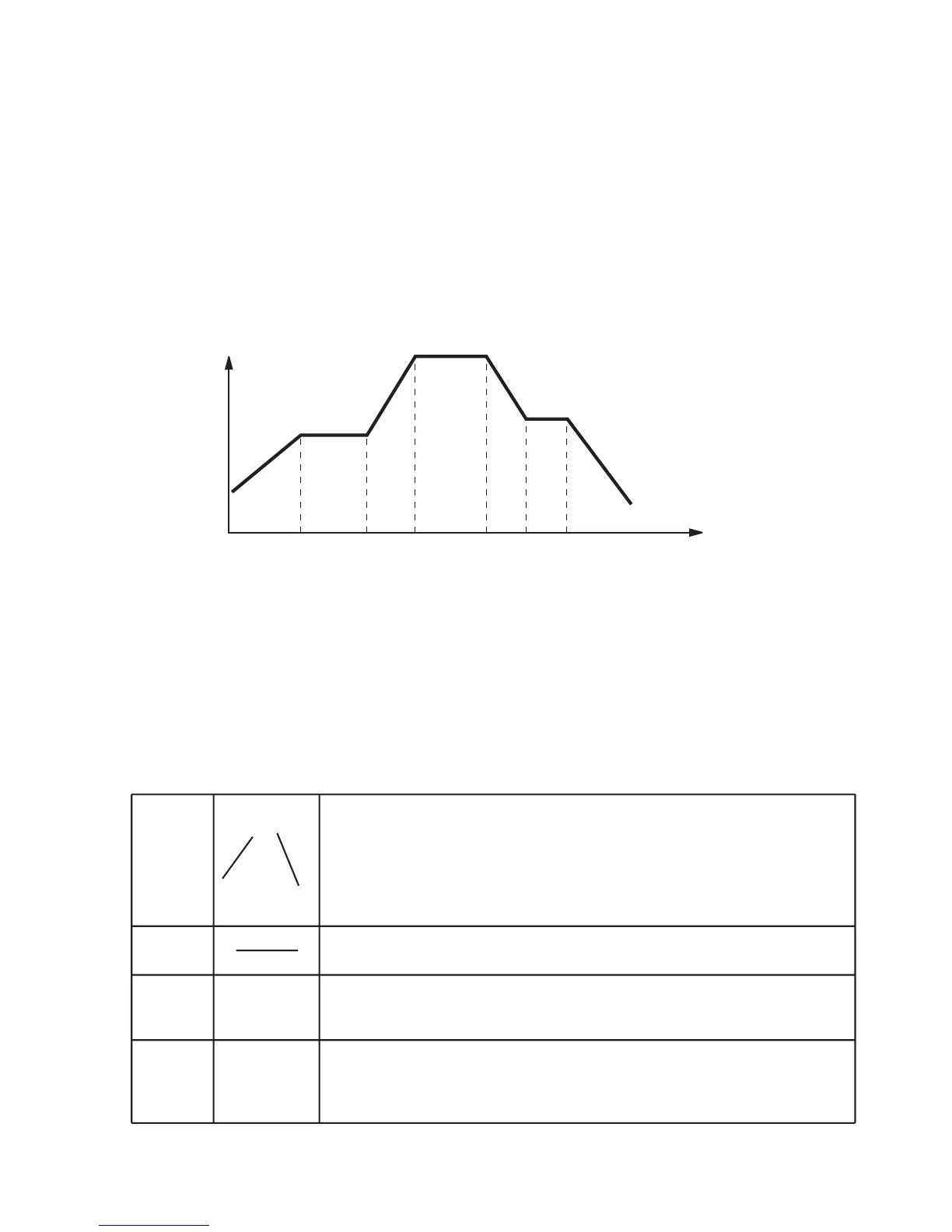
The set point is varied by using a set point profiler. The profile is stored as
a series of " ramp " and " dwell " segments, as shown below.
Set point
Time
Figure 4.1 Set point profileFigure 4.1 Set point profile
In each segment you can define the state of up to 3 event outputs
which can drive either relay, logic or triac outputs, depending on the
modules installed.
A profile is executed either once, repeated a set number of times or
repeated continuously. If repeated a set number of times, then the
number of cycles must be specified as part of the profile.
There are four types of segment:
Ramp
The set point ramp linearly, from its current value to a
new value, either at a rate (ramp rate), or in a set time
ramp time). you must specify the ramp rate or the
ramp time and the target set point when creating or
modifying a profile.
The set point remains constant for a specified period.
It is often necessary to jump backward and run the
loop a set number of cycles.
The profile either ends in this segment or repeats a
set number of cycles. The profile stops after the
repeated cycles are finished.
Dwell
Jump
End
Table 4.1 Segment typesTable 4.1 Segment types
UM0P411A
65



 To Next Page