10
Using the Blind Area Setup of the configurable Backsense
®
System might resolve or
compensate for mounting location issues, enabling off-centred or angled installations ( see
section “4.3.11 Blind Area Setup”).
3.5 Cable
Cables should be run in conduit and along suitable cable runs throughout the vehicle. A 24mm
hole is required to pass the connectors through.
Note: ● Allow a reasonable bending radius when folding excess cabling or for the routing of
the cable.
Avoid tight bends close to the connectors.
Avoid pulling on the connector.
Ensure all cables are fitted into suitable protective conduit
Ensure cabling and connectors are fitted away from sources of excess heat, vibration,
movement and water.
3.6 Display
The display should be mounted so the vehicle operator has good visibility in all environments
and situations. The display should be fixed in a suitable location in line with any current
legislation/regulations.
The base is fixed to the display with a keyway locking method and locked with a machine
screw. The base can be separated from the display by removing the screw and sliding back
and down if the display is used for any flush mounting.
The base has a self-adhesive pad applied for mounting e.g. on the dashboard. Additional
drilling and fixing with screws may be required in some applications.
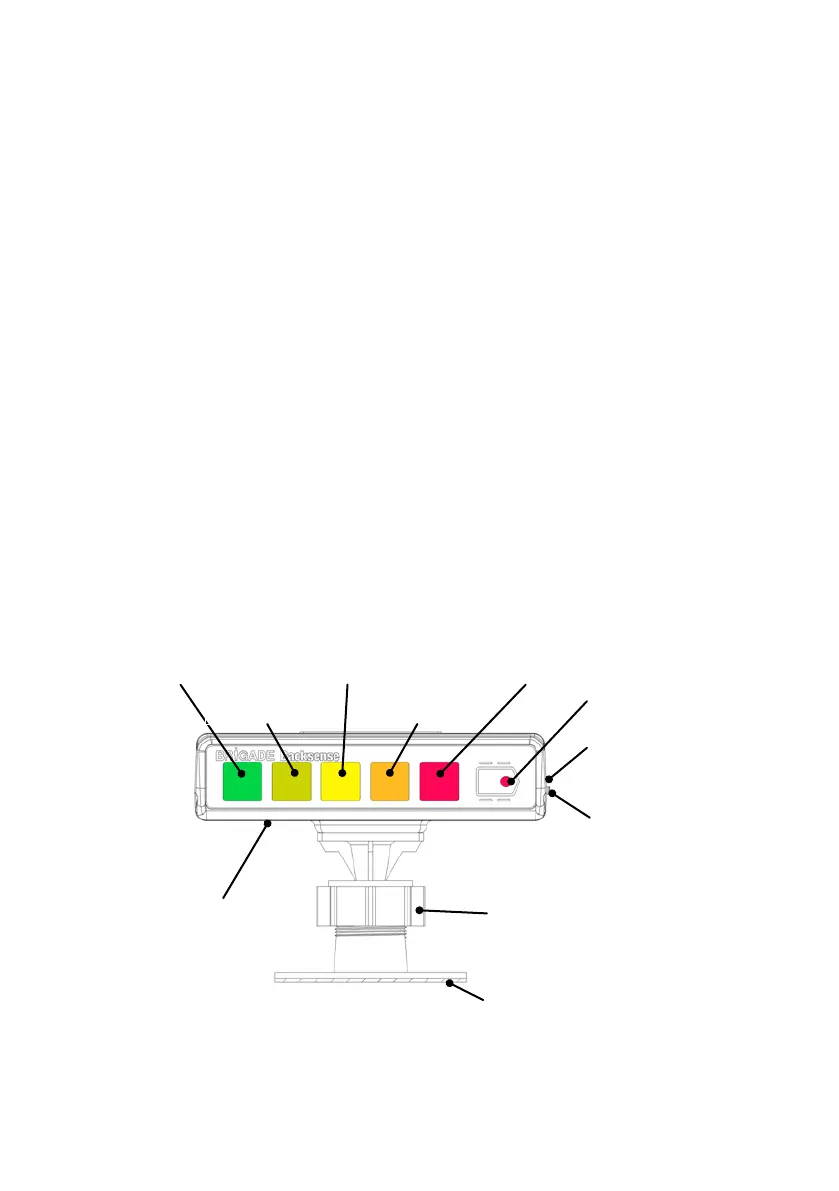
The neck is adjustable in all directions up to 30° and is secured with a locking nut. Locking nut
should only be tightened by hand and excessive torque should be avoided. The volume is
adjustable from 65 to 90dB measured at 1m distance.
USB Connector
(Right Hand Side,
Configurable Version Only)
Volume Control
Right Hand Side)
Green Zone Light
Furthest Detection Zone 5
Buzzer Output
(Underneath)
Red Zone Light
Closest Detection Zone 1
Light Green Zone Light
Detection Zone 4
Yellow Zone Light
Detection Zone 3
Orange Zone Light
Detection Zone 2



 To Next Page