8
3.2 Installation Site
The installation site should be relatively flat without excessive deviation and larger than the
detection range of the intended Backsense
®
System. This will enable a basic setup,
configuration and testing.
3.3 Electrical Connections
Refer to the vehicle manufacturer or bodybuilder guidelines for installation procedures and
connectivity in all applications. Ensure the positive supply connections are fused at source.
The system connections are shown in the table below:
Red cable to non permanent power supply e.g. ignition.
Black cable to ground.
Grey cable to the activating trigger, e.g. reverse. This Activation Input changes the system
status between standby and active.
White cable is a trigger output to activate secondary functions or devices. The white cable
is switch to ground (black cable) when an object is detected within the detection area.
For example a secondary device could be a Brigade bbs-tek
®
white sound
®
alarm or a
light beacon to send a warning into the detection area. Simply connect the device to the
power supply, same non permanent as the red cable is connected to, and the white cable
as a negative connection. For electrical loading limits see section “6 Specifications”. On
the BS-8000 system, the distance when the trigger output is activated can be configured.
Vehicle non permanent
power supply
System supply (3A blade fuse)
(Range +12V to +24V)
Trigger from vehicle, high active
(Range above +9Vdc, up to supply voltage)
Switched to Ground when active
(Loading up to 0.5A)
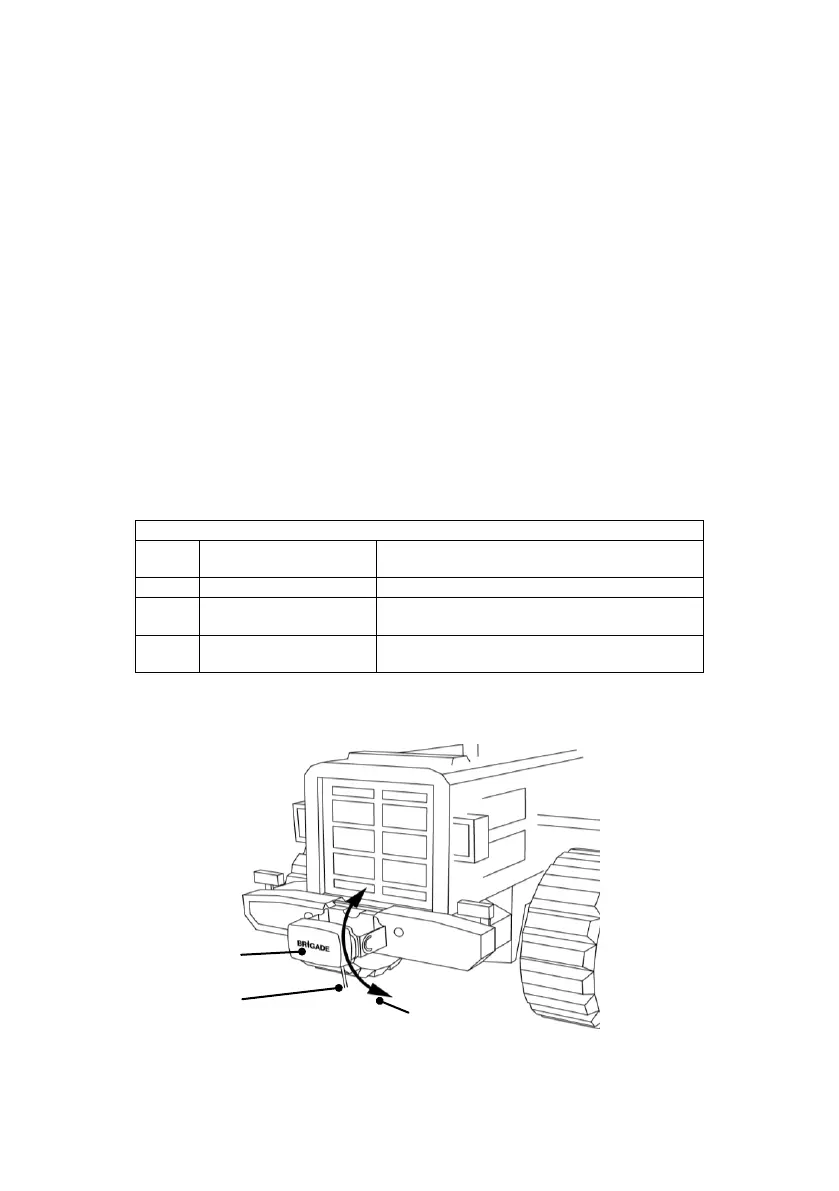
3.4 Sensor Mounting and Location
Brigade Logo Readable,
Normal Orientation
Cable Exit Direction
Pointing To Bottom
Adjustment Angle
In Horizontal Plane



 To Next Page