46 Brocade FastIron WS Hardware Installation Guide
53-1002188-01
Cabling a fiber optic module
4
DRAFT: BROCADE CONFIDENTIAL
Remove a fiber optic module from an SFP slot.
1. Put on the ESD wrist strap and ground yourself by attaching the clip end to a metal surface
(such as an equipment rack).
2. Disconnect the fiber cable connector from the port connector.
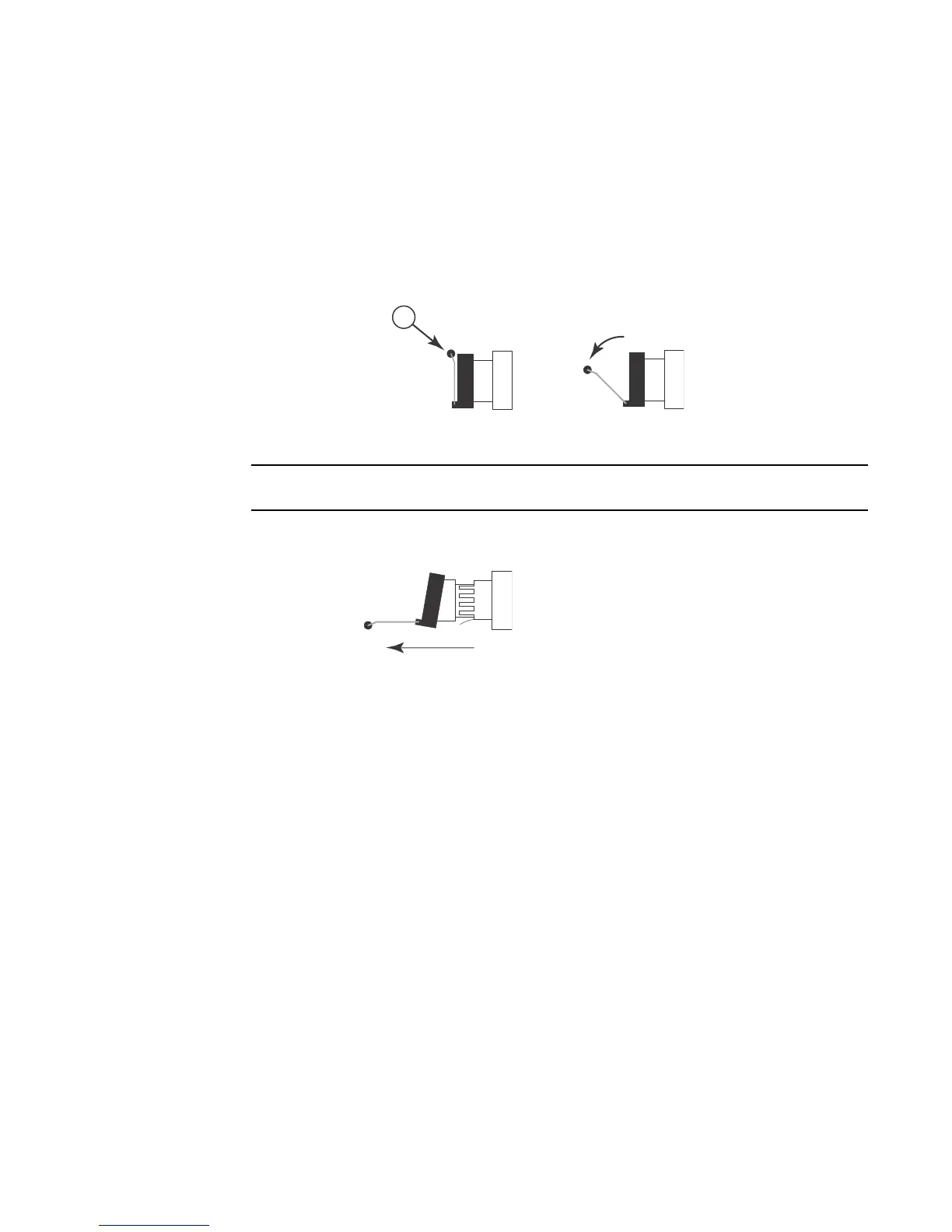
3. Pull the fiber optic module out of the port by pulling the bail latch forward, away from the front
panel of the module. This unlocks the module from the front panel.
The bail latch may be attached to either the top or the bottom of the mini-GBIC.
4. Grasping the bail latch, pull the fiber optic module out of the port.
5. Store the fiber optic module in a safe, static-free place or in an anti-static bag.
6. Install a new fiber optic module in the port. For information about performing this task, refer to
“Installing a new fiber optic module”.
Installing a new fiber optic module
For instruction on installing a fiber optic module refer to “Installing a fiber optic module” on
page 35.
Cabling a fiber optic module
For instruction on cabling a fiber optic module refer to “Cabling a fiber optic module” on page 36.
Cleaning the fiber-optic connectors
For instruction on cleaning a fiber optic module refer to “Cleaning the fiber-optic connectors” on
page 37.
1 Bail latch



 To Next Page