EN | 16 Before initial commissioning // Brose Display Allround E41230
12 Basic controls (buttons)
(4)
(5)
(2)
(3)
(1)
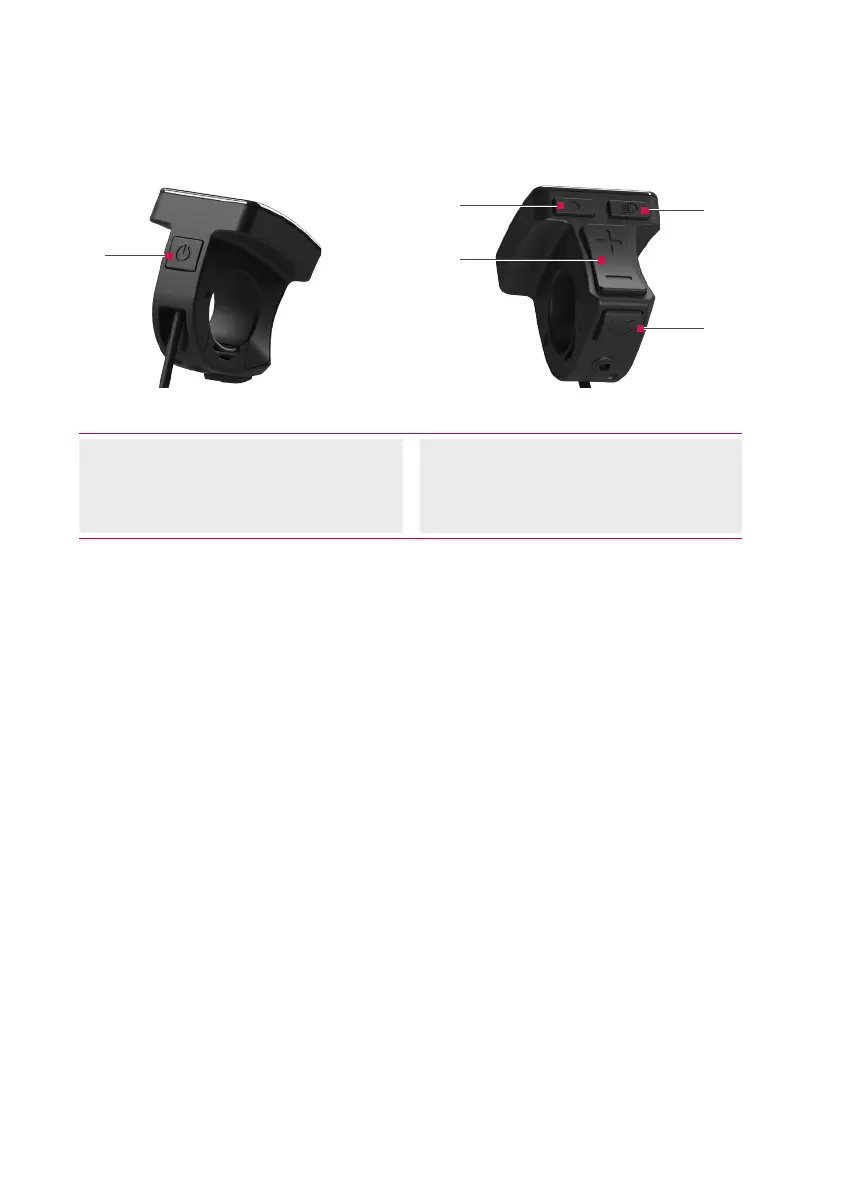
Fig. 1: Controls (buttons) of the control unit
(1) Button (On/Off)
(2) Button (Menu)
(3) Buttons / (Plus/Minus)
(4) Button (Light)
(5) Button (Push Assist)
Button (On/Off)
› Press the button to switch the
Brose Drive System on or off again.
Button (Menu)
› With the button, you can retrieve
various information while cycling.
› If you are in a menu (e.g. “Settings”),
use this button to confirm the
settings you have made.
Buttons / (Plus/Minus)
› Using the n / buttons, you can
increase or decrease the assistance
level.
› If you are in a menu (e.g. “Settings”),
you can use these two keys to scroll
up or down in the menu.
Button (Light)
› Use the button to switch the
lighting of your e-bike on or off
again. This function depends on the
model.
› If you are in a menu (e.g. “Settings”),
press the button to go back one
level. Changed settings are saved.
Button (Push Assist)
› Press the button to enable the
push assist function.



 To Next Page