EasyManua.ls Logo

Brother BAS-415 - Page 56

Brother BAS-415
134 pages
Print Icon
To Next Page IconTo Next Page
To Previous Page IconTo Previous Page
Loading...
Keyboard
unit
\ _
_.
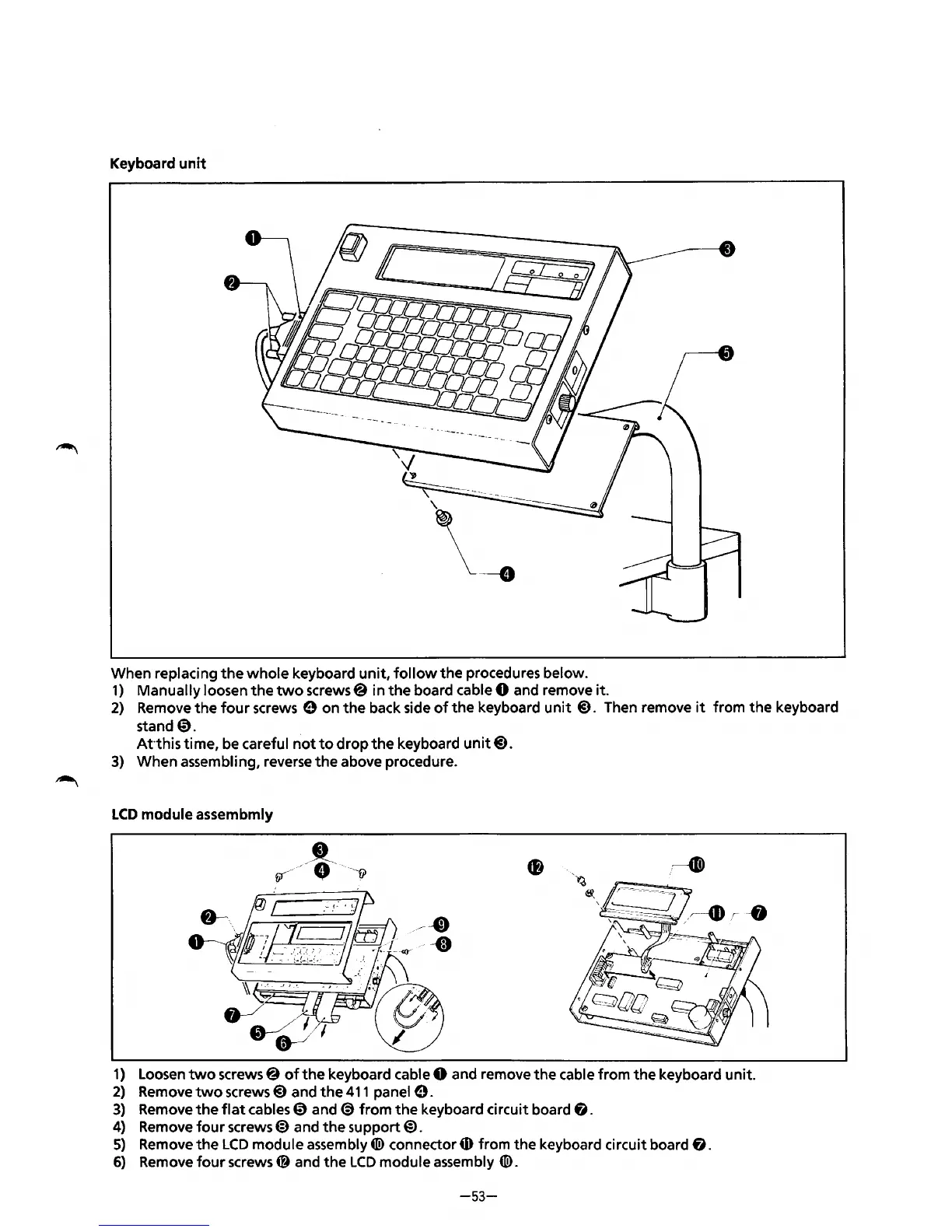
When rep I acing
the
whole
keyboard
unit,
follow
the
procedures below.
1)
Manually loosen
the
two
screws@ in
the
board cable 0 and remove it.
2)
Remove
the
four
screws 0 on
the
back side
of
the
keyboard unit@). Then remove
it
from
the
keyboard
stand
0.
Atthis
time, be careful
not
to
drop
the
keyboard unit@).
3)
When assembling, reverse
the
above procedure.
LCD
module
assembmly
1)
Loosen
two
screws@
of
the
keyboard cable 0 and remove
the
cable from the keyboard unit.
2)
Remove
two
screws@)
and
the
411
panel
0.
3)
Remove
the
flat
cables@)
and
(S)
from
the
keyboard circuit board
fj.
4)
Remove
four
screws@)
and
the
support@).
5)
Remove
the
LCD
module
assembly«!>
connector
4D
from
the
keyboard circuit board
fj.
6)
Remove
four
screws~
and
the
LCD
module assembly
«!>.
-53-
From the library of: Superior Sewing Machine & Supply LLC

Table of Contents

Related product manuals