6-18 Confidential
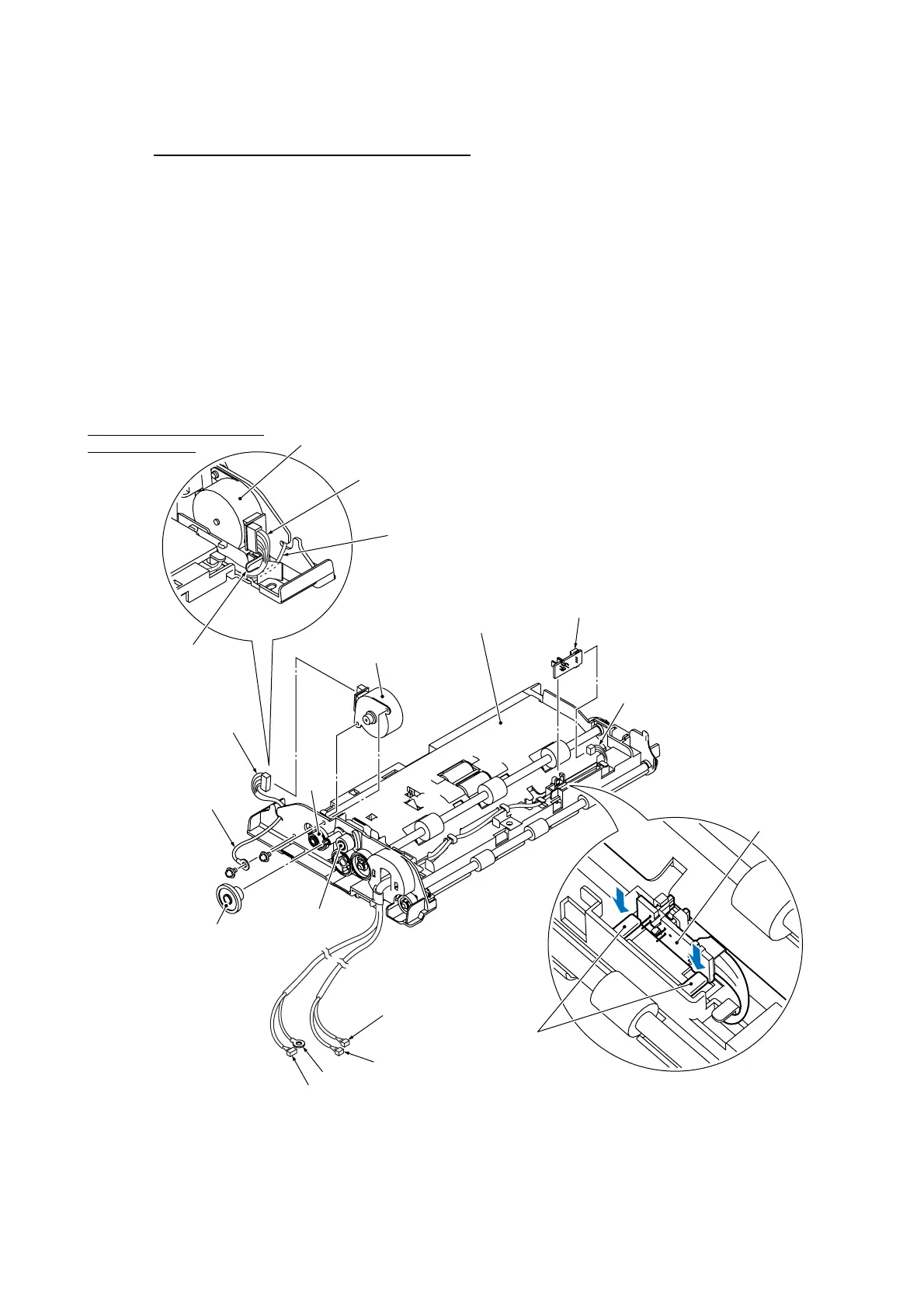
ADF motor and document rear sensor PCB
(12) Place the ADF unit right side up as shown below.
(13) Remove the ADF motor with the following steps.
1) Remove the gear 20/45 by releasing the latch.
NOTE: The gear 21/46 and planet gear 23 become freed. Take care not to lose them.
2) Remove the two screws.
3) Disconnect the ADF motor harness from the ADF motor.
(14) Push down the two lock arms and take out the document rear sensor PCB. Then disconnect the
document rear sensor harness from the PCB.
ADF motor harness
(6_18)
ADF motor
Routing the ADF motor harness
and grounding wire
Cable guide
ADF motor harness
Grounding wire
Gear
21/46
Screw, pan
(s/p washer)
M3x6
Gear 20/45
Planet gear 23
(Rear)
ADF motor harness
Grounding wire
Document rear sensor harness
Document front
sensor harness
(Left)
Lock arms
Document rear
sensor PCB
Document rear sensor harness
Document rear sensor PCB
ADF unit
ADF motor
Grounding wire



 To Next Page