Chapter 5
26
Getting started 5
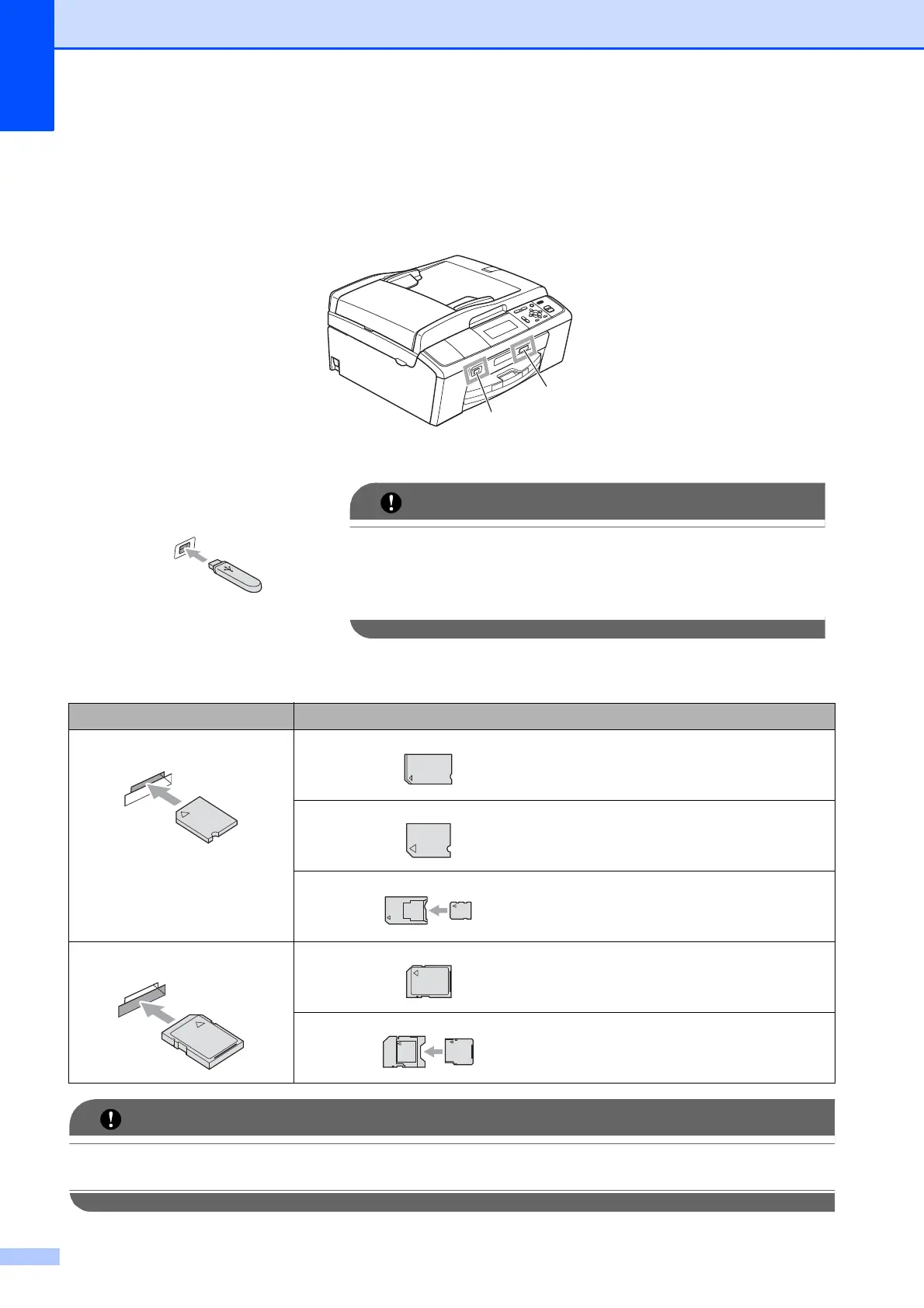
Firmly put a memory card or USB Flash memory drive into the correct slot.
DO NOT insert a Memory Stick Duo™ into the lower SD slot, this may cause damage to the
machine.
1 USB Flash memory drive (DCP-J715W only)
The USB direct interface supports only a USB Flash
memory drive, a PictBridge compatible camera, or a
digital camera that uses the USB mass storage standard.
Any other USB devices are not supported.
2 Memory card slot
Slot Compatible memory cards
Upper slot
Memory Stick™
Memory Stick PRO™
Memory Stick Duo™
Memory Stick PRO Duo™
Memory Stick Micro™
(Adapter required)
Lower slot
SD
SDHC
mini SD (Adapter required)
micro SD (Adapter required)
1
2



 To Next Page
 Loading...













